Compatible Show Health Redux
⚪ Last updated 2024Preview
🔍 Analysis
- 👍 2.1% endorsement rate — high engagement, a strong quality signal
- 🏆 #24 of 116 User Interface mods in this game by downloads
📋 About This Mod
Compatible Show Health Redux
Features
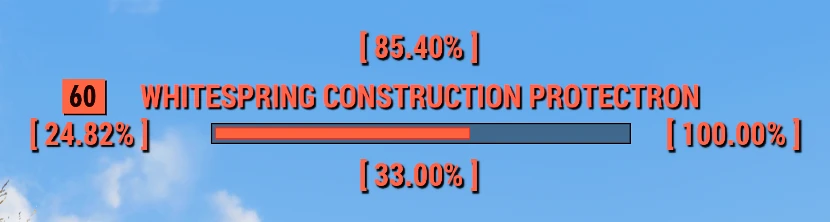
Compatible Show Health Redux shows the percentage of the enemy's health at which the player is currently aimed at.
There are four different positioning options available.
This version of the mod has been rewritten with compatibility for other mods in mind.
Available positionings of the health percentage in regard to the enemy/entity health bar:
-
[]Top (like previous ShowHealth versions)
[
]Bottom[]Right
[]Left
Manual Install
-
[]Pick and download your desired version (you can only have one installed at a time)
[
]Extract the CompatibleShowHealthRedux.ba2 file to your Fallout 76 Data folder (default: "C:\Program Files (x86)\Bethesda.net Launcher\games\Fallout76\Data")[]Navigate to your Fallout 76 settings folder in "My Games" (default: "C:\Users\%USERNAME%\Documents\My Games\Fallout 76")
-
[]If this is your first mod, extract the optional "Fallout76Custom.ini" file to the above mentioned directory.
[]Otherwise, append the name of the new archive, "CompatibleShowHealthRedux.ba2", to the list, separated by a comma, like so:
sResourceArchive2List = CompatibleShowHealthRedux.ba2, ChatMod.ba2
Compatibility
This mod should generally be compatible with any other mod providing a loader for CompatibleShowHealthRedux.swf in their hudmenu.swf file.
Known compatible mods:
-
[]Text Chat by Liyalai
[]Basically any other mod which properly works with Text Chat (load Text Chat last for its loader to work!)
Compatible Show Health Redux also comes with loaders for the following mods (these mods will all work if this mod is loaded AFTER them):
-
[]Perk Loadout Manager
[]any many more
For mod authors:
Installing users please ignore this segment!
To load this and other mods' standalone scripts (aka make your mod compatible with CSHR) just add the following code to your hudmenu.swf:
// Import the Loader class & UncaughtErrorEvent in the package with the other imports
import flash.display. Loader;
import flash.events. UncaughtErrorEvent;
// Add the loader as global variable within the HUDMenu class
private var cshrLoader:Loader;
// This is the topmost already existing function in hudmenu.swf
public function HUDMenu()
// There is a lot of bethesda code here
// Insert this code at the end of the function
this.cshrLoader = new Loader();
addChild(this.cshrLoader);
this.cshrLoader.load(new URLRequest("CompatibleShowHealthRedux.swf"),new LoaderContext(false,ApplicationDomain.currentDomain));
this.cshrLoader.uncaughtErrorEvents.addEventListener(UncaughtErrorEvent. UNCAUGHT_ERROR,this.uncaughtErrorHandler);
catch(e:Error)
// You can optionally log loading errors to the screen here
// Add a handler for when the mod loading fails horribly (won't trigger when there's no CSHR to be loaded)
public function uncaughtErrorHandler(param1:UncaughtErrorEvent) :
// You can optionally log loading errors to the screen here
If your mod is running as standalone script as well please feel free to send me a DM on Nexus and I'll add your mod to my loaders as well so that users can load mods in any order to avoid conflicts and confusion! :)
[*]How is this mod different from any previous version? This is a full re-write of ShowHealth contained in its own standalone script, thus being fundamentally different than its predecessors, a
-
[]Perk Loadout Manager
-
[]Text Chat by Liyalai
-
[]Pick and download your desired version (you can only have one installed at a time)
Compatible Show Health Redux displays the enemy's health percentage at your crosshair with four positioning options. It's a UI mod for Fallout 76, rewritten for compatibility with other mods, and has 568 endorsements and 27,648 downloads. Last updated May 2024.
✨ Key Features
📊 Pros & Cons
✅ Pros
- Community-approved with 568 endorsements and over 27k downloads.
- Multiple positioning options to fit your UI preference.
- Actively maintained (last updated May 2024).
⚠️ Cons
- Manual install requires editing Fallout76Custom.ini, which can be tricky for first-time modders.
- Only one positioning variant can be installed at a time—you'll need to swap files to change position.
- Compatibility depends on load order; if other mods don't load correctly, the health percentage may not show.
For Fallout 76 players who want a clear, customizable health percentage display without breaking other UI mods. If you use Text Chat or other UI overhauls, this is built to play nice. Skip if you prefer a minimal HUD or don't need enemy health percentages.
💡 Beginner Tips
- If you're new to modding, extract the optional Fallout76Custom.ini to your My Games folder—it sets up the necessary archive list for you.
- When editing Fallout76Custom.ini, make sure to append the mod's .ba2 filename to the sResourceArchive2List line, separated by commas.
- Load Text Chat last if you use it, so its loader takes priority and ensures compatibility.
📊 Mod Details
- Game
- Fallout 76 Mods
- Author
- Bibo164
- Version
- 1.0.8
- Downloads
- 27,648
- Endorsements
- 568
- Category
- User Interface
- Created
- 3/20/2022
- Updated
- 5/5/2024
🧩 Commonly Used Together
Users add these mods to the same collections — a real compatibility signal, not an AI guess.
🔧 How to Install Fallout 76 Mods
Use Vortex. Place .ba2 files in Data folder. Use cautiously online.
📖 Full step-by-step install guide for Fallout 76 →
Visit the official mod page for specific installation instructions for this mod.
🎮 Need cheat codes or console commands? Check ur gaming wiki for Fallout 76 commands, item IDs, and more.
Keep browsing — more Fallout 76 mods await