RatMonkeys Glowing Caps Stash Tins
🟡 Updated this yearThis mod may not work until the author updates it. Check for an update, or see the rollback guide.
Preview
🔍 Analysis
- 👍 3.5% endorsement rate — high engagement, a strong quality signal
- 🏆 #7 of 247 Models and Textures mods in this game by downloads
📋 About This Mod
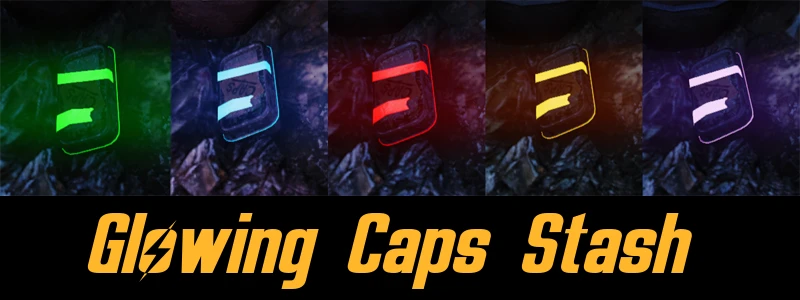
Makes all Bottle Caps Tins glow bright green so you can see them from any distance, or just spot them if you're moving through a new area. They will always be visible from now on.
5 colors to choose from: Green, Blue, Red, Orange, Purple.
Please note: This is a glowing mod, not an esp. You cannot see this through walls.
Installation
1. Open downloaded file. Unzip/Extract it somewhere. Pick your color by choosing a folder. (Red/Green/Blue/Purple/Orange)
2. Extract mod to your Fallout 76 data directory.
3. Add CapsTin.ba2 to your archive load order list in Fallout76Custom.ini
If you have not installed a .ba2 mod before for Fallout 76, here's how.
1. Create a Fallout76Custom.ini in your
2. Find the line, if not there, create it. Then under it, add sResourceArchive2List = CapsTin.ba2
3. Add all your mods to above and separate by comma. For example, test1.ba2, test2.ba2, test3.ba2
Check Out My Other Mods For FO76
RatMonkeys Glowing Caps Stash Tins makes all bottle cap tins in Fallout 76 glow bright green, with five color options (green, blue, red, orange, purple). It's a simple texture mod that requires manual installation via .ba2 file and ini edit. With 2,413 endorsements and 69,408 downloads, it's a popular quality-of-life visual aid for scavengers.
✨ Key Features
📊 Pros & Cons
✅ Pros
- Huge community trust: 2,413 endorsements and 69k downloads
- Multiple color options let you pick your favorite glow
- Simple texture swap—no esp, so it's lightweight and won't bloat your load order
⚠️ Cons
- Manual install requires editing Fallout76Custom.ini—not for mod manager users
- Only affects cap tins, not other loot containers
- Last updated May 2026—check if it's compatible with the current game patch
For Fallout 76 scavengers who hate missing cap stashes in dark corners. If you're a completionist or just want to speed up looting, this makes finding caps a breeze. Skip if you want gameplay changes or if you prefer a more immersive, non-glowing world.
💡 Beginner Tips
- Make sure you have the correct Fallout76Custom.ini path—it's in Documents\My Games\Fallout 76, not the game folder.
- If you already have other .ba2 mods, add CapsTin.ba2 to the same sResourceArchive2List line, separated by commas.
- Pick your color folder before extracting—you can't change colors in-game without reinstalling.
📊 Mod Details
- Game
- Fallout 76 Mods
- Author
- RatMonkey
- Version
- 1.2
- Downloads
- 69,408
- Endorsements
- 2,413
- Category
- Models and Textures
- Created
- 11/24/2018
- Updated
- 5/1/2026
🧩 Commonly Used Together
Users add these mods to the same collections — a real compatibility signal, not an AI guess.
🔧 How to Install Fallout 76 Mods
Use Vortex. Place .ba2 files in Data folder. Use cautiously online.
📖 Full step-by-step install guide for Fallout 76 →
Visit the official mod page for specific installation instructions for this mod.
🎮 Need cheat codes or console commands? Check ur gaming wiki for Fallout 76 commands, item IDs, and more.
Keep browsing — more Fallout 76 mods await