A Realistically Weightless Colored Sorting Mod
⚪ Last updated 2016⚠️ Install Order · 2 steps
Install in this order, then this mod last — most mods fail to load without their framework and dependencies in place.
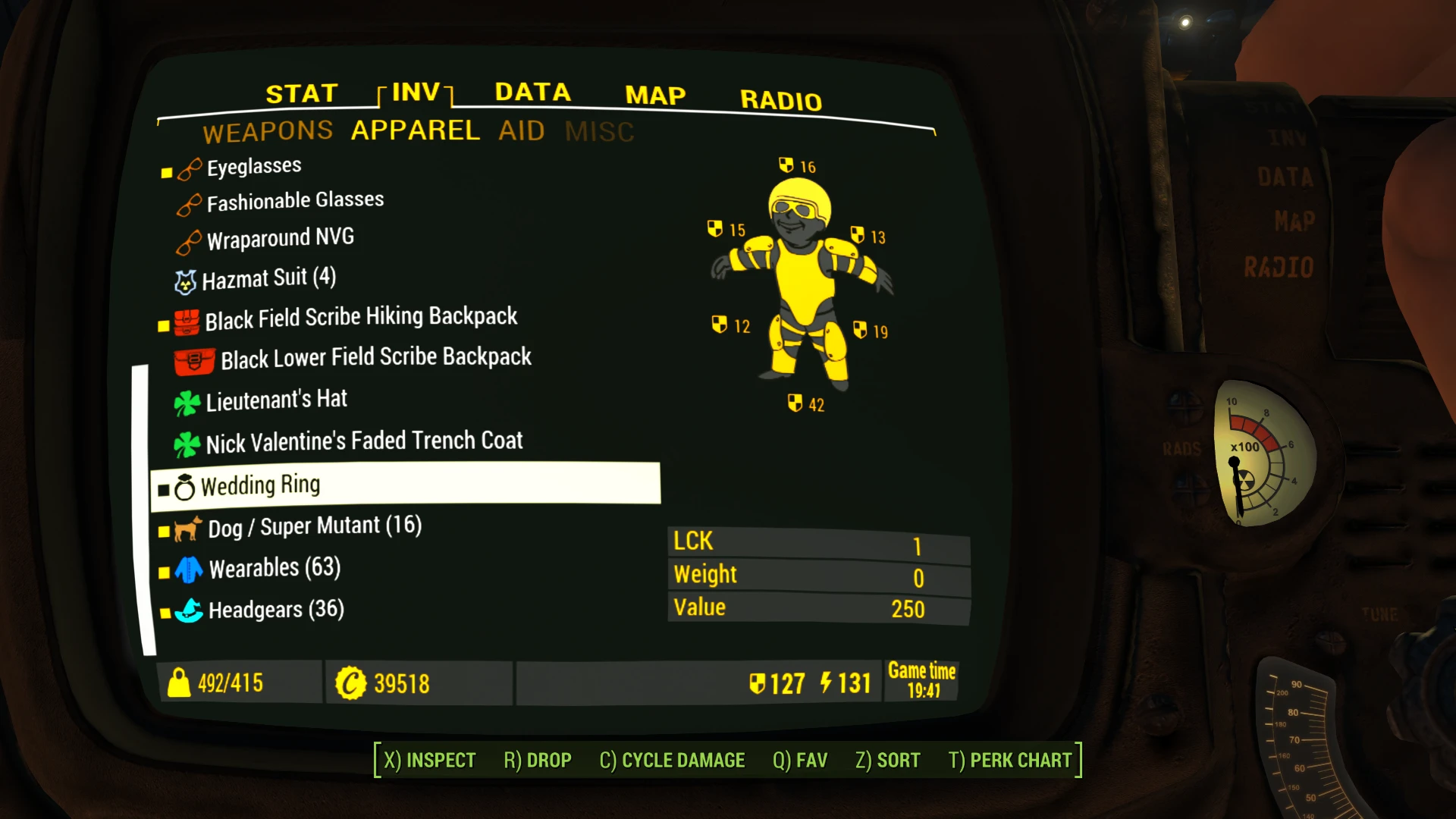
Preview
🔍 Analysis
- 👍 2.6% endorsement rate — high engagement, a strong quality signal
- 🏆 #82 of 110 User Interface mods in this game by downloads
📋 About This Mod
NEW:From v1. 1, ARWCSM is compatible with DEF_HUD's 'Component tags' module (see below).
Introduction
ARWCSM uses DEF_INV resources to display around 50 icons before the items in the inventory. They are sorted by 68 tags. Weapons and Armors are not sorted for now. An upgrade will come soon so in the meantime, you should use the excellent Better Armor and Weapon naming and sorting, which displays | the | mods | attached | like | that and sorts these items well. ARWCSM uses 16 tabs separating the items for a faster access thank to shorter lists.
With the other mods of an ensemble of three, it brings Colored icons to the inventory lists in the Pipboy/Barter/Container/Workbench screens. ARWCSM should be used in conjunction with the two other mods of the set. It is expressively made for a Color Pipboy. It intends to make it finer to watch by diminishing the Contrast between the white Fonts/Icons/Animations and the black Background when the monochrome setting is removed in order to display a Color World Map (main reason).
The other mods: Gold Kit for Color Pipboy -anti-Black&White Screen- The main one. It provides Colors to Icons/Animations and some Fonts for all Pipboy screens and colors the icons in the Barter/Container/Workbench windows. From v1. 1, GKCP removes the monochrome layer (green) of the Pipboy automatically, making it ready to display colors.
Zoom-Out Extended for World Map and Local Map Allows to zoom-out fully on the World/Local Maps and deals with the on-map color of those two screens.
When one removes the monochrome display, the Power Armor Pipboy screens (World Map, inventory...) become too bright. You'll probably need to change (or add) these lines in Fallout4Custom.ini: Chapters [] are essential: The default are respectively 3 and 1: fPipboyScreenEmitIntensityPA=1 fPipboyScreenDiffuseIntensityPA=0. 15
I have also seen: 1. 25 and 0. 15.
As GKCP v1. 1 provides an automatic removal of the monochrome display of the Pipboy, making it ready to display colors, what follows is less relevant. Basically, to remove the monochrome display in the Pipboy screens, you need to edit Fallout4Custom.ini and write: bPipboyDisableFX=1 Fallout4Custom.ini takes precedent over the other INIs (I read) so if that line is elsewhere (with 0 instead of 1), it would be overrun by the one you put in Fallout4Custom.ini (...\Documents\My Games\Fallout4\ with Win7 without Steam) (make a search in C:\ if you don't know where
A sorting mod for Fallout 4 that adds 16 tabs, 68 tags, and ~50 icons to organize inventory items. It offers Weightless and Vanilla versions with Full or Modular installs, part of a color-themed mod ensemble. Popular with 6,368 endorsements and 247,785 downloads, last updated in 2016.
✨ Key Features
📊 Pros & Cons
✅ Pros
- Community favorite with 6,368 endorsements and nearly 250k downloads
- Flexible install options—go Weightless for convenience or Vanilla for realism
- Comprehensive sorting with 16 tabs and 68 tags covers virtually all items
⚠️ Cons
- Last updated in 2016—may not be compatible with current game patches or DLC
- No explicit mention of compatibility with other UI mods, potential conflicts
- Modular install might require manual setup, which could confuse some users
For Fallout 4 players who want a cleaner, more organized inventory without weight penalties. Ideal for loot hoarders and completionists who struggle to find items quickly. Skip if you prefer vanilla sorting or use other UI overhaul mods that might conflict.
💡 Beginner Tips
- Choose the Weightless version if you want to avoid changing item weights, but be aware it may affect gameplay balance.
- Use a mod manager like Nexus Mods or Vortex to install and manage the Full/Modular options easily.
- Check the mod's forum posts for user feedback on compatibility with your game version before installing.
📊 Mod Details
- Game
- Fallout 4 Mods
- Author
- Zenotep
- Version
- 1.15
- Downloads
- 247,785
- Endorsements
- 6,368
- Category
- User Interface
- Created
- 3/19/2016
- Updated
- 4/3/2016
🧩 Commonly Used Together
Users add these mods to the same collections — a real compatibility signal, not an AI guess.
🔧 How to Install Fallout 4 Mods
Download from Nexus.
📖 Full step-by-step install guide for Fallout 4 →
Visit the official mod page for specific installation instructions for this mod.
🎮 Need cheat codes or console commands? Check ur gaming wiki for Fallout 4 commands, item IDs, and more.
Keep browsing — more Fallout 4 mods await