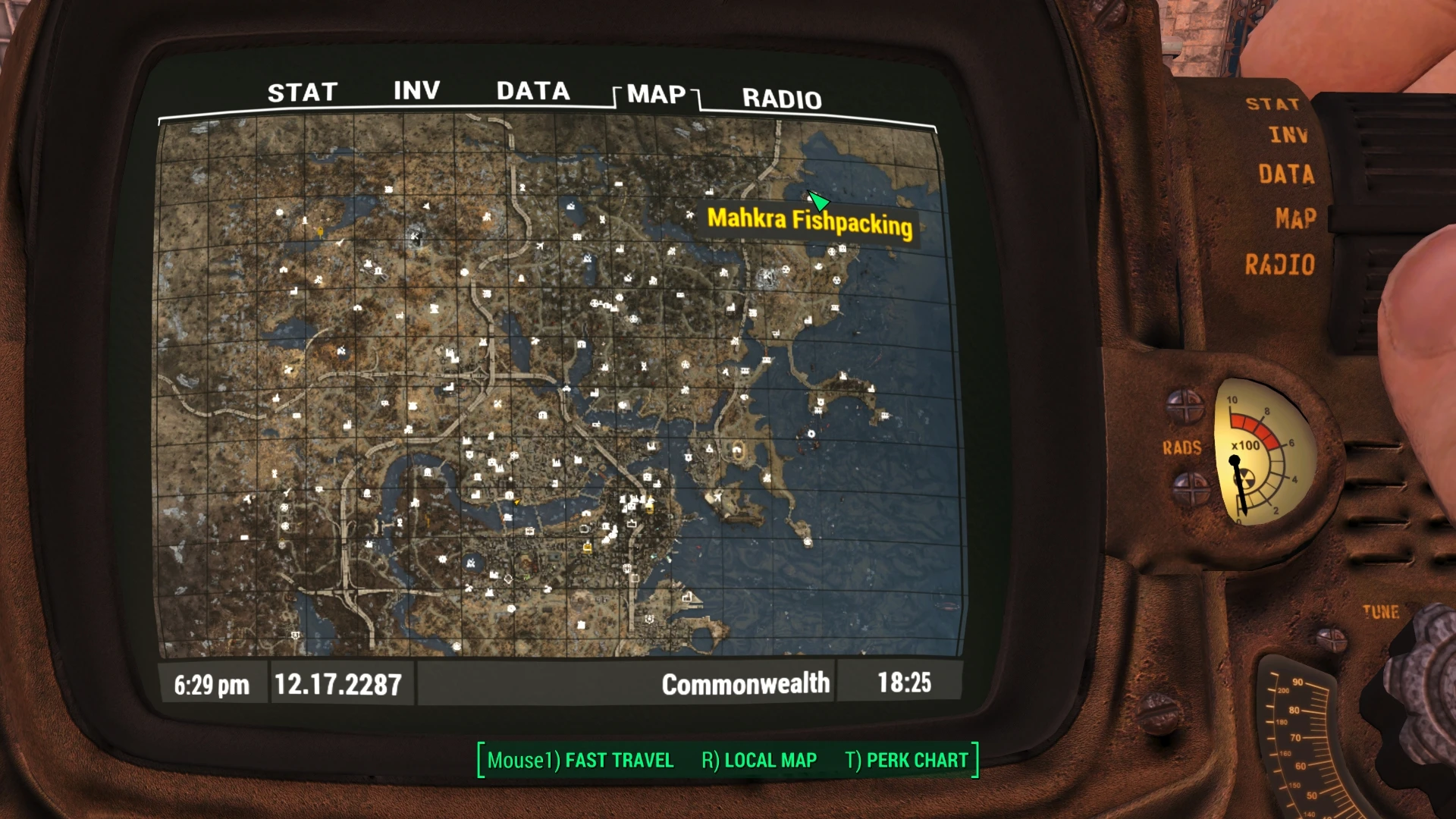
Zoom-out Extended for World and Local Maps - For 2K 4K 8K World Maps
⚪ Last updated 2016⚠️ Install Order · 2 steps
Install in this order, then this mod last — most mods fail to load without their framework and dependencies in place.
Preview
🔍 Analysis
- 👍 3.9% endorsement rate — high engagement, a strong quality signal
- 🏆 #89 of 110 User Interface mods in this game by downloads
📋 About This Mod
En français plus bas.
For the Local Map description, see at the bottom of this page. ----------------------------------------------------------------------------------------------------------------------------------------------------------------------------------
Introduction
Zoom-out Extended is part of a three mods ensemble which main purpose is to reduce the black & white contrast of the Pipboy screens when one removes the monochrome display in order to use a colored World Map (mainly).
The other mods: Gold Kit for Color Pipboy -anti-Black&White Screen- Provides Colors to Icons/Animations and some Fonts for all the Pipboy screens and colors the icons in the Barter/Container/Workbench windows. Increases legibility. From v1. 1, GKCP removes the monochrome layer (shades of green) of the Pipboy automatically, making it black & white but ready to display colors.
There is an independent install for that part of GKCP. No more monochrome - Color setting for the Pipboy! If your Pipboy display is monochrome and you want to simply install Z-o E and a Colored World Map, you can use this small mod to remove the monochrome layer.
A Realistically Weightless Colored Sorting Mod By using DEF_INV and GKCP resources, provides both the inventory and the in-game Barter/Containers/Workbench windows with a variety of colored icons as tags instead of tags which helps to reduce the contrast. There are Weightless and Vanilla weights installs, Full or Modular. ARWCSM 1. 1 is compatible with DEF_HUD 'Component tags' which displays the components a scrappable item is made of, when you point at it in the 3D world view.
DESCRIPTION
SHORT: In the World Map screen, the maximum Zoom-out does not display a global enough view of the world (in my view). Allows to Zoom-out more, displaying the full East/West length of the map at full Zoom-out and all the Local Map. Also increases the number of intermediary scroll heights. Z-o E does not provide a World Map. One should be installed (use the links provided below). If not, the dismal Bethesda map is what is displayed.
LONGER: In the World Map view, the maximum Zoom-out is still too close to the ground and does not display a global enough view. This mod allows the maximum Zoom-out to display the full horizontal lenght of the World map and as much as the Local displays. The scale of the scroll allows more intermediary heights and there is also less difference between the maximum Zoom-out first and second levels.
There are separate installs for World Maps in 2K 4K and 8K. In case you don't know the resolution of the one you us
Zoom-out Extended for World and Local Maps is a UI mod for Skyrim that lets you zoom out further on both the world and local maps, showing the entire map at once. It works with colored and monochrome maps, offers different icon colors, and increases intermediate zoom levels. With over 8,000 endorsements, it's a popular quality-of-life improvement for map navigation.
✨ Key Features
📊 Pros & Cons
✅ Pros
- Huge community trust with 8,129 endorsements and over 200k downloads.
- Simple UI tweak that makes map navigation way less tedious, especially on big screens.
- Works with both map styles, so you don't have to pick sides.
⚠️ Cons
- Last updated in 2016 – might have issues with newer Skyrim versions or mod setups.
- Only affects zoom levels – if you wanted map markers or other UI overhauls, this won't do that.
For Skyrim players who hate squinting at the map and want to see the whole province at a glance. Also great for those using high-res map replacers who need more zoom range. Skip if you're fine with the vanilla zoom or want a full map overhaul.
💡 Beginner Tips
- Since it's a simple UI mod, just drop the files into your Data folder or use a mod manager – no need for patches.
- If you use a map replacer like Quality World Map, this mod works alongside it, so no conflict worries.
- Check your load order – this mod doesn't need to be after anything specific, but keeping it near other UI mods is safe.
📊 Mod Details
- Game
- Fallout 4 Mods
- Author
- Zenotep
- Version
- 1.4
- Downloads
- 209,634
- Endorsements
- 8,129
- Category
- User Interface
- Created
- 1/28/2016
- Updated
- 3/27/2016
🔧 How to Install Fallout 4 Mods
Download from Nexus.
📖 Full step-by-step install guide for Fallout 4 →
Visit the official mod page for specific installation instructions for this mod.
🎮 Need cheat codes or console commands? Check ur gaming wiki for Fallout 4 commands, item IDs, and more.
Keep browsing — more Fallout 4 mods await