HD Bloodstains
⚪ Last updated 2014Preview
🔍 Analysis
- 👍 5.8% endorsement rate — high engagement, a strong quality signal
- 🏆 #6 of 241 Models and Textures mods in this game by downloads
📋 About This Mod
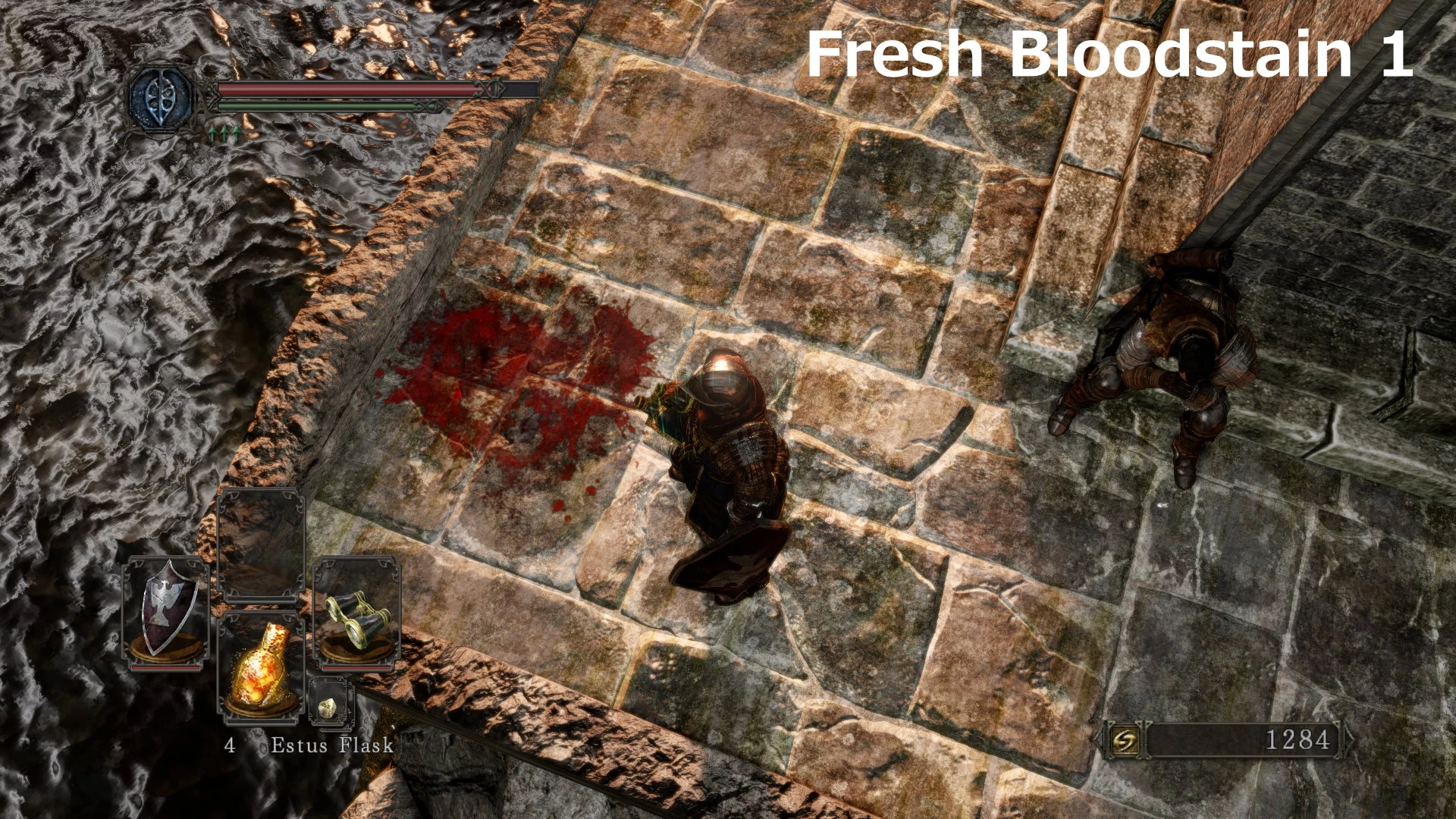
The vanilla bloodstain sprite is half the resolution (128x128) of the one if Dark Souls 1 and has a really bad transparency on it. This HD one is 512x512 and has almost no transparency artifacts.
This is a conversion of my Demon's Souls Style Bloodstain mod for Dark Souls 1, now in 2 versions: Fresh and Dried. This does not change the green soul sprite, might make add optional file for those once I find the corresponding images.
Installation: 1. Choose your prefered style of bloodstain then add the corresponding "52d5b387.png" to "textures/DarkSoulsII/override" inside your GeDoSaTo directory 2. Make sure that you have set "enableTextureOverride" to "true" in GeDoSaTo.ini 3. Happy summoning!
Uninstall: Simply delete the "52d5b387.png" file.
Special thanks to Durante for GeDoSaTo.
HD Bloodstains is a texture mod for Dark Souls that converts the author's Demon's Souls Style Bloodstain mod into two versions: Fresh and Dried. It enhances the appearance of bloodstains in the game, offering players a choice between two visual styles. With 861 endorsements and 14,930 downloads, it has a solid following despite being last updated in 2014.
✨ Key Features
📊 Pros & Cons
✅ Pros
- Community-approved with 861 endorsements and nearly 15k downloads
- Gives you two distinct looks for bloodstains—fresh and dried—so you can pick what fits your vibe
- Simple texture swap that doesn't mess with gameplay, just makes those death markers look better
⚠️ Cons
- Last updated in 2014, so it might not be compatible with newer game versions or mod setups
- Only affects bloodstains, so if you're looking for broader visual overhauls, this is a tiny piece
- Potential conflicts with other texture mods that touch blood or decals—test with your load order
For Dark Souls players who want a subtle visual upgrade to bloodstains without changing gameplay. If you're into lore-friendly or atmospheric tweaks, this is a nice touch. Skip if you want major graphical overhauls or gameplay changes.
💡 Beginner Tips
- Since it's a texture mod, use a mod manager like Nexus Mod Manager or Mod Organizer 2 to keep track of files and avoid overwriting other textures.
- If you're playing with DSfix or other graphical mods, make sure to place this mod's files in the correct texture folder (e.g., 'tex_override') to ensure they load properly.
- Try both Fresh and Dried versions in-game to see which one fits your preferred atmosphere—you can switch between them easily by replacing the files.
📊 Mod Details
- Game
- Darksouls2 Mods
- Author
- YarHar707
- Version
- 1.0
- Downloads
- 14,930
- Endorsements
- 861
- Category
- Models and Textures
- Created
- 5/26/2014
- Updated
- 5/26/2014
🔧 How to Install Dark Souls 2 Mods
Download from Nexus Mods.
📖 Full step-by-step install guide for Dark Souls 2 →
Visit the official mod page for specific installation instructions for this mod.
🎮 Need cheat codes or console commands? Check ur gaming wiki for Dark Souls 2 commands, item IDs, and more.
Keep browsing — more Dark Souls 2 mods await