Fleshy Hollows
⚪ Last updated 2014Preview
🔍 Analysis
- 👍 5.8% endorsement rate — high engagement, a strong quality signal
- 🏆 #1 of 241 Models and Textures mods in this game by downloads
📋 About This Mod
Update: I am currently playing through the game to find all the hollowed NPCs/Enemies and once I am done I will be releasing an NPC update. An optimization update is also on it's way soon.
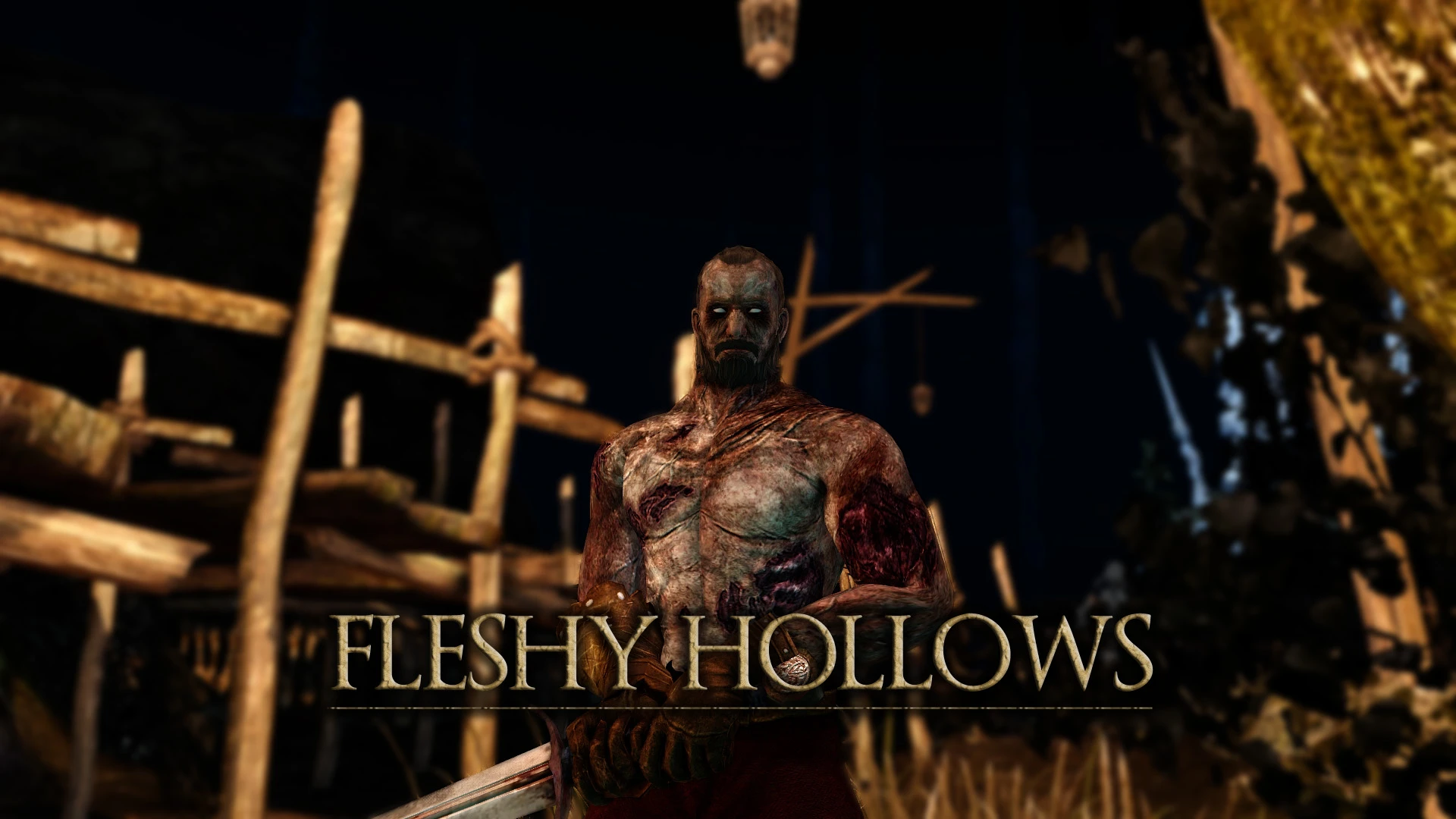
Changes the Hollowing process to make it appear more gradual. The process now includes three stages. The first stage remains as the default unhollowed human skin. After your first death your character's skin will lose it's colour and his/her features will appear sunken and withered. After 4 deaths your character will appear fully hollowed. This edited skin will change the default green hollow to something more flesh coloured.
I will be leaving version 1. 0 of the mod up. This version uses the same hollowing process as the default but replaces the green hollow skin with a recoloured version.
Requires GeDoSaTo Dark Souls 2 version. link: http://blog.metaclassofnil.com/?tag=gedosato
Installation: 1. Download GeDoSaTo and follow the installation instructions. 2. In the GeDoSaTo directory open the GeDoSaTo.ini and change "enableTextureOverride" to true. 3. Create a folder in the GeDoSaTo directory called "Textures" (if one doesn't already exist). Then within the Textures folder create another folder called "DarkSoulsII" and within the folder create another called "Override". Afterwards the file path should look like this "Textures/DarkSoulsII/Override" Thanks to SalvadorKenway for pointing that out. 4. Take the files in the "override" folder included in this mod extract them into the override folder created in step 3. 5. Run the GeDoSaToTool.exe, click activate and then start up Dark Souls 2 Uninstall:
1. Simply delete the mod files from the override folder.
Usage: Feel free to use any files in this mod as long as credit is given.
Thanks to Durante for creating GeDoSaTo, which I highly recommend to everyone.
Requires GeDoSaTo Dark Souls 2 version. link: http://blog.metaclassofnil.com/?tag=gedosato
Installation: 1. Download GeDoSaTo and follow the installation instructions. 2. In the GeDoSaTo directory open the GeDoSaTo.ini and change "enableTextureOverride" to true. 3. Create a folder in the GeDoSaTo directory called "Textures" (if one doesn't already exist). Then within the Textures folder create another folder called "DarkSoulsII" and within the folder create another called "Override". Afterwards the file path should look like this "Textures/DarkSoulsII/Override" Thanks to SalvadorKenway for pointing that out. 4. Take the files in the "override" folder included in this mod extract them into the override folder created in step 3. 5. Run the GeDoSaToTool.exe, click activate and then
Fleshy Hollows is a cosmetic mod for Dark Souls that makes the Hollowing process appear more gradual, altering the character's appearance as Hollowing progresses. It has 2,611 endorsements and 45,010 downloads, last updated in April 2014.
✨ Key Features
📊 Pros & Cons
✅ Pros
- Community favorite with 2,611 endorsements
- High download count (45,010) shows lasting appeal
- Simple concept that enhances immersion
⚠️ Cons
- Last updated in 2014, may not be compatible with newer game versions or mods
- Cosmetic only, so if you want gameplay changes this isn't for you
- Potential conflicts with other character appearance mods
For Dark Souls players who want a more gradual visual transformation when Hollowing, adding to the game's atmosphere. If you're a purist who wants the original look or prefer gameplay-altering mods, skip this.
💡 Beginner Tips
- Make sure to back up your original game files before replacing textures, as this mod likely overwrites them.
- If you use other character texture mods, install Fleshy Hollows last to avoid conflicts.
- Check the mod's compatibility with your game version (e.g., Prepare to Die Edition vs Remastered) before installing.
📊 Mod Details
- Game
- Darksouls2 Mods
- Author
- Catloaf
- Version
- v1.1
- Downloads
- 45,010
- Endorsements
- 2,611
- Category
- Models and Textures
- Created
- 4/25/2014
- Updated
- 4/27/2014
🔧 How to Install Dark Souls 2 Mods
Download from Nexus Mods.
📖 Full step-by-step install guide for Dark Souls 2 →
Visit the official mod page for specific installation instructions for this mod.
🎮 Need cheat codes or console commands? Check ur gaming wiki for Dark Souls 2 commands, item IDs, and more.
Keep browsing — more Dark Souls 2 mods await