Clean UI
⚪ Last updated 2014Preview
🔍 Analysis
- 👍 4.0% endorsement rate — high engagement, a strong quality signal
- 🏆 #1 of 172 User Interface mods in this game by downloads
📋 About This Mod
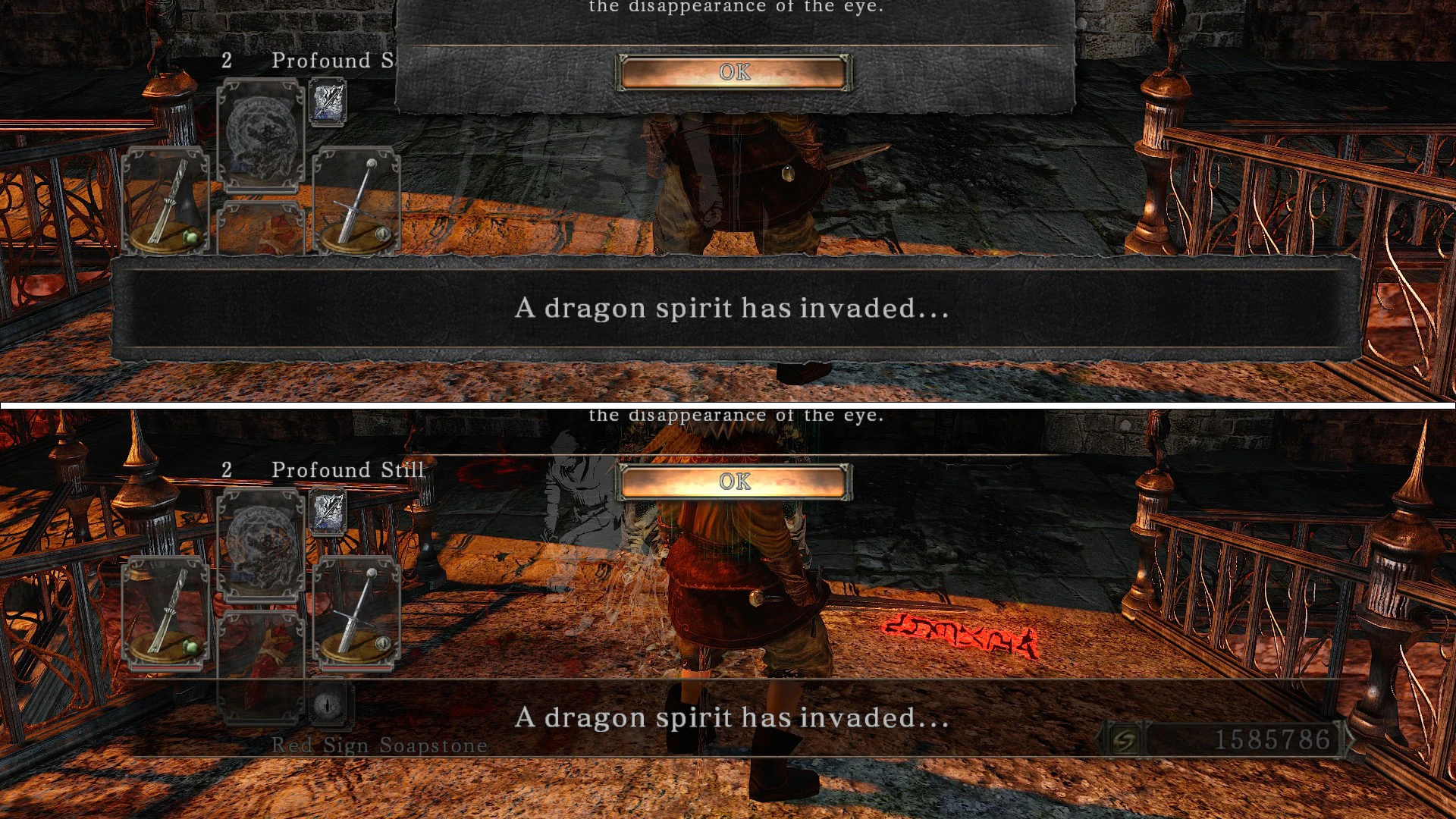
WHAT? This mod makes most menu screens and popups in the game (semi-)transparent. I tried to change as little as possible, basically this mod removes the leather-/book-page-backgrounds from most screens and prompts.
There is an alternative version that includes "Beta style boss HP bar and targetting reticle" by Sir Fist.
Check the comparison pics and decide for yourself.
WHY? When getting invaded / invading, it annoyed me that the invasion message was overlapping the item slot icon. So I made this mod.
I later added transparent menu screens, this can actually be useful if you want to change your weapon while in a match.
If there's anything I missed / could be improved, I'm all ears.
HOW? You NEED GeDoSaTo! set texture override to true in its config file.
Either use the Nexus Mod Manager or manually uncompress the archive to GeDoSaTo_location/textures/DarkSoulsII/override.
texture descriptions & file list:
01d82cb0.dds - invasion messages 1ff168b4.dds - menu screens (equipment, inventory, etc.) 7de4e358.dds - write message 52a77b92.dds - death count message in majula and similar 563b82a2.dds - bonfire menu, npc menu c9e21ab1.dds - "summon this phantom" message e0c55687.dds - merchant screens, bottomless box e15ca94c.dds - read message
Clean UI is a lightweight user interface mod for Dark Souls that removes the opaque backgrounds from menus, invasion messages, and button prompts, giving the HUD a transparent look. It has 4,240 endorsements and over 105,000 downloads, indicating strong community approval despite its age.
✨ Key Features
📊 Pros & Cons
✅ Pros
- Community favorite with 4,240 endorsements and over 105k downloads
- Does exactly what it says: cleans up the UI without extra bloat
- Lightweight and likely compatible with most setups since it's just a texture swap
⚠️ Cons
- Last updated in 2014, so it may not be compatible with newer game versions or mods
- Only affects UI backgrounds—if you want a full UI overhaul, this isn't it
- Potential conflicts with other UI mods that alter the same files
For Dark Souls players who want a cleaner, more immersive HUD without overhauling the entire interface. If you're tired of clunky menu backgrounds and want a minimal look, this is for you. Skip if you're looking for gameplay changes or a full UI redesign.
💡 Beginner Tips
- Since this mod is from 2014, check if you're using the original Dark Souls (Prepare to Die Edition) or remastered—it may not work on the remaster without tweaks.
- If you're using DSfix, make sure to install Clean UI after DSfix so it doesn't get overwritten.
- Test the mod in the main menu first to see if the transparent effect applies correctly before diving into gameplay.
📊 Mod Details
- Game
- Darksouls2 Mods
- Author
- Endebert
- Version
- 1.4
- Downloads
- 105,483
- Endorsements
- 4,240
- Category
- User Interface
- Created
- 5/12/2014
- Updated
- 5/31/2014
🔧 How to Install Dark Souls 2 Mods
Download from Nexus Mods.
📖 Full step-by-step install guide for Dark Souls 2 →
Visit the official mod page for specific installation instructions for this mod.
🎮 Need cheat codes or console commands? Check ur gaming wiki for Dark Souls 2 commands, item IDs, and more.
Keep browsing — more Dark Souls 2 mods await