GEM-ENB or GEM-GeDoSaTo
⚪ Last updated 2014Preview
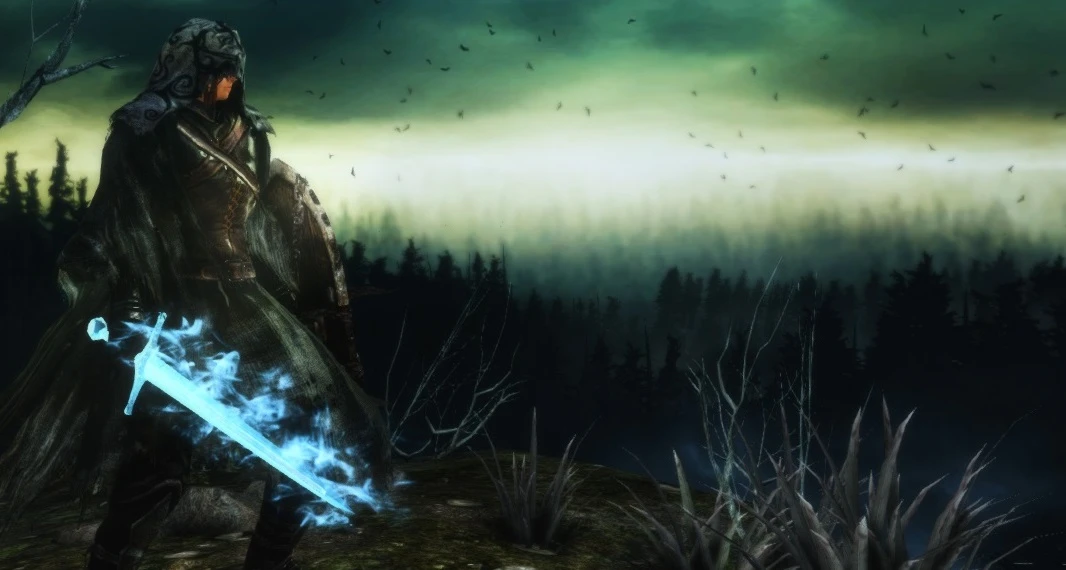
🔍 Analysis
- 👍 2.4% endorsement rate — high engagement, a strong quality signal
- 🏆 #2 of 69 Visuals and Graphics mods in this game by downloads
📋 About This Mod
GEM is build to work best with GeDoSaTo and ENB
GEM+GeDoSaTo instructions GEM Download GEM from FILES section above or visit www.gem-fx.tk (not the latest version there but 1. 0) Click the Dark Souls 2 banner in the Projects section.
GeDoSaTo Direct Link
- []make sure to open GeDoSaTo.ini and set "enablePostprocessing" to false
HighDoF (drop the files into your GeDoSaTo folder) MyGDSTHighDoFSettings
GEM+ENB instructions You can find the instructions under the DSII-GEMvXX-ENB-HD file in the FILES section above. Be aware that ENB for DSII is yet in development and can cause some artifacts like flickering of AO.
- [] d3d9.dll
- [] d3d9.dll [] GEM_Readme.txt, SweetFX_Readme.txt [] GEM_settings.txt, SweetFX_settings.txt [] SweetFX
- []Turn off DoF in GeDoSaTo.ini. []Set ExpEffects in GEM_settings.txt to 0
- []pause-key to reload GEM []scroll-lock to toggle GEM []K-key to enable edge blur (set GBlur to 1 first in GEM_settings.txt) []F11 to disable expensive dynamic lightning effects (some might find them annoying)
- []OBS works if you capture the monitor instead of the game.
GEM-ENB is a visual enhancement mod for Dark Souls II, offering a stable and mature atmosphere to bring a new challenge to the game. With over 5,000 endorsements and 200,000 downloads, it's a well-established choice for players seeking a graphical overhaul.
✨ Key Features
📊 Pros & Cons
✅ Pros
- Community favorite with 5,120 endorsements and 209,749 downloads.
- Designed for stability and maturity, so you're not chasing constant crashes.
- Gives DSII a fresh look that can make the game feel new again.
⚠️ Cons
- Last updated in 2014, so it might not play nice with newer game patches or DLC.
- Could conflict with other graphics mods or reshade presets.
- Performance hit is real on older hardware—expect to tweak settings.
For Dark Souls II veterans who want a visual refresh without overhauling gameplay. If you're a purist who wants the vanilla look, skip it. But if you're up for a new atmosphere and a bit of a challenge, this is your mod.
💡 Beginner Tips
- Make sure to disable anti-cheat or play offline to avoid softbans, as ENB mods can trigger them.
- Back up your original game files before installing, so you can revert if needed.
- Tweak the ENB settings in-game with Shift+Enter to adjust brightness and effects to your liking.
📊 Mod Details
- Game
- Darksouls2 Mods
- Author
- General Choi Jeong
- Version
- 1.4
- Downloads
- 209,749
- Endorsements
- 5,120
- Category
- Visuals and Graphics
- Created
- 4/26/2014
- Updated
- 8/24/2014
🔧 How to Install Dark Souls 2 Mods
Download from Nexus Mods.
📖 Full step-by-step install guide for Dark Souls 2 →
Visit the official mod page for specific installation instructions for this mod.
🎮 Need cheat codes or console commands? Check ur gaming wiki for Dark Souls 2 commands, item IDs, and more.
Keep browsing — more Dark Souls 2 mods await