Oil Indicator (plus a possible fix for 1.12's Oil Indicator)
⚪ Last updated 2016⚠️ Install Order · 2 steps
Install in this order, then this mod last — most mods fail to load without their framework and dependencies in place.
Preview
🔍 Analysis
- 👍 5.7% endorsement rate — high engagement, a strong quality signal
- 🏆 #73 of 155 User Interface mods in this game by downloads
📋 About This Mod
Oil Indicator
THIS MOD IS NO LONGER NECESSARY AFTER PATCH 1. 12.
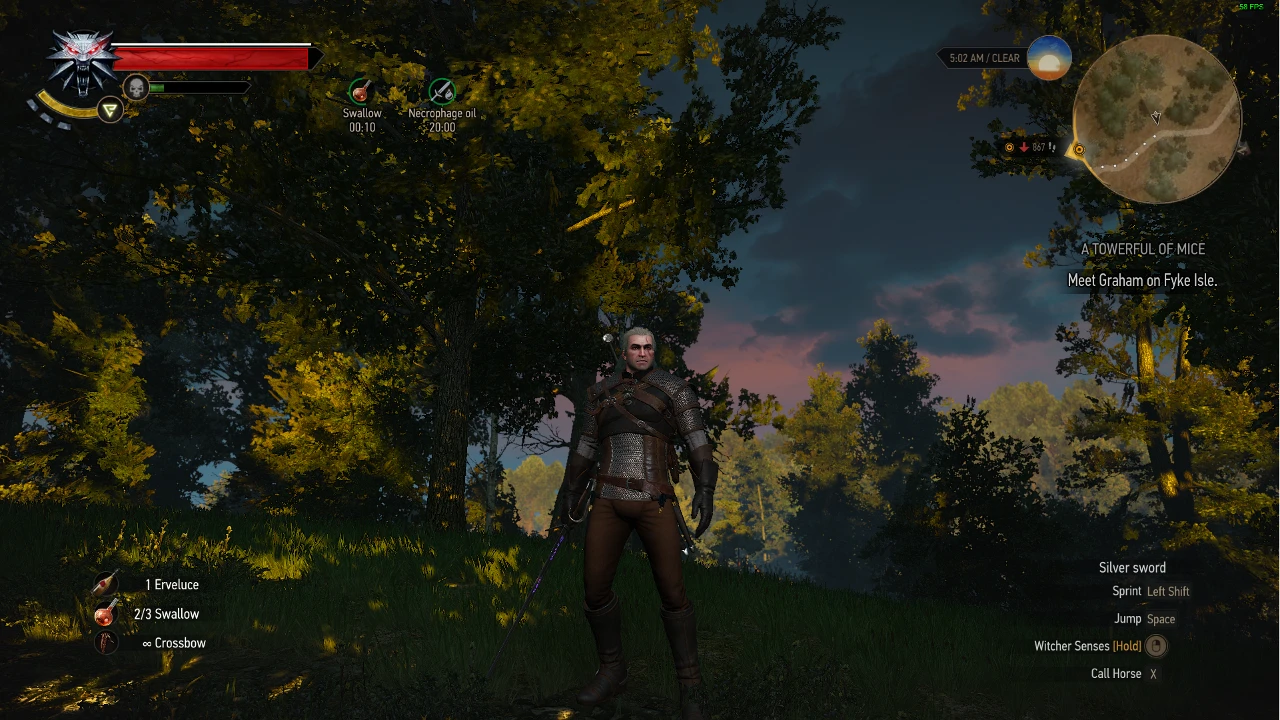
I personally got sick and tired of having to look in my inventory during battles to figure out if I still had some oil left on my blade. This mod removes that hassle! It adds an indicator to the area of the screen which displays your current buffs, which tells you the type of oil applied as well as how many uses you have left before it runs out. Due to the way the game is coded it displays the number of uses left the same way as minutes are shown for regular buffs.
Gopher featured this mod in one of his videos (thanks a lot man!). You can see the mod in action at around 6:00 in this video.
YolaeWk5Dm4
Using the mod There are two modes this mod can work in. Mode 1 is the default.
Mode 1: Oil icon is displayed when sword is drawn Draw one of your swords and the indicator should appear if there is oil applied to it! If this doesn't happen then there is a bug (see the Bug Reporting section for more information).
Mode 2: Oil icon for both swords is displayed regardless of whether sword is drawn or not To activate this mode, you'll need to open the text file in the mod folder. In there near the top is the alwaysDisplayOils variable, set to false by default. Change this value to true to activate this mode.
In this mode the oil icons for both swords will always be on screen.
Mod conflicts If you are using this mod alongside any other mods, please be aware that sometimes there can be conflicts. I would recommend trying AnotherSymbiote's Script Merger tool. This is capable of solving a lot of conflicts but it's not foolproof. If you've done this and are still having problems please post a comment here and I'll see what I can do.
Current known conflicts which can't be fixed by Script Merger:
Buffs In Radial Menu by Germ1nal Buffs Repositioned by TheLastWitcher
If you use one of the above mods, please check the downloads page to see if there is a version released which is compatible with the mod you are using. If you use one of these files you will need to make sure that this mod has a higher priority than the mod it is conflicting with in your mods.settings file. Also, DO NOT attempt to use Script Merger with with the above files and this mod. It could cause problems and there's really no need to.
Installation Instructions Either:
Use NMM to install the file.
Download the file manually and extract the contents of the folder to your Witcher 3/Mods folder.
Bug reporting If notice any situations where this mod is not running as inten
This UI mod adds an oil indicator to the HUD, showing the oil applied to the currently held sword. It was made before patch 1.12, which introduced a built-in indicator, so it is no longer required. Despite being outdated, it retains a dedicated following with over 1,100 endorsements.
✨ Key Features
📊 Pros & Cons
✅ Pros
- Community-approved with 1,169 endorsements and over 20,000 downloads.
- Simple, focused UI addition that does exactly what it says.
- Useful for players on pre-1.12 versions who want a clear oil status.
⚠️ Cons
- Obsolete after patch 1.12 — the game now has its own oil indicator.
- Last updated in 2016, so it may not be compatible with current game versions.
For players still on pre-1.12 versions who want a quick visual reference for sword oil. Also for mod collectors who appreciate historical UI mods. Skip if you're on the latest patch — the built-in indicator makes this redundant.
💡 Beginner Tips
- If you're on patch 1.12 or later, uninstall this mod — the game already shows oil status.
- Check your game version before installing; this mod was built for an older patch.
- Since it's a simple UI mod, place the files in the appropriate mod folder and ensure no conflicts with other HUD mods.
📊 Mod Details
- Game
- Witcher 3 Mods
- Author
- SheepDarklord
- Version
- v1.07.1
- Downloads
- 20,352
- Endorsements
- 1,169
- Category
- User Interface
- Created
- 9/3/2015
- Updated
- 1/28/2016
🔧 How to Install Witcher 3 Mods
Download from Nexus.
📖 Full step-by-step install guide for Witcher 3 →
Visit the official mod page for specific installation instructions for this mod.
🎮 Need cheat codes or console commands? Check ur gaming wiki for Witcher 3 commands, item IDs, and more.
Keep browsing — more Witcher 3 mods await