Custom Localization Fix
⚪ Last updated 2023⚠️ Install Order · 3 steps
Install in this order, then this mod last — most mods fail to load without their framework and dependencies in place.
Preview
🔍 Analysis
- 👍 2.6% endorsement rate — high engagement, a strong quality signal
- 🏆 #6 of 155 User Interface mods in this game by downloads
📋 About This Mod
v1. 0. 13 released with Witcher 3 Next Gen v4. 04 support.
(Not really tested, but hopefully it gets people unblocked for Next Gen. Good luck.)PSA TO MOD AUTHORS:
If you decide to use W3Strings Encoder for localization support PLEASE include the unencoded file for people to edit themselves. With so many mods these days, menu clutter is real and we should provide users an easier time merging and clean it up as they see fit. Providing unencoded string .csv files also allows you to give your community an opportunity to offer you translations. What is the point of having localization support if you aren't even going to localize?
--------------------------------------------------------
Features
-
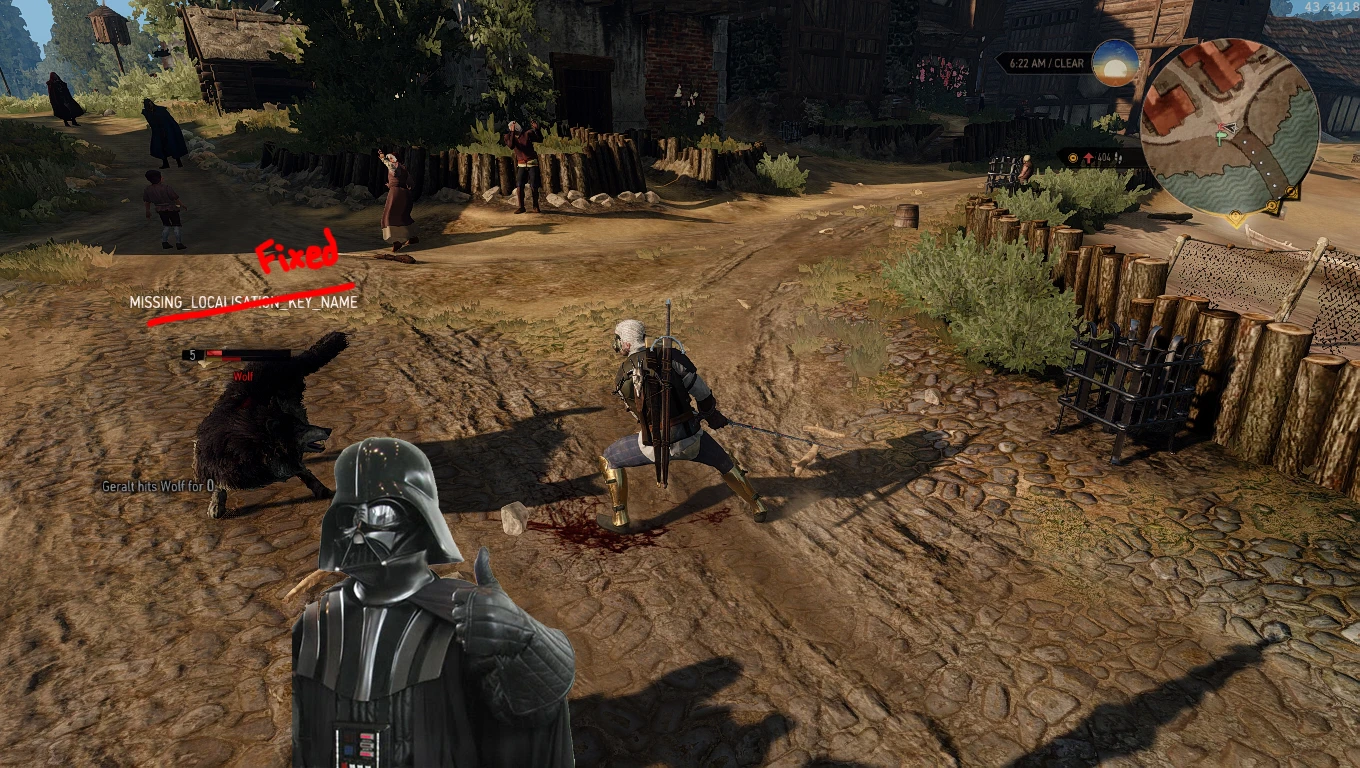
[]Preserves CDPR localization. Fixes issues with broken CDPR menu items and names
[
]Removes "Panel_" from custom Options groups being shown by mods - Removes "MISSING_LOCALISATION_KEY_NAME" from combat
Installation
1. Extract "modCustomLocalizationFix" to <Witcher 3 Dir>\Mods\
2. Copy "modCustomLocalizationFix\bin" folder to <Witcher 3 Dir> and overwrite preexisting files to repair damaged localization.ini from other mods
3. Use Script Merger as needed if you have other mods that modify the following files: baseEffect.ws, hudModuleBuffs.ws, igmOptions.ws
Note for Modders
If you are creating a menu structure please try to maintain consistency with the rest of the community and put your menu inside the Mods submenu. To do this, in your custom \bin\config\r4game\user_config_matrix\pc\myMod.xml file that you make, make sure that your <Group> element is using the displayName attribute consistent with the following nomenclature: Mods.myModName.optionalAdditionalSubMenus
Ex: If you don't have additional submenus, just add your options into a group with your mod name.
<Group id="myMod" displayName="Mods.myModName">
Ex: If you have additional submenus your mod group wants to display, just create them accordingly after myModName.
<Group id="myModGeneral" displayName="Mods.myModName. General">
<Group id="myModExtras" displayName="Mods.myModName. Extras">
Custom Localization Fix is a small utility mod that addresses issues introduced by the Missing Localization String Fix mod. With 14,378 endorsements and over half a million downloads, it's a widely used patch for players experiencing localization errors. Last updated in July 2023.
✨ Key Features
📊 Pros & Cons
✅ Pros
- Huge community trust with 14,378 endorsements and over half a million downloads.
- Directly solves problems introduced by another popular mod, making it essential for those users.
- Lightweight and focused—does one job without bloat.
⚠️ Cons
- Requires the Missing Localization String Fix mod to be installed first, adding a dependency.
- Only addresses issues from one specific mod—if you don't use that, this is useless.
For players who use the Missing Localization String Fix mod and encounter lingering localization bugs. If you're dealing with missing text or garbled UI strings, this patch is a must-have. Skip if you don't use that mod or don't have localization issues.
💡 Beginner Tips
- Make sure you have the Missing Localization String Fix mod installed before adding this one.
- If you're using a mod manager, let it handle the file placement to avoid overwriting issues.
- Check the mod's posts section for any user-reported compatibility notes with other UI mods.
📊 Mod Details
- Game
- Witcher 3 Mods
- Author
- uacvax
- Version
- 1.0.13
- Downloads
- 558,715
- Endorsements
- 14,378
- Category
- User Interface
- Created
- 10/23/2015
- Updated
- 7/20/2023
🧩 Commonly Used Together
Users add these mods to the same collections — a real compatibility signal, not an AI guess.
🔧 How to Install Witcher 3 Mods
Download from Nexus.
📖 Full step-by-step install guide for Witcher 3 →
Visit the official mod page for specific installation instructions for this mod.
🎮 Need cheat codes or console commands? Check ur gaming wiki for Witcher 3 commands, item IDs, and more.
Keep browsing — more Witcher 3 mods await