All Quest Objectives On Map
⚪ Last updated 2023⚠️ Install Order · 2 steps
Install in this order, then this mod last — most mods fail to load without their framework and dependencies in place.
Preview
🔍 Analysis
- 👍 2.3% endorsement rate — high engagement, a strong quality signal
- 🏆 #1 of 155 User Interface mods in this game by downloads
📋 About This Mod
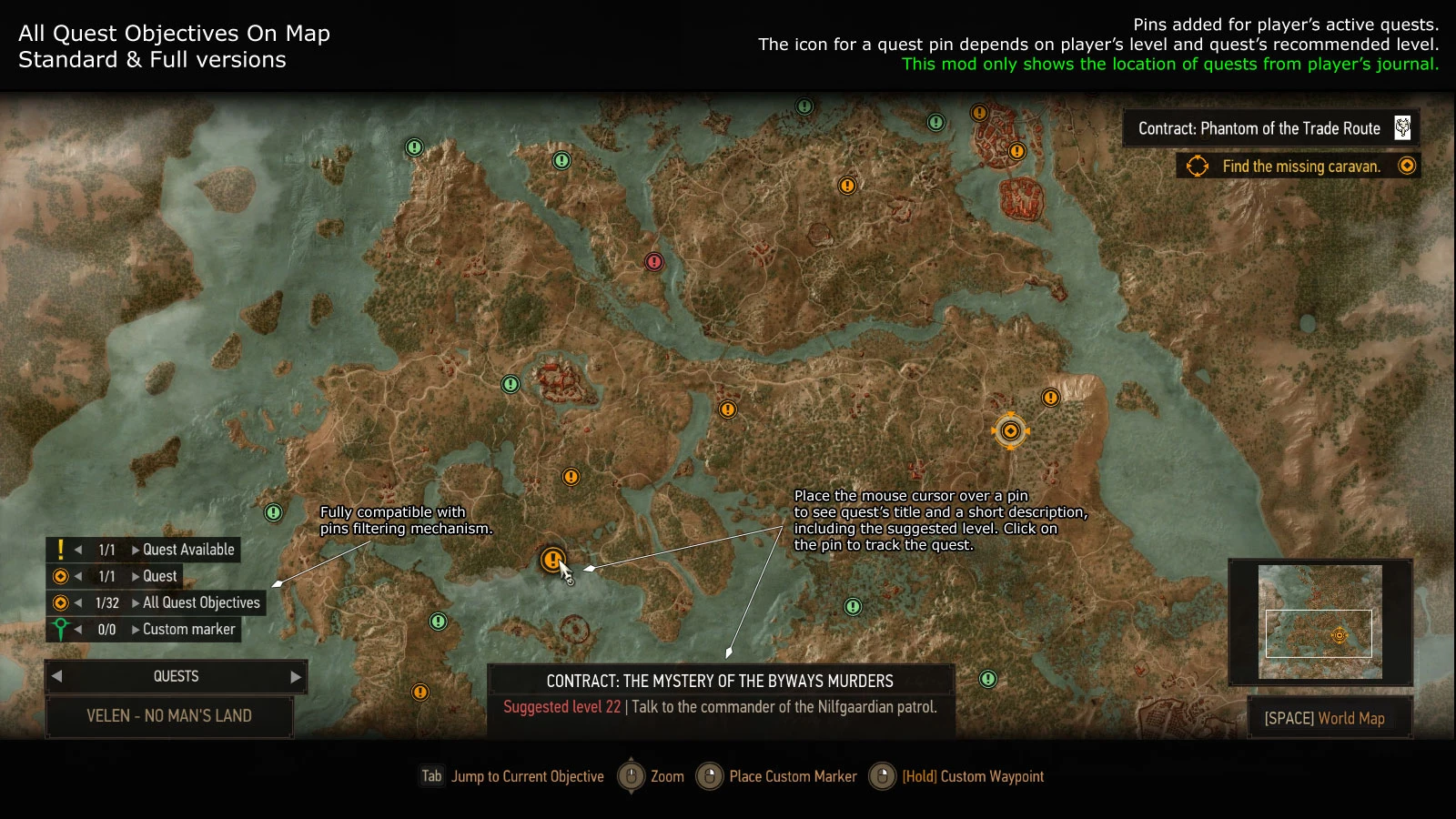
Shows on map all objectives for all player's active quests. See the screenshots for details. See wmkMapMenu.ws file for some settings.
This mod doesn't show the location of quests the player doesn't have in journal.
HOW TO INSTALL
Install it like any other Witcher 3 mod. Compatible with Nexus Mod Manager. Use Script Merger to detect and solve any conflicts with other installed mods.
See the downloads page for a fix for some generic merchants: sometimes is impossible to view their inventory and they don't have a pin on map, even if the player is close. Also a wrong model may be used during the dialog scene. Is a must have if you use the full version of All Quest Objectives on Map mod, otherwise it won't save the map pins for bugged merchants. See the README.txt file included in the archive for more details.
If the scripts fail to compile with errors about AddSessionTag, LogWithName, LogWithValue, LogWithLabel, LogWithLabelAndValue etc... functions then you have an old telemetryKeyword.ws script file. Or you don't have the file. See the MISCELLANEOUS section from downloads page for a fix.
LITE VERSION
Shows the location for all player's active (not finished, not failed) quests.
I don't recommend this version and instead you should use the standard one. Install it only if you also use a mod that changes panel_worldmap.redswf file, but currently there are very few. For more details see the COMPATIBILITY section below.
This version doesn't support custom icons for quest pins and instead uses an white exclamation mark as icon!
Adds only few new lines in mapMenu.ws file. Easy to merge if there's a conflict with another mod.
STANDARD VERSION
Supports custom icons for quest pins. Click on a quest pin to change the currently tracked quest (or objective) directly from map. Compatible with pin filtering mechanism (the pins can be hidden, they appear in Quests category etc...).
Adds more changes to mapMenu.ws file than the lite version and also changes the panel_worldmap.redswf file.
FULL VERSION
By default some merchants are visible on map only when the player is close to them. This version saves their location and adds the missing icons when the map is opened. Works only for merchants discovered after the mod is installed. You can click on a cached / saved pin to remove it. The list with discovered merchants is not lost when the game is restarted. By default the wandering merchants are ignored and their location is not saved, but this is configurable.
Note that the solution is not perfect and in some cases the mod may add a pin for a merchant that already has one. This usually happens for the merchants tha
All Quest Objectives On Map displays all objectives for all active quests on the map simultaneously, eliminating the need to switch tracked quests. It also allows changing the tracked objective directly from the map and optionally caches objective locations. A highly popular UI mod with over 80k endorsements and 3.4 million downloads.
✨ Key Features
📊 Pros & Cons
✅ Pros
- Massive community trust with 80,276 endorsements and 3.4M downloads.
- Saves time by eliminating constant quest menu switching.
- Lightweight UI tweak that improves map usability without overhauling the interface.
⚠️ Cons
- Last updated July 2023 — may have compatibility issues with newer game patches.
- Optional caching feature is not fully explained, leaving its benefits unclear.
For players who juggle multiple quests and hate constantly opening the quest menu to track objectives. Also great for completionists who want a full view of all active quests at a glance. Skip if you prefer a minimal map or only track one quest at a time.
💡 Beginner Tips
- If you're using a mod manager, install this mod like any other and enable it in your load order.
- Check the mod's comments section for any reported issues with the latest game version before installing.
- Use the in-game map settings to toggle the objective display if it feels cluttered.
📊 Mod Details
- Game
- Witcher 3 Mods
- Author
- Wolfmark
- Version
- 4.03.13
- Downloads
- 3,444,639
- Endorsements
- 80,276
- Category
- User Interface
- Created
- 11/1/2015
- Updated
- 7/20/2023
🔗 Required By 2 Mods
These mods list this mod as a dependency.
🧩 Commonly Used Together
Users add these mods to the same collections — a real compatibility signal, not an AI guess.
🔧 How to Install Witcher 3 Mods
Download from Nexus.
📖 Full step-by-step install guide for Witcher 3 →
Visit the official mod page for specific installation instructions for this mod.
🎮 Need cheat codes or console commands? Check ur gaming wiki for Witcher 3 commands, item IDs, and more.
Keep browsing — more Witcher 3 mods await