Auto Apply Oils (Next Gen Compatible) NO LONGER REQUIRED
⚪ Last updated 2023⚠️ Install Order · 2 steps
Install in this order, then this mod last — most mods fail to load without their framework and dependencies in place.
Preview
🔍 Analysis
- 👍 3.2% endorsement rate — high engagement, a strong quality signal
- 🏆 #1 of 132 Tweaks mods in this game by downloads
📋 About This Mod
Auto Apply Oils
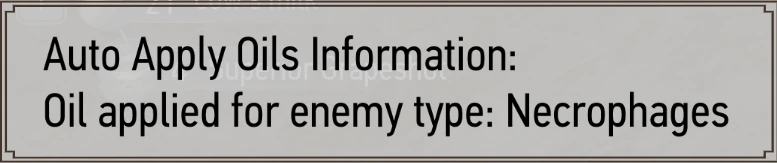
Tired of opening your inventory to apply your oils at the start of combat? Then this mod is for you! When you draw your sword the mod scans the enemies around you, and applies the oil that will be effective most against them.
SINCE PATCH 4. 0. 3 YOU DON'T NEED THIS MOD ANYMORE
Installation Instructions
Witcher Mod Manager (recommended)
- []Install the file in the normal way. After WMM version 0. 9, WMM can handle all configuration required.
-
[]Vortex cannot handle all the configuration required, as far as I know. I highly recommend using Witcher Mod Manager instead. If you must use Vortex, make sure you go through the “manual” install instructions to configure the mod.
-
[]Download the file manually and extract the contents of the folder to your Witcher 3 install folder. If you've installed the mod before you'll be asked to overwrite some files. It's safe to overwrite everything
[
]Copy the contents of the user.settings.part.txt file to the bottom of the user.settings file in the My Documents\The Witcher 3\. Do the same for the dx12user.settings.part.txt file.[]Edit the DX11 and DX12 file lists text files to include the text "modAutoApplyOils.xml;" at the bottom. These files are found in \bin\config\r4game\user_config_matrix\pc.
Configuration
Config options can be found in the mod menu. If the mod menu doesn't show up, make sure you changed the DX11 and DX12 files mentioned above properly (WMM shuold do this for you now).
Bug reporting
If notice any situations where this mod is not running as intended, please use the bug report feature. I need the following information:
-
[]How you installed the mod (manual or WMM)?
[]What other mods are you using?
[]Does the problem still happen when you have no other mods installed?
[]Have you uninstalled the mod, verified your game files, and re-installed the mod?
CDPR for the game and mod tools!
AnotherSymbiote for creating the Script Merger tool.
JupiterTheGod (I think) for the city detection code
Tenzian for maintaining this mod.
AzarGiN for adding the mod menu entry
HermesZum for the batch script idea
Translations
-
[]EN - Me
[]RU - DarkEviLx17
[]ZH - r901042004
[]FR - SkweeZ & qtaim76
[]PL - pizdadupa
- DE - Neko14789
-
[]EN - Me
-
[]How you installed the mod (manual or WMM)?
-
[]Download the file manually and extract the contents of the folder to your Witcher 3 install folder. If you've installed the mod before you'll be asked to overwrite some files. It's safe to overwrite everything
Auto Apply Oils automatically applies the most effective oil at the start of combat. With 53,521 endorsements and 1.7M downloads, it's a highly popular tweak for players who want to streamline combat preparation. Note: the title says 'NO LONGER REQUIRED', suggesting the feature may be in the base game now.
✨ Key Features
📊 Pros & Cons
✅ Pros
- Massive community trust (53,521 endorsements) – this is a must-have for many players.
- Saves time and hassle – no more manually applying oils before every fight.
- Simple, focused tweak that does exactly what it says without bloat.
⚠️ Cons
- Title says 'NO LONGER REQUIRED' – likely redundant if you're on the latest game version, so check before installing.
- Last updated March 2023 – may not be tested with the newest patches, though the 'Next Gen Compatible' tag helps.
For players who want to cut down on repetitive prep work in combat. If you're tired of manually selecting oils every fight, this is a no-brainer. Skip if you're on the latest version where the feature might already be built-in.
💡 Beginner Tips
- Check if your game version already includes auto-applying oils – the mod's title suggests it might be obsolete.
- If you're using a mod manager, just download and activate; if manual, drop the files into your mod folder.
- Since it's a tweak, it should be compatible with most setups, but always read the mod page comments for any reported issues.
📊 Mod Details
- Game
- Witcher 3 Mods
- Author
- SheepDarklord
- Version
- 4.0.2.0
- Downloads
- 1,698,804
- Endorsements
- 53,521
- Category
- Tweaks
- Created
- 9/7/2015
- Updated
- 3/14/2023
🧩 Commonly Used Together
Users add these mods to the same collections — a real compatibility signal, not an AI guess.
🔧 How to Install Witcher 3 Mods
Download from Nexus.
📖 Full step-by-step install guide for Witcher 3 →
Visit the official mod page for specific installation instructions for this mod.
🎮 Need cheat codes or console commands? Check ur gaming wiki for Witcher 3 commands, item IDs, and more.
Keep browsing — more Witcher 3 mods await