Lip Movement and HiRes Shadows (and High Quality Heads) on NPCs in gameplay
⚪ Last updated 2020⚠️ Install Order · 2 steps
Install in this order, then this mod last — most mods fail to load without their framework and dependencies in place.
Preview
🔍 Analysis
- 👍 3.6% endorsement rate — high engagement, a strong quality signal
- 🏆 #18 of 264 Visuals and Graphics mods in this game by downloads
📋 About This Mod
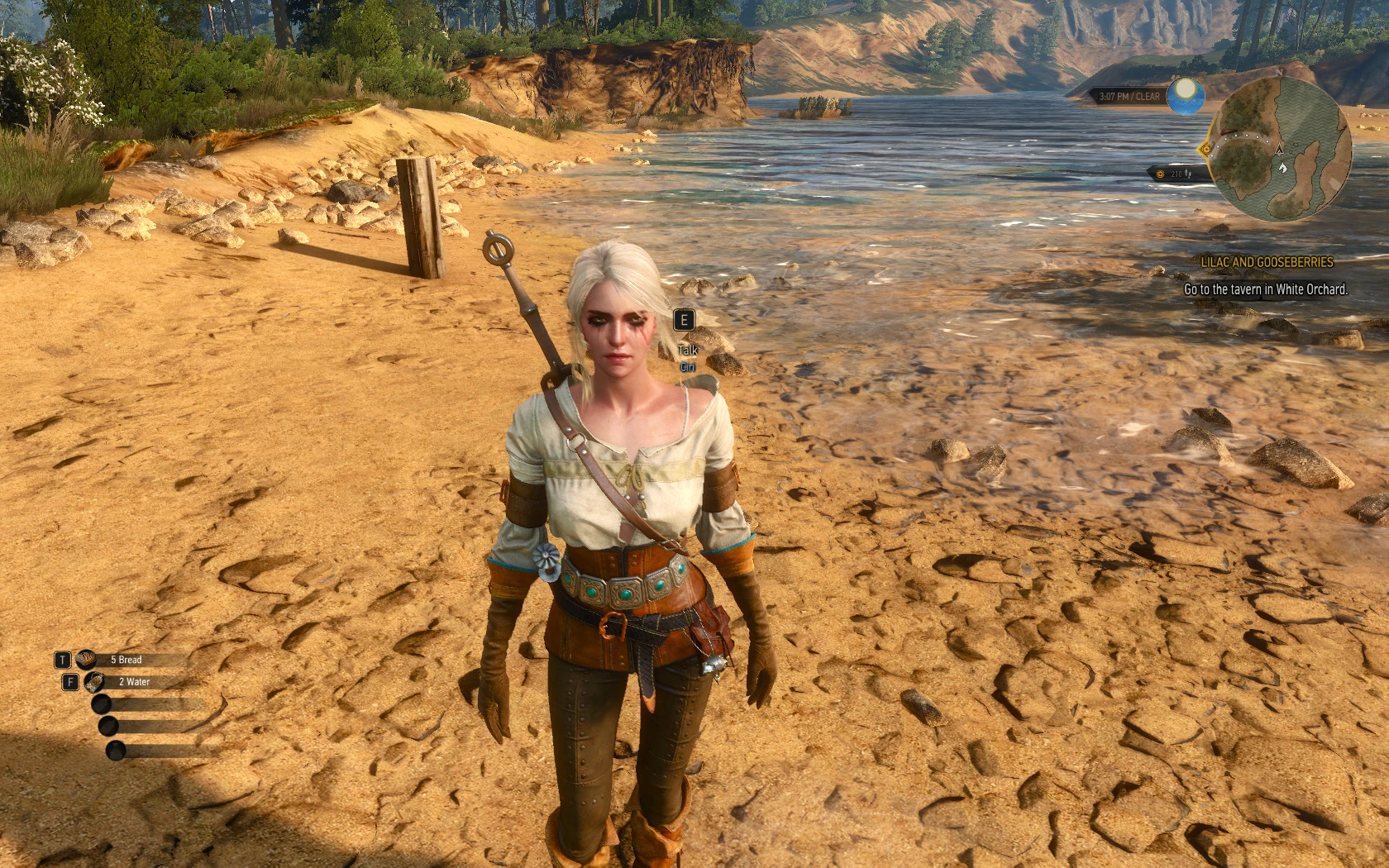
Lip Movement and HiResShadows (and High Quality Heads) on NPCs in gameplay
Enables high quality heads (LOD0), lip movement and higher shadow resolution as used in dialog scenes on (human) npcs in normal gameplay.
Don't use head LOD mods like High Quality Faces and change your "MeshLODDistanceScale" back to "1".
EnableMimics mod forces NPCs to use their highest quality head mesh.
Demonstration:
v62kqgRz_wo
This means there is no reason to use "High Quality Faces" or any other head lod mod.
Because those require this mod for working mimics and with this mod installed they literally do nothing.
This means you can change the value of your "MeshLODDistanceScale" back to 1.
Setting "MeshLODDistanceScale" to anything other than "1" generally breaks more than it improves.
What is new? (Changelog)
I literally don't know what went wrong. It looks like Nexus didn't update the file. i didn't even had the previous version on my harddrive when i uploaded the current version.
- the previous v0. 5. 3 was actually v0. 5. 2
- Fixed a bug; the timing of the reloading of mimics mod still had an issue, now onliners won't be cut of right after cutscenes/dialogs
- Fixed a bug; reloading mimics mod after cutscenes/dialogs was able to stop onliners that happen directly after the cutscene/dialog
- Changed beard growth and facial animation fix back to previous method to avoid potion effects being cancelled after loading a savegame
- Rework fix of the beard growth bug; had an epiphany about how to trigger geralts facial animations
- (Optional) Added compatibility patch/bugfix for Complete Animation mod (now I am fixing mods I am not even using)
- Fixed a bug; if you are in control of Ciri, Ciri will now blink
- Fixed another bug; after some dialogues/cutscenes mimics mod didn't reactivated lod0 heads
- Rework fix of the beard growth bug; works with DLC beards
- Fixed a bug; after being knocked out by guards the face of some npcs melted (mimics mod unloaded)
- Fixed a bug; dead npcs no longer chew their tongue after death
- Added versions with scripted beard growth
- Fixed a bug; Refreshing Geralt's head during a Cutscene could stop his mimics temporarily (only happen if that cutscene started right after you load a save or change subworlds)
- Added commands "mt" and mimicstrigger" to refresh mimics manually; if npcs do not emote after using the command they never will/did
This mod enhances Skyrim's visuals by applying high-quality head models, lip movement, and higher shadow resolution to NPCs during normal gameplay, matching the quality seen in dialogue scenes. It's a performance-friendly visual upgrade for players who want more lifelike characters outside of conversations.
✨ Key Features
📊 Pros & Cons
✅ Pros
- Huge community trust with over 10k endorsements and 280k downloads
- Makes NPCs look noticeably better in gameplay without needing an ENB
- Simple install—just drop the files in and go
⚠️ Cons
- Last updated in 2020—might have issues with the latest Skyrim version or other mods
- Only affects human NPCs, so creatures and beasts stay unchanged
- Performance impact on lower-end systems due to higher shadow resolution
For Skyrim players who want their NPCs to look as good in gameplay as they do in dialogue scenes. If you're into immersion and visual polish without overhauling your whole setup, this is a must-try. Skip if you're on a weak PC or only care about gameplay mechanics.
💡 Beginner Tips
- Make sure to load this mod after other NPC overhauls to avoid conflicts.
- If you use a mod manager, install via MO2 or Vortex for easy uninstallation.
- Test in a crowded area like Whiterun to see the performance impact before committing.
📊 Mod Details
- Game
- Witcher 3 Mods
- Author
- rmemr and Gerignak
- Version
- 0.5.3b
- Downloads
- 280,490
- Endorsements
- 10,145
- Category
- Visuals and Graphics
- Created
- 8/14/2016
- Updated
- 5/30/2020
🧩 Commonly Used Together
Users add these mods to the same collections — a real compatibility signal, not an AI guess.
🔧 How to Install Witcher 3 Mods
Download from Nexus.
📖 Full step-by-step install guide for Witcher 3 →
Visit the official mod page for specific installation instructions for this mod.
🎮 Need cheat codes or console commands? Check ur gaming wiki for Witcher 3 commands, item IDs, and more.
Keep browsing — more Witcher 3 mods await