Torch Light Mod
🟡 Updated this year⚠️ Install Order · 1 step
Install in this order, then this mod last — most mods fail to load without their framework and dependencies in place.
Preview
🔍 Analysis
- 👍 4.9% endorsement rate — high engagement, a strong quality signal
- 🏆 #31 of 82 Visuals and Graphics mods in this game by downloads
📋 About This Mod
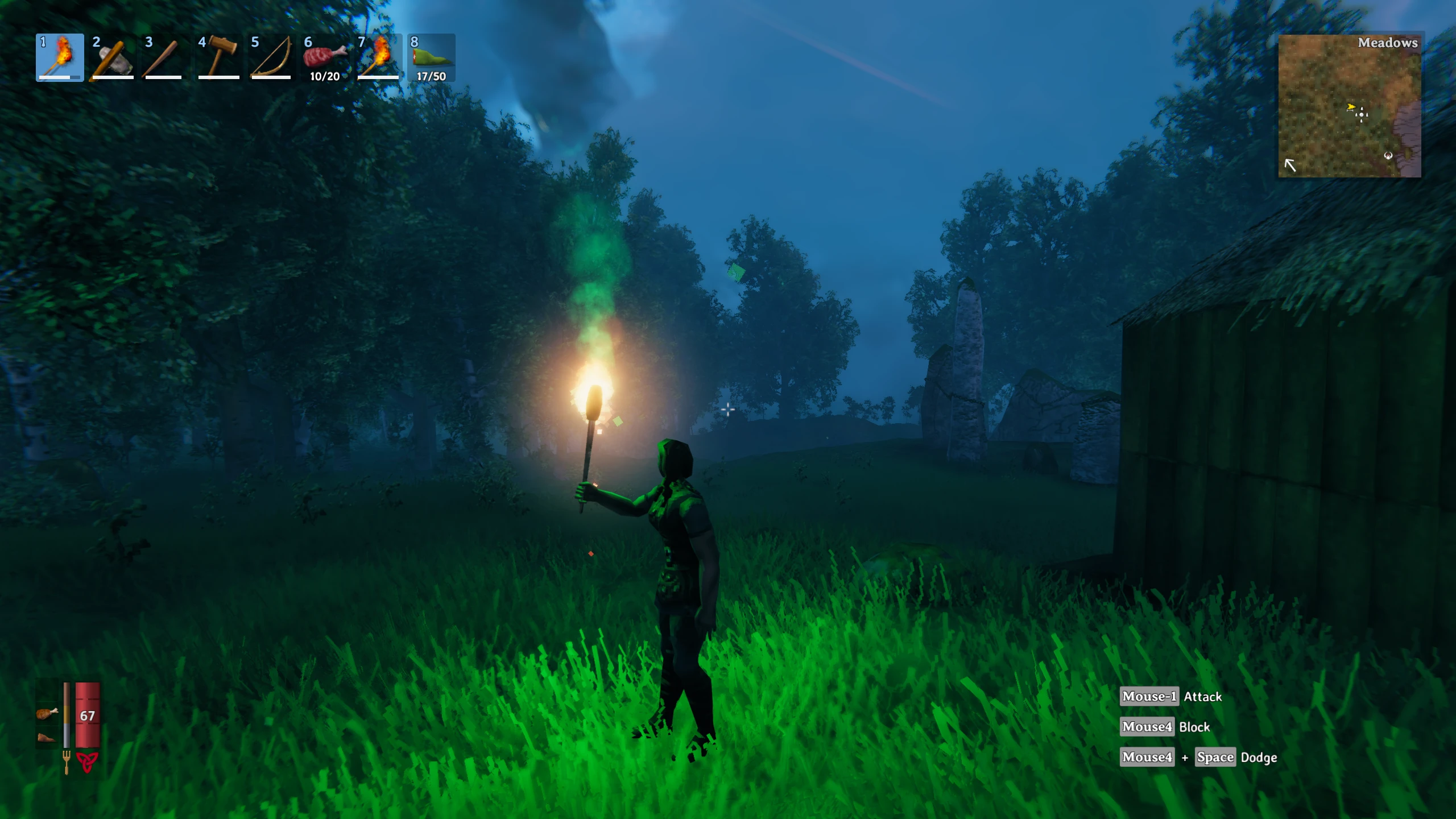
This mod allows tweaking the light cast by torches, standing torches, wall torches (sconces), and fire pits.
To use this mod, install it by adding its dll file to the folder BepInEx/plugins and running the game once. Exit the game and edit the file BepInEx/config/aedenthorn. TorchMod.cfg. The editable variables are native Unity3D light properties, so for more information on what they do, see the Unity3D Light API.
You can adjust the config values in-game using the Config Manager.
Here is a list of the properties you can edit with this mod:
-
[]Color: The color of the light (disabled by default for torches, standing torches, and sconces).
[
]Range: The range of the light. (float)[]Intensity: The Intensity of a light is multiplied with the Light color. (float 0-8)
[]BounceIntensity: The multiplier that defines the strength of the bounce lighting. (float 0+)
[]ShadowStrength: Strength of light's shadows. (float)
[]UseColorTemperature: Set to true to use the color temperature.
- ColorTemperature: The color temperature of the light. (float)
There are separate sets of properties for each type of light source. For fire pits, there are two sets of properties, low and high.
This mod only affects the lights of flames, not the flame textures themselves. To change flame textures, use Custom Textures, e.g.:
objecttexture_Torch_leaf_low_MainTex.png
Technical
To install this mod, the easiest way is to just use Vortex, the Nexus Mods mod manager. It should take care of all dependencies.
To install manually, place the dll file in the BepInEx/plugins folder. You will need BepInEx.
Code is at https://github.com/aedenthorn/ValheimMods.
If you want to complain or ask for help or help me test my mods, you can visit my Discord server.
Click here for a list of all my mods for Valheim.
Torch Light Mod lets you tweak color, range, intensity, bounce intensity, shadow strength, and color temperature for torches, fire pits, and the light circlet. A niche visual customization tool with 203 endorsements, last updated November 2025.
✨ Key Features
📊 Pros & Cons
✅ Pros
- Fine-grained control over lighting—tweak everything from color to shadow strength.
- Community-approved with 203 endorsements, so it's proven useful.
- Covers multiple light sources: torches, fire pits, and the light circlet.
⚠️ Cons
- Only affects light sources listed; other lights like lanterns or magic glow are untouched.
- Last updated in November 2025—check compatibility with your game version.
For players who want to fine-tune lighting aesthetics, especially those who find default torch light too harsh or too dim. If you're into immersive lighting or screenshot photography, this gives you control. Skip if you want gameplay changes—this is purely visual.
💡 Beginner Tips
- If you use a mod manager, install manually by dropping files into the game folder—no extra dependencies needed.
- Test changes in a dark area like a cave to see the full effect of color and intensity adjustments.
- Start with small tweaks to intensity and range to avoid over-brightening interiors.
📊 Mod Details
- Game
- Valheim Mods
- Author
- aedenthorn
- Version
- 1.0.0
- Downloads
- 4,155
- Endorsements
- 203
- Category
- Visuals and Graphics
- Created
- 2/16/2021
- Updated
- 11/21/2025
🔧 How to Install Valheim Mods
Download from Nexus.
📖 Full step-by-step install guide for Valheim →
Visit the official mod page for specific installation instructions for this mod.
🎮 Need cheat codes or console commands? Check ur gaming wiki for Valheim commands, item IDs, and more.
Keep browsing — more Valheim mods await