Custom Textures
🟠 Updated over a year ago⚠️ Install Order · 1 step
Install in this order, then this mod last — most mods fail to load without their framework and dependencies in place.
Preview
🔍 Analysis
- 👍 2.6% endorsement rate — high engagement, a strong quality signal
- 🏆 #1 of 80 Visuals and Graphics mods in this game by downloads
📋 About This Mod
Description
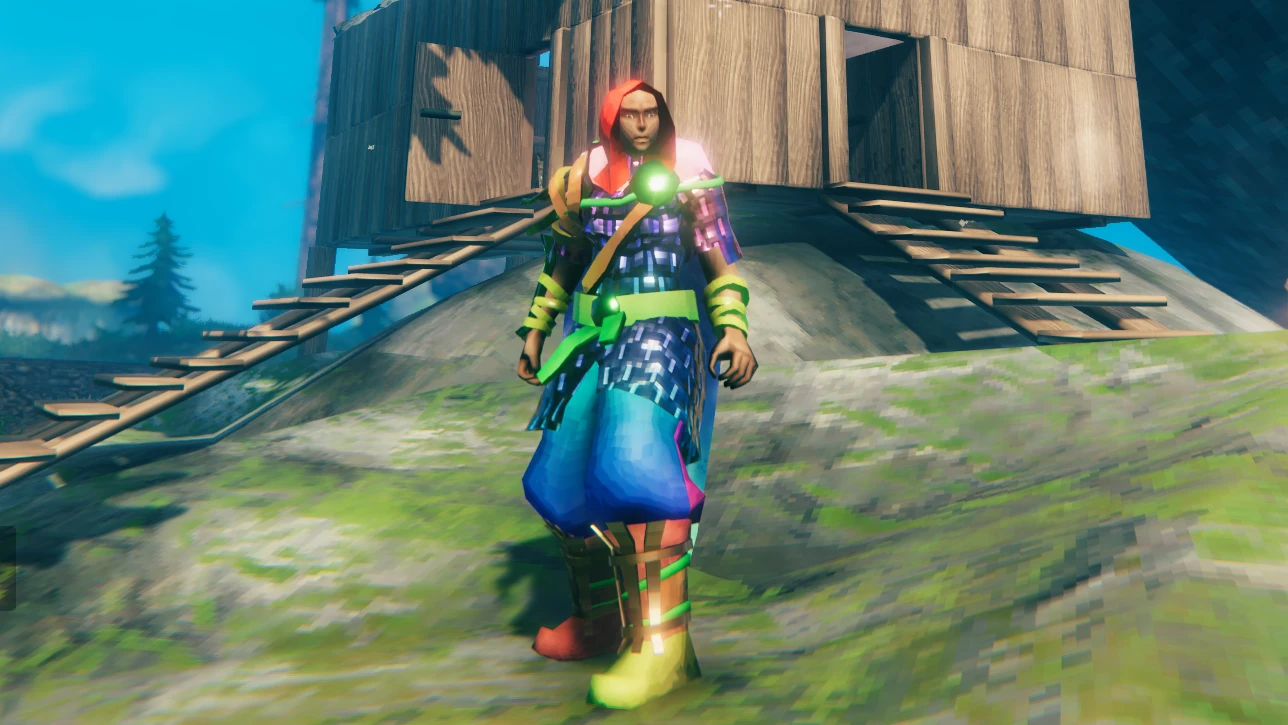
This mod should allow you to replace the following:
-
[]player model textures
[
]item inventory icons[]equipment textures like armor, weapons, and tools
[]terrain and water textures
[]environmental textures
[]special location textures (villages, crypts, rune stones, etc.)
- world object textures, almost everything else in the game world
It also now supports layers, so you can apply multiple textures to the same vanilla texture (see Layers below).
To create your own custom textures requires basic reading comprehension! It's not that difficult, but please read all of the information below carefully before asking for help.
Basic Usage
To extract the vanilla textures for reference, I use Asset Studio. The textures are in the valheim_Data/sharedassets files.
To replace a texture, you simply add a png file to the folder BepInEx/plugins/CustomTextures with the proper name format explained below, and then load the game.
You can also organize textures into subfolders! If you are publishing a texture pack I encourage you to do this, to allow easy install and removal.
Also, if you are publishing a texture pack, putting your textures in a CustomTextures folder before creating the zip file will allow Vortex to install them automatically!
To reload world textures while in game, there is a hotkey (default Page Down). Note: this doesn't reload any vanilla textures, so if you remove a custom texture file, you'll have to restart the game to see the vanilla texture again.
For a list of mods creating custom textures with this mod, click on Requirements above this description.
Here's some kind person's video on how to use this mod with premade texture packs.
Filter Mode
Valheim textures use point filtering, which makes them look pixelated up close. If you want to use bilinear or trilinear filtering for higher-res textures, place your textures in a subfolder named bilinear or trilinear and the mod will change the filter mode for those textures (they can still be in sub-subfolders if you choose).
File Naming Summary
File names are made up of up to four parts, prefixes, identifiers, property names, and layer names. To get most of this information, use the scene dump (see Scene Dump below)
You create file names starting with a prefix, usually followed by an underscore, then an identifier, then the property name (and optionally an underscore followed by a layer name, as explained under Layers), i.e. for a complete texture replacement:
<prefix>_
Custom Textures by aedenthorn lets you swap any game texture with your own PNG files, offering a simple way to personalize visuals. With 6,174 endorsements and 240,182 downloads, it's a popular tool for modders and players seeking custom looks. Last updated February 2025, it remains a reliable choice for texture replacement.
✨ Key Features
📊 Pros & Cons
✅ Pros
- Huge community trust: 6,174 endorsements and 240k downloads show it's a go-to for texture swaps.
- Dead simple concept: point it at a PNG and you're done—no complex setup.
- Still updated as of early 2025, so it's not abandoned like many texture tools.
⚠️ Cons
- Requires you to source or create your own PNG textures; no built-in library.
- Potential compatibility issues with mods that alter the same textures—test before stacking.
For modders and players who want to personalize game visuals without learning complex tools. If you're tired of default textures and have your own images ready, this is your shortcut. Skip if you want pre-made texture packs—this is a framework, not a content pack.
💡 Beginner Tips
- Check if your game has mod manager support (like Vortex or MO2) to handle file placement automatically.
- Name your PNG files exactly as the original textures are named, or the game won't recognize them.
- Test with a single texture first to confirm the mod works before replacing a bunch.
📊 Mod Details
- Game
- Valheim Mods
- Author
- aedenthorn
- Version
- 3.4.3
- Downloads
- 240,182
- Endorsements
- 6,174
- Category
- Visuals and Graphics
- Created
- 2/20/2021
- Updated
- 2/22/2025
🔗 Required By 2 Mods
These mods list this mod as a dependency.
🧩 Commonly Used Together
Users add these mods to the same collections — a real compatibility signal, not an AI guess.
🔧 How to Install Valheim Mods
Download from Nexus.
📖 Full step-by-step install guide for Valheim →
Visit the official mod page for specific installation instructions for this mod.
🎮 Need cheat codes or console commands? Check ur gaming wiki for Valheim commands, item IDs, and more.
Keep browsing — more Valheim mods await