In-Game Data Bank Displays
⚪ Last updated 2017⚠️ Install Order · 2 steps
Install in this order, then this mod last — most mods fail to load without their framework and dependencies in place.
Preview
🔍 Analysis
- 👍 2.8% endorsement rate — high engagement, a strong quality signal
- 🏆 #15 of 224 Miscellaneous mods in this game by downloads
📋 About This Mod
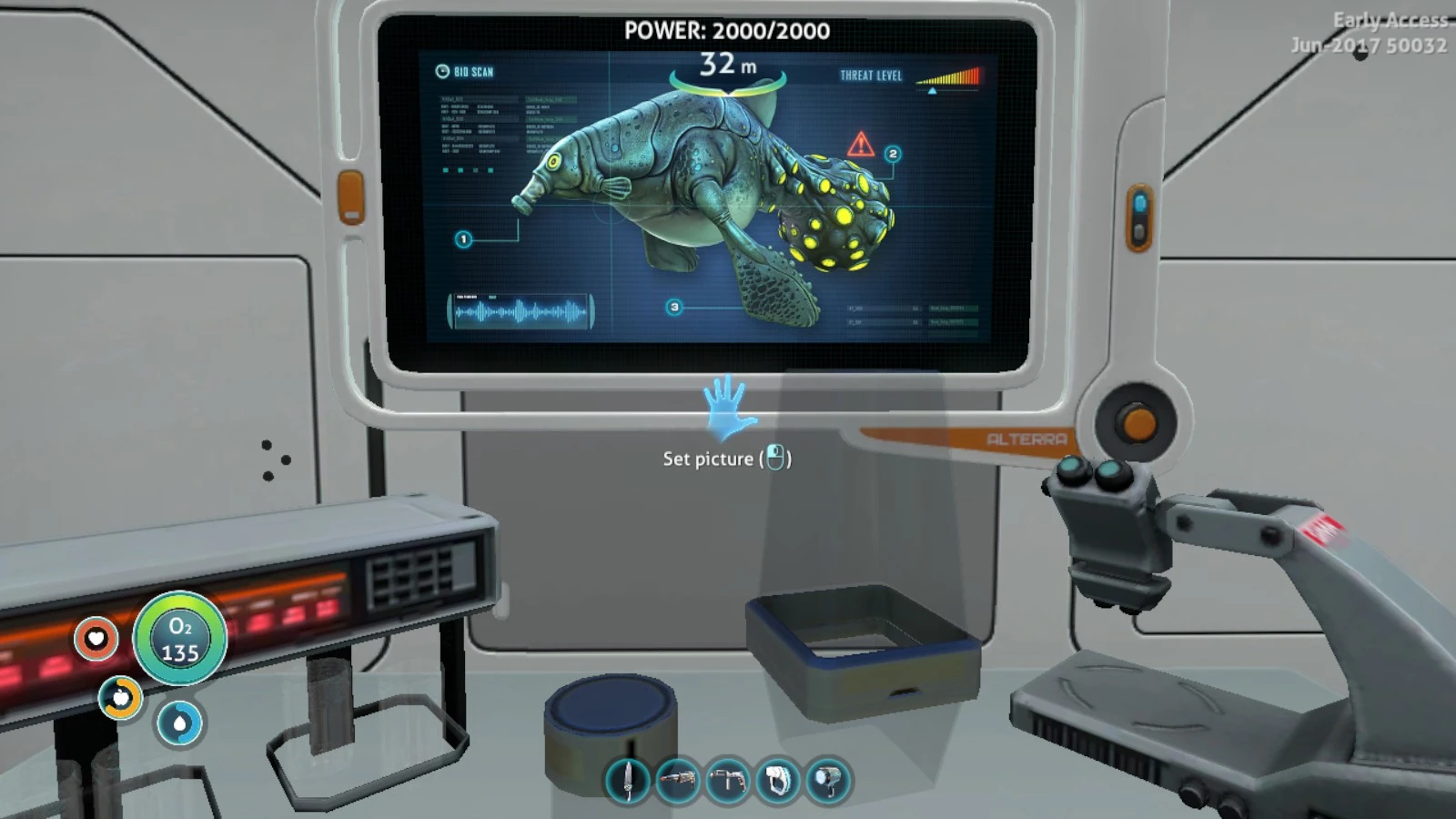
I was setting up the lab in my base, and I decided that, while Alterra's PDA was nice to have on the go, I wanted a bigger screen to really be able to in-depth study these weird alien species I kept coming across without getting eaten (or at least losing a limb or two). Thus, the idea for this was born.
This is a set of pictures I made of the data bank entries for each creature, usable in the picture frame in-game. Once installed, you can just go to any picture frame and select them like you would a screenshot taken with F11. I tried to keep a balance between image quality/size, so they are very slightly blurry as I had to upsize them to fit the frame, but it's really only noticeable if you're standing right on top of them.
Installation instructions: Because of the way the game's files are set up, this has to be manually installed. This was the easiest way I could find to locate the correct save as you're not able to name your game and they don't seem to be in any kind of order. If somebody else knows an easier way, please let me know and I'll update this.
1) Open your preferred saved game and take a screenshot. Doesn't matter of what, just make sure you remember what it looks like (if you've already got a couple, you can use those instead). This will just be to help locate the correct save file.
2) Open your main Subnautica folder (usually C:\Program Files\Steam\steamapps\common\Subnautica)
3) Open the 'SNAppData' folder and then 'SavedGames'
4) You will see a list of folders called 'slot(xxx)'. Open each one and open the 'Screenshots' folder inside. Once you find the picture you took earlier, extract all of the mod's files into that same folder. If you have multiple games you'd like to stick the pictures in, you can do this again for each one.
Since there are a LOT of fauna in the game, I separated them into three categories. There's also a master file for those of you who want to add all of them. Since it's a manual install, it's also pretty easy to just delete any creatures you don't want.
Herbivores:
Bladderfish
Boomerang
Crimson Ray
Cute Fish
Eyeye
Garryfish
Gasopod
Ghostray
Holefish
Hoopfish
Hoverfish
Jellyray
Oculus
Peeper
Rabbit Ray
Reefback
Reginald
Sea Treader
Spadefish
Spinefish
Carnivores:
Ampeel
Biter
Blighter
Boneshark
Crabsnake
Crabsquid
Crashfish
Lava Lizard
A small utility mod that displays data bank readouts in picture frames. With 1,514 endorsements and 54,808 downloads, it's a popular quality-of-life addition for players who want to view lore without opening menus. Last updated in 2017, so compatibility with current game versions is uncertain.
✨ Key Features
📊 Pros & Cons
✅ Pros
- Community favorite with over 1.5k endorsements and 54k downloads.
- Adds a neat way to display lore without pausing gameplay.
- Simple concept that fits seamlessly into base building.
⚠️ Cons
- Last updated in 2017 — might break with newer game patches.
- No install instructions or compatibility notes provided.
- Only works with picture frames, so limited use if you don't build much.
For base-building enthusiasts who want to show off lore in their bases. Also great for players who like to read data bank entries without opening menus. Skip if you rarely build or prefer gameplay-changing mods.
💡 Beginner Tips
- Make sure to place the mod files in the correct folder (e.g., Subnautica's QMods folder) if you're using a mod manager.
- If the mod doesn't work, check if you have the latest version of the game and any required dependencies like QModManager.
- Test with a single picture frame first to see if the readouts appear correctly.
📊 Mod Details
- Game
- Subnautica Mods
- Author
- SJane3384
- Version
- N/A
- Downloads
- 54,808
- Endorsements
- 1,514
- Category
- Miscellaneous
- Created
- 7/16/2017
- Updated
- 7/16/2017
🧩 Commonly Used Together
Users add these mods to the same collections — a real compatibility signal, not an AI guess.
🔧 How to Install Subnautica Mods
Download from Nexus.
📖 Full step-by-step install guide for Subnautica →
Visit the official mod page for specific installation instructions for this mod.
🎮 Need cheat codes or console commands? Check ur gaming wiki for Subnautica commands, item IDs, and more.
Keep browsing — more Subnautica mods await