Starblue Valley World Recolor 1.5 Update (The Dirty Fix)
⚪ Last updated 2021⚠️ Install Order · 2 steps
Install in this order, then this mod last — most mods fail to load without their framework and dependencies in place.
Preview
🔍 Analysis
- 👍 3.6% endorsement rate — high engagement, a strong quality signal
- 🏆 #9 of 102 Maps mods in this game by downloads
📋 About This Mod
UPDATE 01/15/2020: Updated code so flooring and craftables now display properly across seasons. Thanks to majortommo for reporting the issue and hatmouse, greedfool and LadyShardust for helping me figure out the new location-dependent code required.
About Starblue Valley
Welcome to the Starblue Dirty Fix for 1. 5. Why is it the “dirty” fix? Because it’s the bare minimum to get Starblue functioning again. This update focuses on eliminating invisible assets and mismatched textures only. So while there many, many components left to tackle and some pieces aren't up to my personal standards, it's... fine. The most egregious issues are handled while I work on the rest of the new assets. An example of the Beach Farm in summer has been added to the photos, but I'll be holding off on more photos until I have more of the update complete.
I’m also rolling in some pre-1. 5 additions I completed but never uploaded, such as Caroline’s greenhouse and further expansion of the interface.
What Has Been Fixed:
-
[]Partial/basic recolor of {{season}}_island_tile_sheet_1. Messy and incomplete, but your beach farms will no longer be a hot mess.
[
]Recolor of new assets from farmhouseTiles so no mismatches in your new island farmhouse, either.[]Menu map recolor so the new beach farm maps will appear correctly with each season. When using the interface option, the border around Ginger Island will match the UI.
[]Complete recolor of Caroline’s greenhouse, rain and shine. The door and adjacent floor also matches the farm greenhouse recolor.
[]Added code so the Starblue summer tiles will not be used on Ginger Island.
[]Made the shipping bin an on/off toggle option. This hasn’t been optimized for the 1. 5 update yet.
[]Seasonal recolors of the farmer’s menu sprite when using the custom interface.
[]Fixed invisible floors.
[]Fixed invisible fruit trees.
[]Added recolors of the snowman, some rarecrow stakes, the Stardew Hero Trophy, and gold Lewis.
[]Added the Language Buttons and Tailoring to the interface recolor.
[]Fixed a bug where the top of the butterfly hutch didn’t display correctly.
[]Fix to the woven straw interior floor.
[]Minor fixes.
What Has NOT Been Fixed (Yet):
[]Sorry, but Ginger Island is 100% vanilla at this time. This will be the most ambitious part of the update, as it will be redone with a different color scheme from the mainland.
[]Some of the new mainland assets, like the giant tree, Willy’s boat, and the Special Orders board, have not yet been recolored.
[]New menus like the orders board and the dwarven enchantment board have not been recolored.
[]The new fruit trees have not been recolored.
[*]Mahogany trees have not been recolor
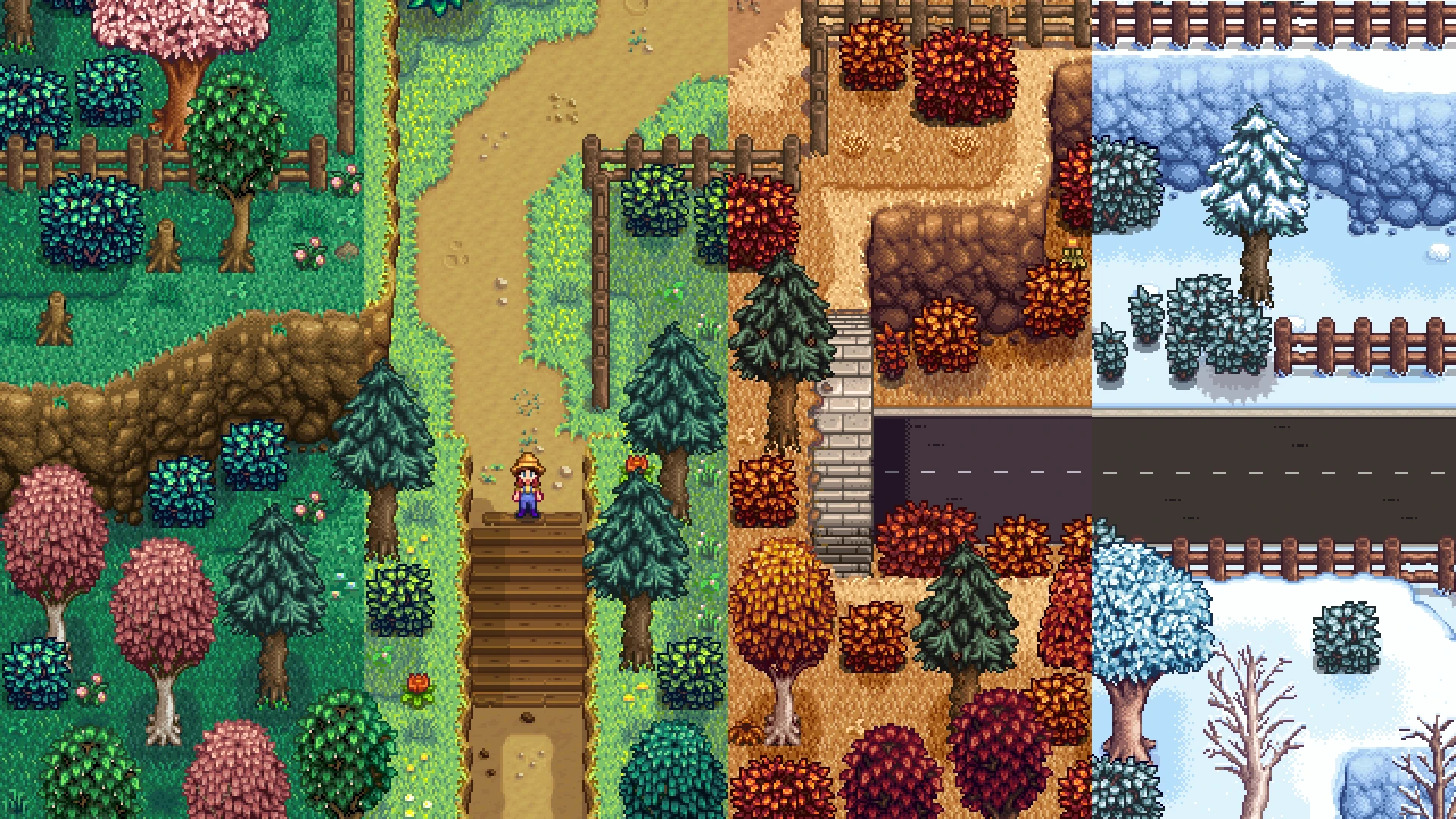
Starblue Valley World Recolor is a comprehensive visual overhaul for Stardew Valley that reduces the game's yellow tint and saturation, shifting grass and leaves to a cooler blue tone while making autumn gold. It covers interiors, craftables, flooring, furniture, and a neutral interface. With over 11,000 endorsements and 319,000 downloads, it's a popular choice for players seeking a fresher, less warm palette.
✨ Key Features
📊 Pros & Cons
✅ Pros
- Huge community trust: 11,512 endorsements and 319,700 downloads.
- Comprehensive coverage: affects everything from world to UI.
- Unique color direction: blue-tinted grass and gold fall stand out.
⚠️ Cons
- Last updated in January 2021 — may not be compatible with the latest Stardew Valley patches.
- The blue tint might not be to everyone's taste if you prefer the original warm palette.
For Stardew Valley players who find the default yellow-green saturation too warm and want a cooler, more muted aesthetic. Also for those who want a cohesive recolor that touches everything from the farm to the UI. Skip if you love the original color grading or want a more subtle tweak.
💡 Beginner Tips
- Since this is a recolor mod, make sure you have a mod loader like SMAPI installed and place the mod folder in your Mods directory.
- If you use other visual mods, load order can affect which colors show — put this mod last to ensure its changes apply.
- Check the mod's compatibility with Stardew Valley 1.5.5+ if you're on the latest version, as it hasn't been updated since early 2021.
📊 Mod Details
- Game
- Stardew Valley Mods
- Author
- Lita
- Version
- 1.5.0
- Downloads
- 319,700
- Endorsements
- 11,512
- Category
- Maps
- Created
- 2/17/2018
- Updated
- 1/15/2021
🧩 Commonly Used Together
Users add these mods to the same collections — a real compatibility signal, not an AI guess.
🔧 How to Install Stardew Valley Mods
Download from Nexus.
📖 Full step-by-step install guide for Stardew Valley →
Visit the official mod page for specific installation instructions for this mod.
🎮 Need cheat codes or console commands? Check ur gaming wiki for Stardew Valley commands, item IDs, and more.
Keep browsing — more Stardew Valley mods await