Simple Crop Label
🟠 Updated over a year ago⚠️ Install Order · 2 steps
Install in this order, then this mod last — most mods fail to load without their framework and dependencies in place.
Preview
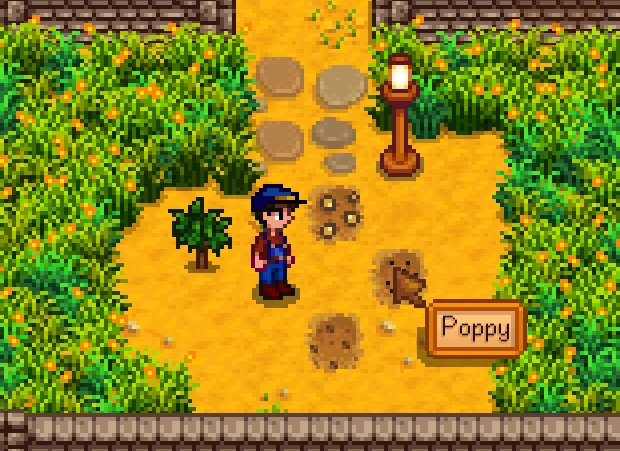
🔍 Analysis
- 👍 3.1% endorsement rate — high engagement, a strong quality signal
- 🏆 #1 of 53 Crops mods in this game by downloads
📋 About This Mod
Adds a tooltip identifying crops and fruit trees.
New
Latest version (6. 0. 2) for Stardew Valley 1. 6. 13. Requires SMAPI 4. 1. 6 or later.
How to use
Hold right mouse button OR controller A (bottom face) button over crop/fruit tile.
Optionally configure mod to show label on cursor hover, display crop growth/harvest information, and set custom keybinds (see below on how to configure).
Supports splitscreen, Generic Mod Config Menu mod, Custom Bush mod, and Stardew Valley Expanded mod.
How to install
1. Install SMAPI 4. 1. 6 or later.
2. Download mod.
3. Extract and place folder 'SimpleCropLabel' in your StardewValley/Mods folder.
( Stardew Valley > Mods > SimpleCropLabel > manifest.json and SimpleCropLabel.dll )
4. Launch game using StardewValleyModdingAPI.exe.
See guide on how to install mods.
How to configure
Locate config.json file in the 'SimpleCropLabel' mod folder (run the game once with the mod installed to generate config.json file if not present).
Values below can also be changed in-game using the Generic Mod Config Menu mod.
To hover cursor over crop instead of holding down button to display label
Open the config file in a text editor and modify the "mouse_hover" value from
"mouse_hover": false, (default) hold button to display label
"mouse_hover": true, (changed) hover cursor to display label
and save file.
Change custom keybindings
"custom_key": "" (default) uses right mouse button or controller A (bottom face)
"custom_key": "Z" (changed) to use the "Z" key on the keyboard instead
Combination of keys can be used, for example, "LeftShift + Z"
OR set multiple bindings, for example, "Z, LeftControl + X"
more key values here
Enable growth/harvest information
"growth_info": false, (default) no growth information
"growth_info": true, (changed) show crop growth information (see gif below)
Donate
If you like what I do consider buying me a coffee
Simple Crop Label is a lightweight mod for Stardew Valley that adds clear labels to crops and fruit trees, making farm management easier. With over 26,000 endorsements and 840,000 downloads, it's a popular quality-of-life tool for players who want to quickly identify what's planted.
✨ Key Features
📊 Pros & Cons
✅ Pros
- Huge community trust: 26,279 endorsements and 840k downloads show it's a go-to mod
- Does exactly what it says—no bloat, just clear labels for your farm
- Last updated October 2024, so it's fresh and likely compatible with current game versions
⚠️ Cons
- No detailed feature list in the description—you get labels, but not much else
- May not offer customization options like label style or position, which some players might want
- If you're using other farm UI mods, there could be overlap or visual clutter, but no compatibility info is provided
For Stardew Valley players who want a quick, no-fuss way to see what's growing without hovering over each tile. Perfect for large farms with mixed crops and fruit trees. Skip if you prefer a more immersive look or need advanced labeling features.
💡 Beginner Tips
- Since it's a simple mod, just drop it into your Mods folder and launch the game—no extra setup needed.
- If you use a mod manager like SMAPI, install it through there to keep everything organized.
- Check that you have SMAPI installed, as most Stardew Valley mods require it to run.
📊 Mod Details
- Game
- Stardew Valley Mods
- Author
- TheMusketeer
- Version
- 6.0.2
- Downloads
- 840,317
- Endorsements
- 26,279
- Category
- Crops
- Created
- 4/16/2016
- Updated
- 10/14/2024
🧩 Commonly Used Together
Users add these mods to the same collections — a real compatibility signal, not an AI guess.
🔧 How to Install Stardew Valley Mods
Download from Nexus.
📖 Full step-by-step install guide for Stardew Valley →
Visit the official mod page for specific installation instructions for this mod.
🎮 Need cheat codes or console commands? Check ur gaming wiki for Stardew Valley commands, item IDs, and more.
Keep browsing — more Stardew Valley mods await