Remote Fridge Storage - Use cooking ingredients from chests
🟡 Updated this year⚠️ Install Order · 2 steps
Install in this order, then this mod last — most mods fail to load without their framework and dependencies in place.
Preview
🔍 Analysis
- 👍 3.2% endorsement rate — high engagement, a strong quality signal
- 🏆 #8 of 63 Crafting mods in this game by downloads
📋 About This Mod
Description
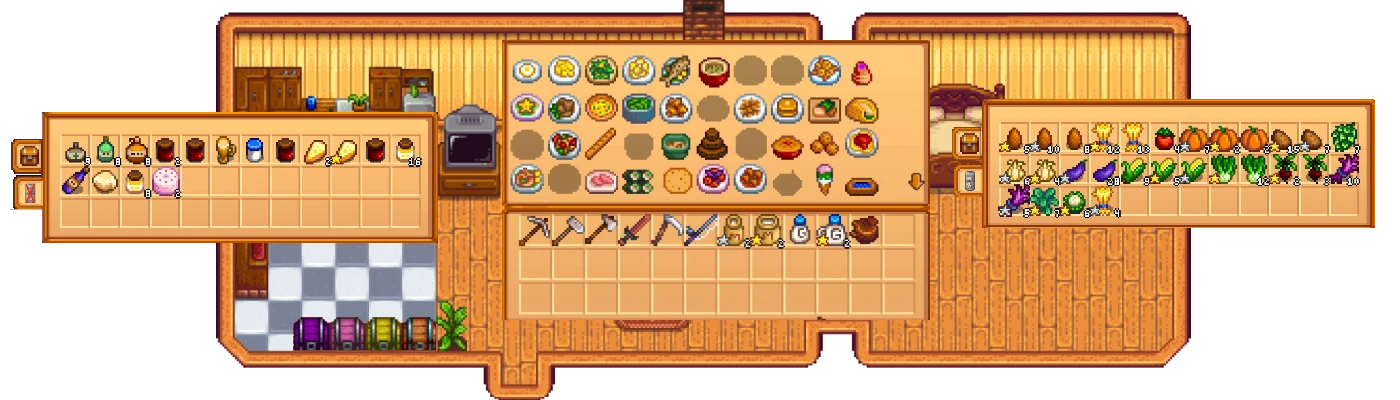
Allows you to marks chest for storing your cooking ingredients instead of storing it all in the fridge. When you use the counter to start cooking it will look through all ingredient chest and take the items automatically out of the chests when crafting.
Installation
-
[]Install SMAPI.[/]
[]Unzip this mod into Stardew Valley/Mods.[/]
[]Run the game using SMAPI.[/]
Place a chest anywhere in the world and click the fridge icon to mark it as an ingredient chest.
Additionally you can change the location of the icon in game by holding the right mouse button while hovering over the icon, and moving the mouse.
Compatibility
-
[] Compatible with Chests Anywhere [/]
[] Compatible with Cooking Skill [/]
[] Compatible with Love Of Cooking [/]
[] Compatible with Expanded Fridge [/]
[] Compatible with Convenient Chests (you will still be able to cook from unmarked chests if they are close the fridge)[/]
[]Semi Compatible with Better Crafting if you disable its cooking features.[/]
[] May be incompatible with mods that make changes to cooking or chests.[/]
Multiplayer
The mod works in multiplayer but the selected changes are not synchronized and they are not saved for the farm hands.
Uninstalling
Make sure all chests are unmarked for usage by the fridge and you saved the game. Then delete the RemoteFridgeStorage folder.
For Mod Authors
Simple interface to get all marked chests.
public interface IRemoteFridgeApi
IEnumerable<Chest> GetFridgeChests();
ISomeModApi api = helper. ModRegistry. GetApi<ISomeModApi>("EternalSoap. RemoteFridgeStorage");
Github Source
Suggestions and improvements are welcome!
Thanks to HohenHeizen for creating the icons!
Remote Fridge Storage lets you place chests in your farmhouse and use their contents for cooking recipes, effectively expanding your kitchen storage. With 4,253 endorsements and 134,582 downloads, it's a popular quality-of-life mod for Stardew Valley players who want to keep ingredients organized without cluttering the kitchen.
✨ Key Features
📊 Pros & Cons
✅ Pros
- Huge community trust (4,253 endorsements) and over 134k downloads — this is a proven QoL mod.
- Simple concept that saves you from running back and forth to the fridge.
- Works with any chests you place in your farmhouse, so you can organize by category.
⚠️ Cons
- Only works with chests inside the farmhouse — you can't use sheds or other buildings.
- No config options mentioned, so you can't tweak which chests are included.
- Last updated in March 2026 — check for compatibility with the latest Stardew Valley version if you're on a newer patch.
For Stardew Valley players who cook a lot and hate juggling ingredients between the fridge and chests. If you're a completionist or a chef who likes to stockpile, this is a must-have. Skip if you rarely cook or prefer to keep your farmhouse minimalist.
💡 Beginner Tips
- Place chests near your kitchen or in a dedicated pantry room to keep things tidy.
- Label your chests (e.g., 'Vegetables', 'Fish') to quickly find what you need for recipes.
- If you use a mod manager like SMAPI, just drop the mod folder into your Mods directory and launch the game.
📊 Mod Details
- Game
- Stardew Valley Mods
- Author
- EternalSoap
- Version
- 1.10.2
- Downloads
- 134,582
- Endorsements
- 4,253
- Category
- Crafting
- Created
- 7/22/2018
- Updated
- 3/14/2026
🔧 How to Install Stardew Valley Mods
Download from Nexus.
📖 Full step-by-step install guide for Stardew Valley →
Visit the official mod page for specific installation instructions for this mod.
🎮 Need cheat codes or console commands? Check ur gaming wiki for Stardew Valley commands, item IDs, and more.
Keep browsing — more Stardew Valley mods await