Jorts and Jean Stardew Valley Expanded Compatibility Patch (Removes plank from SVE mountain path)
⚪ Last updated 2023⚠️ Install Order · 4 steps
Install in this order, then this mod last — most mods fail to load without their framework and dependencies in place.
Preview
🔍 Analysis
- 👍 0.7% endorsement rate
- 🏆 #50 of 102 Maps mods in this game by downloads
📋 About This Mod
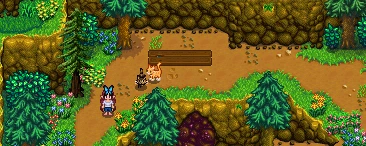
This is a very silly little mod that removes the plank that appears on the mountain path when both "Stardew Valley Expanded" and "Jorts and Jean the Helper Cats" mods are installed. Put it in your mod folder and it will auto-detect if both mods are installed and then, BOOM! PLANK-B-GONE!
Yes, it works with re-colors. I included a picture with DaisyNiko's Earthy Recolor installed to show that it works. ^_^
If either "Jorts and Jean" or "Stardew Valley Expanded" add a fix for this small visual issue, I'll be happy to remove this mod forever.
In the meantime, I'll take all the endorsements I can get! (That was a joke. This is a silly little nothing mod. It does not deserve your endorsement. Others deserve endorsements far more - particularly the two mods it is creating compatibility for. PLEASE go and endorse them if you like this one. :)
I've finally gone ahead and opted in for donation points for this mod, since it still works in 1. 6 and is still popular. I wanted to donate them to the same charity as tiakall chose for the original Jorts and Jean, but United Farm Workers is no longer an option. I have therefore chosen to donate all donation points earned from this mod to Doctors Without Borders, a charity I have personally donated to before and which I has a mission I support.
Please check out my other mods!
Better Slime Hutch:
Transform your slime hutch into a larger, configurable space. Make it look and act like a greenhouse, shed, cellar, or even a slime hutch! Raise slimes, grow crops, grow trees, store kegs, store casks, AND decorate! https://www.nexusmods.com/stardewvalley/mods/19304Greenhouse-style Wood Floor Border for Alternative Textures by glymr:
https://www.nexusmods.com/stardewvalley/mods/19311Adds a wood floor texture that matches the border in the vanilla greenhouse. Particularly useful with my Better Slime Hutch mod!Furniture Anywhere Redux Series:
[]Place Lamps Outside: Allows you to place vanilla lamps outside! https://www.nexusmods.com/stardewvalley/mods/18533
[]Place Fish Tanks Outside: Allows you to place vanilla fish tanks outside! https://www.nexusmods.com/stardewvalley/mods/18534/
[]Place Couches and Armchairs Outside: Allows you to place vanilla couches and armchairs outside! https://www.nexusmods.com/stardewvalley/mods/18586/
[]Place Bookcases and China Cabinet Outside: Allows you to place vanilla bookcases and the china cabinet outside! https://www.nexusmods.com/stardewvalley/mods/19108
[]Place Dressers and Fireplaces and TVs Outside: Allows you to place dressers, fireplaces, and TVs outside - all of them still work! https://www.nexusmods.com/stardewvalley/mods/19109
This small compatibility patch removes the plank that appears on the mountain path when both Stardew Valley Expanded and Jorts and Jean the Helper Cats are installed. It's a simple fix for players using both mods, with 382 endorsements and frequent updates.
✨ Key Features
📊 Pros & Cons
✅ Pros
- Community-approved fix with 382 endorsements and over 54k downloads.
- Solves a specific visual glitch that would otherwise break immersion.
- Actively maintained, last updated September 2023.
⚠️ Cons
- Only useful if you have both mods installed—otherwise it does nothing.
- Requires both Stardew Valley Expanded and Jorts and Jean the Helper Cats to be installed, adding dependency complexity.
For Stardew Valley players who use both Stardew Valley Expanded and Jorts and Jean the Helper Cats and want to remove the visual glitch on the mountain path. Skip if you don't use both mods or don't care about that specific plank.
💡 Beginner Tips
- Make sure you have both Stardew Valley Expanded and Jorts and Jean the Helper Cats installed before adding this patch.
- If you use a mod manager like SMAPI, place the mod folder in your Mods directory and it should load automatically.
- Check that the plank disappears after loading your save; if not, verify the mod is enabled in your mod list.
📊 Mod Details
- Game
- Stardew Valley Mods
- Author
- glymr
- Version
- 1.0.0
- Downloads
- 54,275
- Endorsements
- 382
- Category
- Maps
- Created
- 9/19/2023
- Updated
- 9/19/2023
🔧 How to Install Stardew Valley Mods
Download from Nexus.
📖 Full step-by-step install guide for Stardew Valley →
Visit the official mod page for specific installation instructions for this mod.
🎮 Need cheat codes or console commands? Check ur gaming wiki for Stardew Valley commands, item IDs, and more.
Keep browsing — more Stardew Valley mods await