Item Ball Dig Spot
⚪ Last updated 2019⚠️ Install Order · 2 steps
Install in this order, then this mod last — most mods fail to load without their framework and dependencies in place.
Preview
🔍 Analysis
- 👍 4.2% endorsement rate — high engagement, a strong quality signal
- 🏆 #59 of 133 Miscellaneous mods in this game by downloads
📋 About This Mod
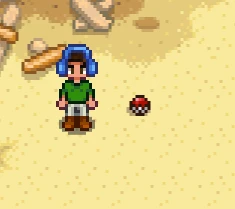
Replaces the artifact worm dig spot sprite and animation with that of an item ball from Pokemon.
Using the config.json you can choose between an item ball sprite from generations 1-5.
The generation 1 and 2 sprites bob/bounce while the generation 3, 4, and 5 sprites jiggle/roll back and forth.
Requires Content Patcher to use, just download this and drop it in your folder with your other CP mods.
I hope you enjoy my second ever posted mod :)
If you like this mod, check out my Faciful Resources mod :D
https://www.nexusmods.com/stardewvalley/mods/4168?tab=description
This small cosmetic mod replaces the artifact dig spot worms in Stardew Valley with Pokemon-style item balls from generations I-V. It's a simple visual swap for players who want a nostalgic Pokemon touch. With 129 endorsements and 3,054 downloads, it's a niche but appreciated mod, last updated in May 2019.
✨ Key Features
📊 Pros & Cons
✅ Pros
- Nostalgic for Pokemon fans, adds a fun visual twist to digging.
- Lightweight and easy to install, just drop in the mods folder.
- Community-tested with 129 endorsements, so it works for many players.
⚠️ Cons
- Only affects dig spot visuals, so if you want more Pokemon content, this won't satisfy.
- Last updated in 2019, so it might not be compatible with the latest Stardew Valley versions.
- No screenshots or detailed instructions provided, so you're flying blind until you try it.
For Stardew Valley players who grew up with Pokemon and want a subtle nod to the franchise while farming. It's perfect for those who enjoy small cosmetic tweaks that don't change gameplay. Skip if you're looking for substantial content or if you prefer to keep the game's original aesthetic.
💡 Beginner Tips
- Make sure you have SMAPI installed, as most Stardew Valley mods require it.
- Place the mod folder in your Stardew Valley 'Mods' directory, then launch the game with SMAPI.
- If the mod doesn't work, check that you're using the correct game version, as the mod was last updated in 2019.
📊 Mod Details
- Game
- Stardew Valley Mods
- Author
- DZK312
- Version
- 1
- Downloads
- 3,054
- Endorsements
- 129
- Category
- Miscellaneous
- Created
- 5/17/2019
- Updated
- 5/17/2019
🧩 Commonly Used Together
Users add these mods to the same collections — a real compatibility signal, not an AI guess.
🔧 How to Install Stardew Valley Mods
Download from Nexus.
📖 Full step-by-step install guide for Stardew Valley →
Visit the official mod page for specific installation instructions for this mod.
🎮 Need cheat codes or console commands? Check ur gaming wiki for Stardew Valley commands, item IDs, and more.
Keep browsing — more Stardew Valley mods await