Dreamy Valley Reshade
⚪ Last updated 2021⚠️ Install Order · 3 steps
Install in this order, then this mod last — most mods fail to load without their framework and dependencies in place.
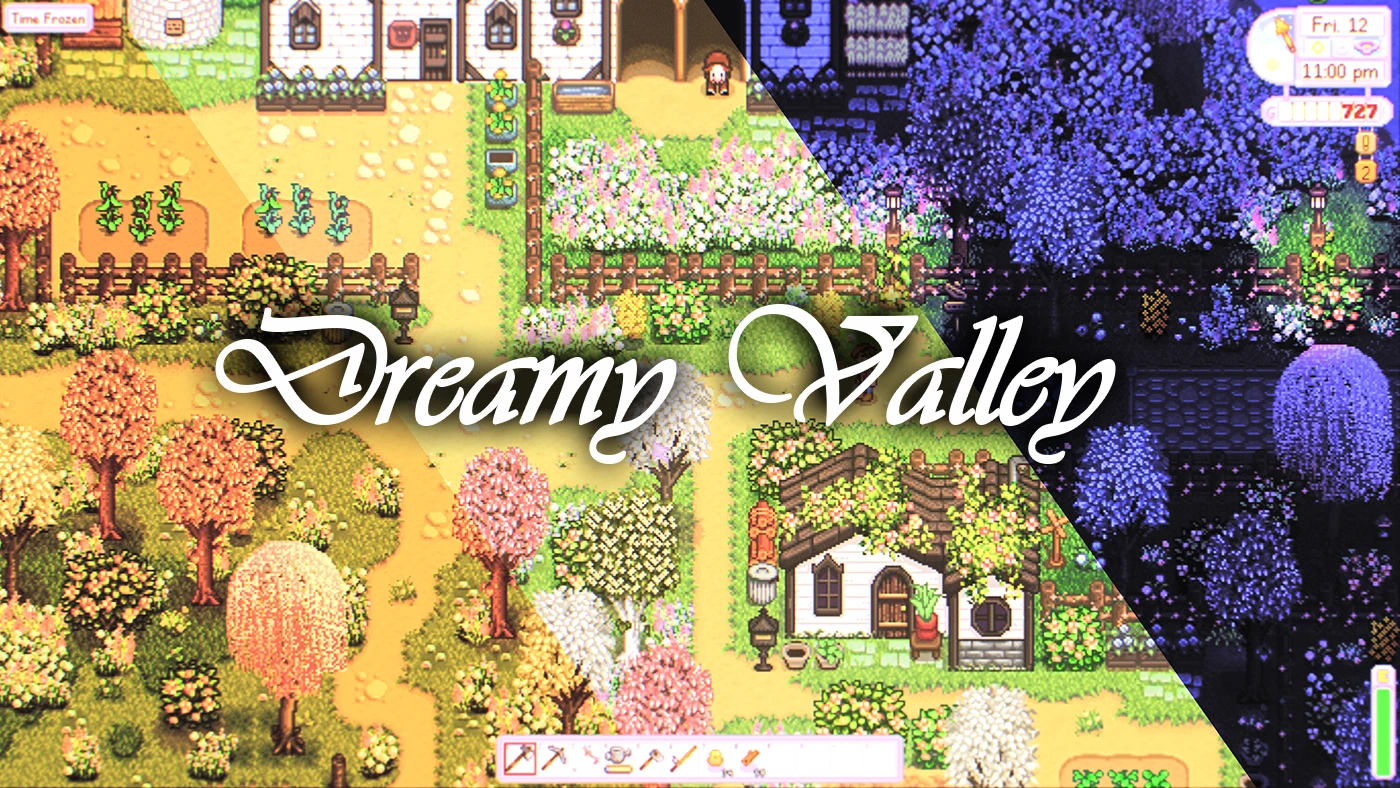
Preview
🔍 Analysis
- 👍 3.0% endorsement rate — high engagement, a strong quality signal
- 🏆 #166 of 227 Visuals and Graphics mods in this game by downloads
📋 About This Mod
Updated for 1. 5. 4 and Latest SMAPI | Thanks for the kind Feedback!IMPORTANT
To still achieve the intended looks shown in the screenshots, you will need to install an old version of Dynamic Night Time no Longer available, as the new versions have significantly different Dawn and Night Lightings. You can download a Backup here; All Credits for this fantastic mod go to the Original Author: Sakorona
Welcome to Dreamy Valley.
IMPORTANT
To still achieve the intended looks shown in the screenshots, you will need to install an old version of Dynamic Night Time no Longer available, as the new versions have significantly different Dawn and Night Lightings. You can download a Backup here; All Credits for this fantastic mod go to the Original Author: Sakorona
Stardew Valley is one of those games I always wanted, ever since I played the first harvest Moon on GameBoy. Even unmodded this game is almost flawless, including the charmingly crafted Visuals that gradually got taken to another level By Eemie and the many other fantastic modders putting their time and effort into Crafting new assets, making this game look absolutely fantastic. But every now and then I came across some edited Gifs or images of the game on Tumblr, making me think I wish I could actually play the game looking like that. Well this Is my attempt at Making jennyofvengerberg's Gif's playable.
Initially I only wanted to make this for myself and I highly underestimated how hard It would end up being due the amounts of different colors, times of day (Dynamic Night Time) and Varying Brightness levels, the scene specific edits of those Gifs, and the result can safely be considered experimental and not for everyone. But due to the unexpectedly large (relatively speaking) large amount of positive reactions to Work in progress shots I shared, I decided to make this publicly available here, for anyone who might be interested.
Update 01. 05. 21
Updated to Work with Latest version of SMAPI and Stardew; All lag fixed.
Update 28. 07. 19
Added 2 Toggles:
- Due to request: Press F5 to turn off the Cinematic blur (Press f5 again to reactivate it)
- Experimental: Press F6 to Toggle a "screenshot" mode (Can be used while Blur is on or off) which adds some atmospheric elements. Doesnt work well with all times of day, just try it out at certain times and see if you like it. Completely optional, turned off by default. Press F6 again after youve taken your screenshot because this doesnt work for actual gameplay due to numerous reasons. This function can be ignored but I thought I might aswell add it as it fits the theme of the mod.
Hopefully a few might actually like this!
Things to note:
- This is a bright Preset!
- The UI can get a bit hard to read if you play at a Very zoomed out state due to the Tilt-shift blur effect
- Every 30 game days you willl have to do a very quick preset switch, I know its an inconvenience but there was no way around it due to how heavily this edits the colors.
To achieve the Intended result the following fant
Dreamy Valley Reshade is a visual overhaul mod for Stardew Valley that completely changes the game's atmosphere with a dreamy, ethereal look. With over 1,000 endorsements and 36,000 downloads, it's a popular choice for players seeking a fresh aesthetic. Last updated in 2021, it remains a stable option for enhancing the game's visuals.
✨ Key Features
📊 Pros & Cons
✅ Pros
- Community-approved with over 1,000 endorsements and 36k downloads.
- Transforms the entire look of Stardew Valley into something dreamy and unique.
- Simple to install if you already use Reshade.
⚠️ Cons
- Last updated in 2021 — may not be compatible with the latest Reshade versions.
- Requires Reshade, which can be intimidating for new users.
For Stardew Valley players who want a complete visual overhaul without changing gameplay. If you're tired of the default look and want something dreamy and ethereal, this is for you. Skip if you prefer vanilla graphics or don't want to mess with Reshade.
💡 Beginner Tips
- Make sure you have Reshade installed and set up before adding this preset.
- Check the mod's comments section for any user-uploaded screenshots to see the effect before installing.
- If you're new to Reshade, follow a tutorial to get the basics down first.
📊 Mod Details
- Game
- Stardew Valley Mods
- Author
- Manakaiser
- Version
- 1.3
- Downloads
- 36,983
- Endorsements
- 1,093
- Category
- Visuals and Graphics
- Created
- 7/23/2019
- Updated
- 5/1/2021
🔧 How to Install Stardew Valley Mods
Download from Nexus.
📖 Full step-by-step install guide for Stardew Valley →
Visit the official mod page for specific installation instructions for this mod.
🎮 Need cheat codes or console commands? Check ur gaming wiki for Stardew Valley commands, item IDs, and more.
Keep browsing — more Stardew Valley mods await