Dreamlike's Portraits
⚪ Last updated 2016⚠️ Install Order · 2 steps
Install in this order, then this mod last — most mods fail to load without their framework and dependencies in place.
Preview
🔍 Analysis
- 👍 0.7% endorsement rate
- 🏆 #50 of 130 Portraits mods in this game by downloads
📋 About This Mod
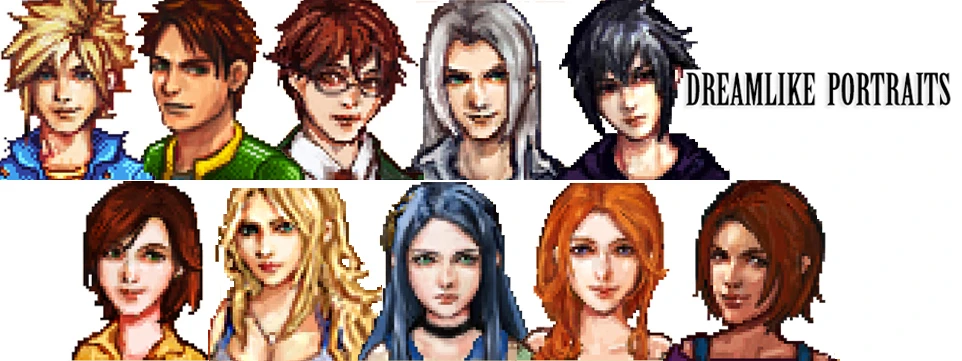
♥ DREAMLIKE's PORTRAITS Change Original Portraits to some Final Fantasy style.
I added Sebastian character FF style in same download file :) -> CURRENTLY DONE : -Maru →You can choose between original (with or without glasses) & Lightning(Portraits&Characters) -Leah -Haley -Abigail →You can choose between original violet hair & FF style -Penny (Penny as final fantasy character is coming soon) -Sebastian -Elliott →You can choose between original & White hair(Portraits&Characters) -Alex -Sam -Cute Harvey (Portraits&Characters) →You can choose between glasses →You can choose between glasses & without glasses
- -------------------------------------------------------------------------------
- →HOW TO INSTALL MODS :
- !!BACK UP YOUR ORIGINAL FILES BEFORE YOUR DO!!
- →for portraits files
- Copy (.xnb) mod Files to Folder \Stardew Valley\Content\Portraits
- →for characters files
- Copy (.xnb) mod Files to Folder \Stardew Valley\Content\characters
- -------------------------------------------------------------------------------
Dreamlike's Portraits replaces the original portraits in the game with Final Fantasy-style artwork. With 550 endorsements and over 80,000 downloads, this cosmetic mod has a dedicated following. Last updated in 2016, it remains a popular choice for players seeking a visual overhaul of character portraits.
✨ Key Features
📊 Pros & Cons
✅ Pros
- Community favorite with 550 endorsements and 80k downloads.
- Gives your game a fresh Final Fantasy aesthetic.
- Simple cosmetic swap—no gameplay impact.
⚠️ Cons
- Last updated in 2016—may not be compatible with the latest game version.
- Only affects portraits, so if you wanted more visual changes, this won't cover them.
For players who love Final Fantasy's art style and want to see it in their portrait screens. Great for those who want a quick visual refresh without touching gameplay. Skip if you're looking for more comprehensive visual overhauls or need current mod support.
💡 Beginner Tips
- Since it's a simple portrait replacer, just drop the files into your game's portrait folder—no mod manager needed.
- If you're using other portrait mods, check load order to ensure this one takes priority.
- Back up your original portraits if you want to revert easily.
📊 Mod Details
- Game
- Stardew Valley Mods
- Author
- DREAMLIKE
- Version
- 02
- Downloads
- 80,638
- Endorsements
- 550
- Category
- Portraits
- Created
- 3/18/2016
- Updated
- 4/7/2016
🔧 How to Install Stardew Valley Mods
Download from Nexus.
📖 Full step-by-step install guide for Stardew Valley →
Visit the official mod page for specific installation instructions for this mod.
🎮 Need cheat codes or console commands? Check ur gaming wiki for Stardew Valley commands, item IDs, and more.
Keep browsing — more Stardew Valley mods await