Changing Skies -- Weather- and Time-Dependent UI
⚪ Last updated 2024⚠️ Install Order · 2 steps
Install in this order, then this mod last — most mods fail to load without their framework and dependencies in place.
Preview
🔍 Analysis
- 👍 0.7% endorsement rate
- 🏆 #101 of 227 Visuals and Graphics mods in this game by downloads
📋 About This Mod
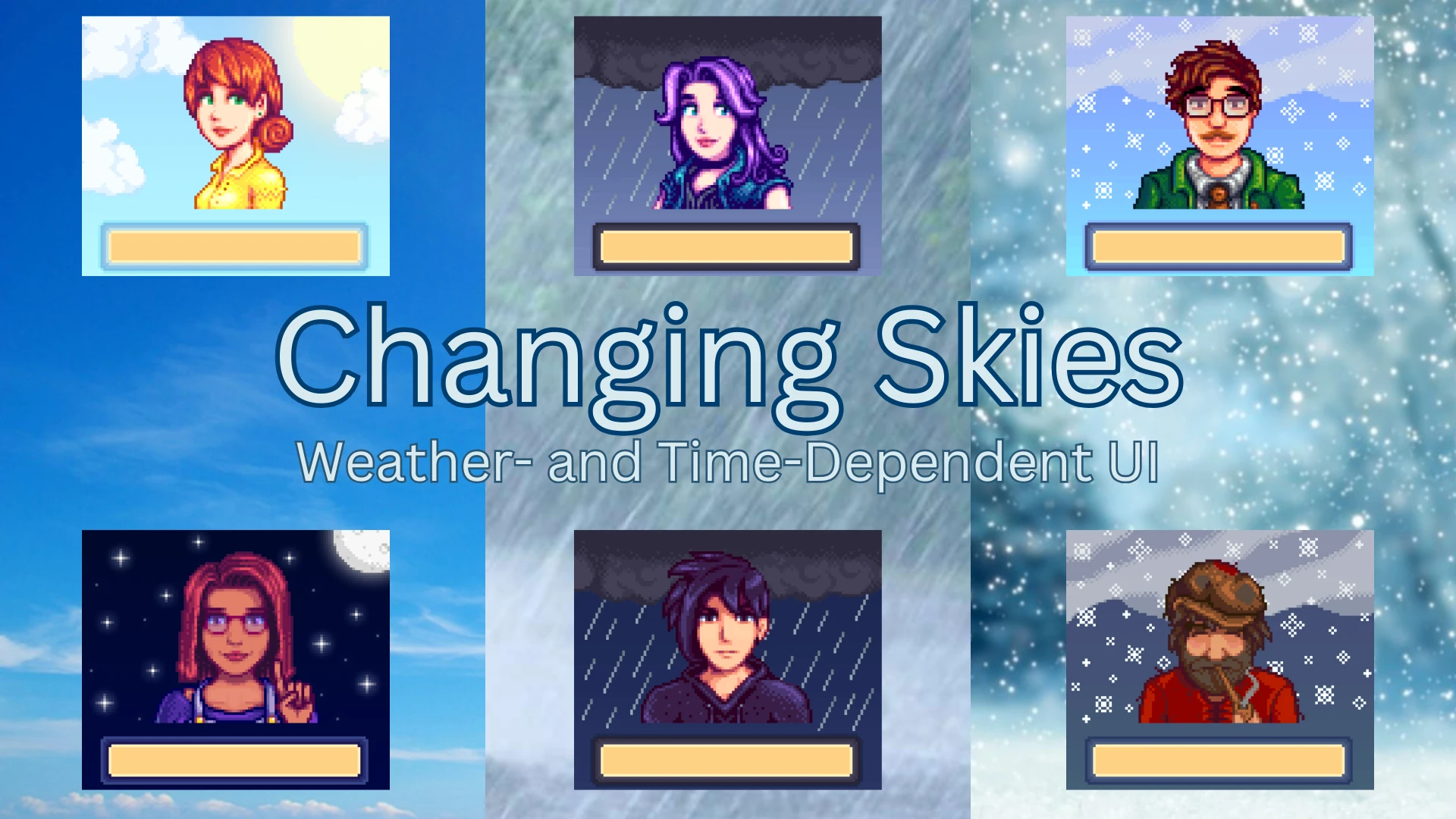
As the name and the short blurb imply, this mod aims to take a new approach to customizing the dialogue box by reflecting the current weather and time of day.
At the moment, there's a grand total of eight different portrait backgrounds: Sunny, rainy and snowy days have their own unique day and night portrait backgrounds. The mod switches between the day and night versions once the in-game clock reaches 5 PM and you change the map you're on (so when you leave the bus stop and enter the town, for example).
Additionally, there are background for the sewers as well as caves such as the mines or the Skull Cavern. Because that isn't enough, though, there's also a special overlay when you're indoors: a comically big window that shows the current weather. If you reach a certain blue gentleman on Ginger Island, you might even be treated to another special background...
There are also day and night versions of a new special event in 1. 6 that you can find under the following spoiler. Click at your own risk!
If you've got feedback, comments and things you'd like to see in the future, please leave a comment or ping me (Doragoun) in the SDV Discord server's modded farmers channel and I'll get back to you as soon as possible. Additionally, if you like the mod, please consider endorsing it – it's easy to do and gets more people to see it. Thanks for reading this far!
The gap between the portrait and the box containing their name has always annoyed me just as much as some of the commenters. Thankfully, there's an update for Dialogue Display Framework and I finally figured out how to make a content pack for it thanks to its author MangusuPixel!
Portrait from Mono's Portraits
The pack itself is pretty simple – all it does is move the name upwards so there's no more awkward gap. To use it, simply make sure you've got the updated Dialogue Display Framework installed. That's it! I'd heavily recommend using it, but it's obviously up to you. If you notice something looking off, please don't hesitate to let me know!
In addition to the portrait backgrounds, there's also a new style for the borders of the dialogue box with rounded corners that also change their color to fit the current weather. If you don't like this change, though, you can use GMCM to edit the config.json file that'll be created once you've run the game with this mod once. Seriously, please get GMCM. It makes things much easier.
The config that's responsible for the borders is called "Border Style" and can be set to three different values. It defaults to "Dynamic" that changes the borders to a new design with rounded corners and dynamically changes their color to fit the current weather/time varuation. If you'd rather have a constantly brown border with the new ro
Changing Skies is a visual mod for Stardew Valley that dynamically alters the background behind NPC portraits and optionally the dialogue box borders and Community Center interface based on in-game weather and time. It supports version 1.6 and has 477 endorsements with over 66,000 downloads, making it a popular cosmetic enhancement.
✨ Key Features
📊 Pros & Cons
✅ Pros
- Community favorite with 477 endorsements and over 66k downloads—clearly a hit.
- Adds a subtle but immersive touch that makes the UI feel alive with the game world.
- Optional features let you customize how much of the UI changes.
⚠️ Cons
- Purely cosmetic—no gameplay impact, so if you want functional changes, look elsewhere.
- Only affects portrait backgrounds and dialogue/Community Center borders; other UI elements remain untouched.
- Requires the game to be updated to 1.6, which might be a hurdle if you're on an older save.
For Stardew Valley players who love immersion and want the UI to reflect the world around them. If you're a screenshot enthusiast or just enjoy small visual polish, this is a must-have. Skip if you prefer a static, minimalist UI or want gameplay-altering mods.
💡 Beginner Tips
- Make sure your Stardew Valley is updated to 1.6 before installing, as the mod explicitly requires it.
- If you use a mod manager like Vortex, installation is a breeze—just download and enable.
- Check the mod's settings in-game (if any) to toggle the optional borders to your liking.
📊 Mod Details
- Game
- Stardew Valley Mods
- Author
- Doragoun
- Version
- 1.5.0
- Downloads
- 66,011
- Endorsements
- 477
- Category
- Visuals and Graphics
- Created
- 12/14/2023
- Updated
- 7/14/2024
🔧 How to Install Stardew Valley Mods
Download from Nexus.
📖 Full step-by-step install guide for Stardew Valley →
Visit the official mod page for specific installation instructions for this mod.
🎮 Need cheat codes or console commands? Check ur gaming wiki for Stardew Valley commands, item IDs, and more.
Keep browsing — more Stardew Valley mods await