Auto Tool Select
🟠 Updated over a year ago⚠️ Install Order · 2 steps
Install in this order, then this mod last — most mods fail to load without their framework and dependencies in place.
Preview
🔍 Analysis
- 👍 3.3% endorsement rate — high engagement, a strong quality signal
- 🏆 #210 of 382 Gameplay Mechanics mods in this game by downloads
📋 About This Mod
Mod will automatically select right tool to interact with the object in your hit location.
Install
-
[]Install the latest version of SMAPI.
[
]Download this mod and unzip it into Stardew Valley/Mods.[]Run the game using SMAPI.
[]Change config options. Config file will be created after opening the game.
Compatibility
[]Works with Stardew Valley 1. 6. 15 on Linux/Mac/Windows.
[]Works with Generic Mod Info Menu 1. 12. 0
[]Works with Smapi 4. 1. 10
How it works
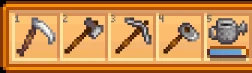
If player holds left Ctrl or toggles F5 is directed to the tile and hovers cursor over it, mod will choose the right tool from player's toolbox that can interact with it. Mod chooses :
-
[]Axe for stump, log, tree, twig or giant crop, twig bug
[]Pickaxe for stone, meteorite, 2x2 rock, rock crab
[]Melee Weapon for weeds, ice crystal, mine barrel, grass, crops harvestable only by scythe and dead crops (prioritizing scythe on farm and greenhouse)
[]Hoe for digable field, artifact spots (worm), garlic and seed spots
[]Watering can for water sources (including well) or hoed unwatered fields on farm, unwatered garden pots and greenhouse and lava in Volcano Dungeon
[]Fishing rod for water outside farm
[]Pan if there is shimmering lights nearby
[]Shears for sheep that are ready to harvest
[]Milk pail for cows and goats ready to milk
- When player hovers oven any machine that can process items mod will select item that can be put inside
Config options
Activation Key (LCtrl) - when hold, mod is activatedToggle Key (F5) - press to turn on/off mod
Here is list of keys https://stardewvalleywiki.com/Modding:Player_Guide/Key_Bindings
Hoe Select - true: mod will select hoe when you target ground. I recommend to set false
If None Tool Choose Weapon - true: mod will select weapon/scythe when none tool was chosen. Works better with Hoe Select=false
Ride Horse Cursor - true: mod will use cursor location to determine which tool should be chosen while riding horse (tractor), false: mod will use tool hit location to determine which tool should be chosen while riding horse (tractor). I recommend to set true, but false might be useful for controller
Pickaxe Over Watering Can - true: mod will select pickaxe on hoed dirt, instead of watering can. Can be used to collect clay. Works better with Hoe Select=true. I recommend to set false
Cursor Over Tool Hit L
Auto Tool Select automatically picks the correct tool for the object you're aiming at, saving you from manually switching in your inventory. With nearly 2,000 endorsements and over 60,000 downloads, it's a popular quality-of-life mod for players who want smoother gameplay. Last updated in March 2025, it remains relevant for current game versions.
✨ Key Features
📊 Pros & Cons
✅ Pros
- Huge community trust – 1,983 endorsements and 60k+ downloads show it's a go-to for many players.
- Saves you from fumbling through your hotbar mid-combat or while gathering – a real QoL win.
- Actively maintained – last updated March 2025, so it's likely compatible with current game patches.
⚠️ Cons
- May not support modded tools or custom objects, so if you use content mods, you might see gaps.
- Could conflict with other UI or hotkey mods that alter tool selection – worth checking your mod list.
For survival and crafting players who hate manually switching tools every few seconds. If you're tired of digging with a pickaxe or chopping with an axe, this mod is a no-brainer. Skip if you prefer full manual control or use a complex hotkey setup.
💡 Beginner Tips
- If you're playing on a server, make sure the mod is installed on the client side – it's a client-side QoL mod, so it won't affect other players.
- Test it with different tools (axe, pickaxe, shovel) to see how it prioritizes – you might want to adjust your keybinds for manual override.
- Check if the mod has a config file – some similar mods let you tweak behavior, so look for one in your mod folder.
📊 Mod Details
- Game
- Stardew Valley Mods
- Author
- lolmaj
- Version
- 4.4
- Downloads
- 60,879
- Endorsements
- 1,983
- Category
- Gameplay Mechanics
- Created
- 5/8/2019
- Updated
- 3/28/2025
🧩 Commonly Used Together
Users add these mods to the same collections — a real compatibility signal, not an AI guess.
🔧 How to Install Stardew Valley Mods
Download from Nexus.
📖 Full step-by-step install guide for Stardew Valley →
Visit the official mod page for specific installation instructions for this mod.
🎮 Need cheat codes or console commands? Check ur gaming wiki for Stardew Valley commands, item IDs, and more.
Keep browsing — more Stardew Valley mods await