A Less Yellow Stardew
⚪ Last updated 2016⚠️ Install Order · 2 steps
Install in this order, then this mod last — most mods fail to load without their framework and dependencies in place.
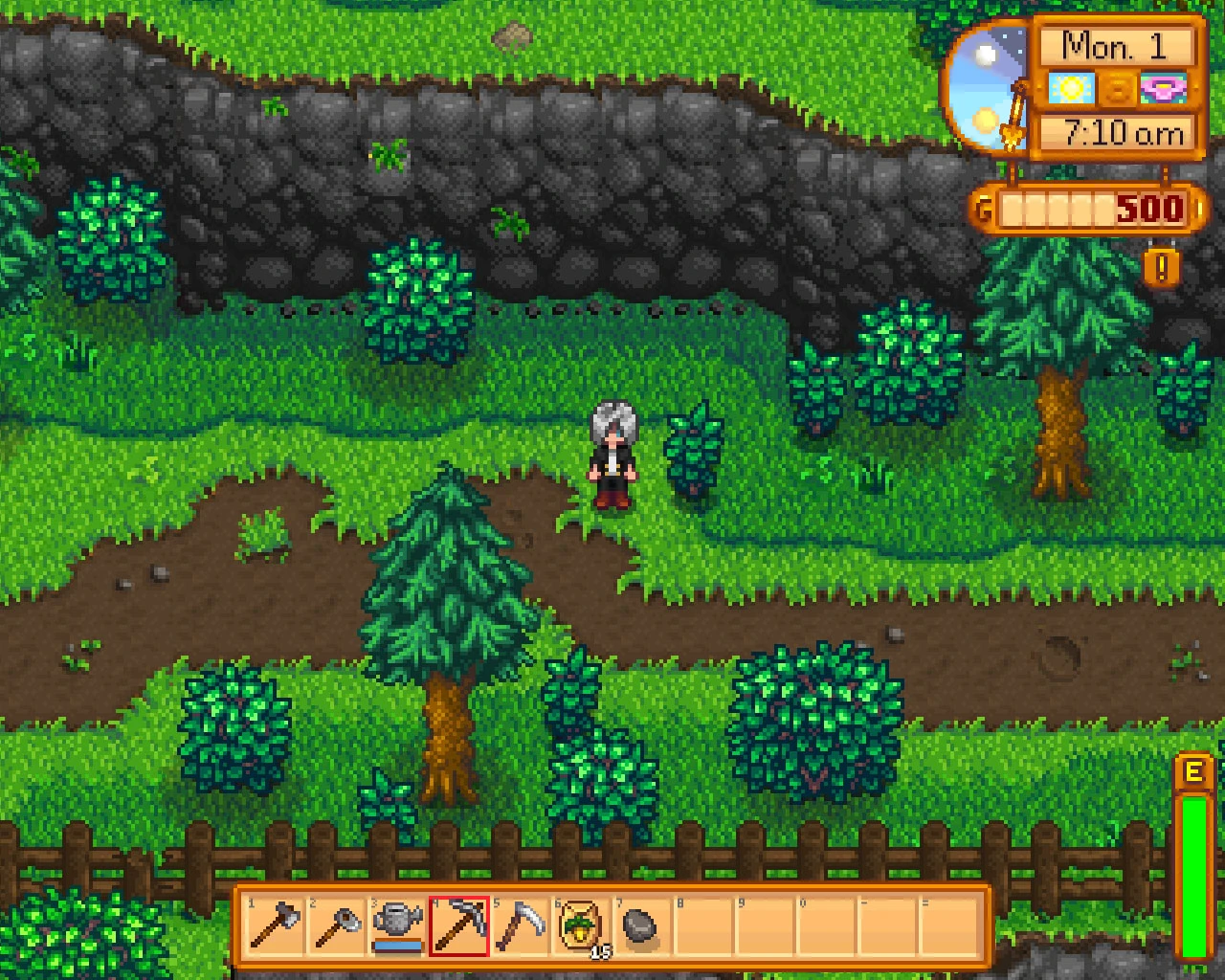
Preview
🔍 Analysis
- 👍 4.1% endorsement rate — high engagement, a strong quality signal
- 🏆 #61 of 130 Miscellaneous mods in this game by downloads
📋 About This Mod
A Less Yellow Stardew
Lately I've been working on changing the dirt across all seasons from yellow to brown, but then I noticed once doing so that a lot of other things looked too bright and yellow (and sometimes purple) once that was done... and before I knew it I had edited the textures of a few other things as well.
I've created three different shades of dirt, for those that don't want to have the ground particularly dark. There are also different kinds of grass if the default is too bright for your monitor.
To-Do List Sandy Beach Dirt
Progress
- []07/05/2016 Created compatibility file between this mod and Animal Crossing Digspot - Worm Replacement.[]07/03/2016 Created alternate grass for each dirt version (2. 0).
- 06/21/2016 Created Darker Hoe'd Dirt for Light Dirt.
To Install: Copy the Contents folder located in the zip file and paste it into your main Stardew Valley folder. Remember to back up your original files beforehand.
A simple texture overhaul for Stardew Valley that recolors dirt to brown, rocks to grey, and wood to look more like wood. With 2,271 endorsements and 55,844 downloads, it's a popular choice for players seeking a more grounded, natural color palette. Last updated in 2016, so compatibility with newer versions is uncertain.
✨ Key Features
📊 Pros & Cons
✅ Pros
- Community favorite with 2,271 endorsements and over 55k downloads
- Simple, focused texture overhaul that improves the natural look of the game
- Lightweight and easy to install—just drop files into the game folder
⚠️ Cons
- Last updated in 2016—may not be compatible with the latest Stardew Valley versions
- Only affects dirt, rocks, and wood—no changes to other textures
- No screenshots or detailed install instructions provided by the author
For Stardew Valley players who want a more realistic, muted color palette for the ground and materials. If you're tired of the default bright yellow dirt and prefer a more grounded aesthetic, this is for you. Skip if you're looking for major visual overhauls or gameplay changes—this is purely cosmetic.
💡 Beginner Tips
- Back up your original game files before replacing textures, so you can revert if needed.
- Make sure to place the mod files in the correct folder: Stardew Valley/Content/Textures.
- If you're using a mod manager like SMAPI, you can also use this mod with it, but manual installation works fine.
📊 Mod Details
- Game
- Stardew Valley Mods
- Author
- Lark the Brave
- Version
- 2.0
- Downloads
- 55,844
- Endorsements
- 2,271
- Category
- Miscellaneous
- Created
- 6/17/2016
- Updated
- 7/6/2016
🔗 Required By 1 Mod
These mods list this mod as a dependency.
🧩 Commonly Used Together
Users add these mods to the same collections — a real compatibility signal, not an AI guess.
🔧 How to Install Stardew Valley Mods
Download from Nexus.
📖 Full step-by-step install guide for Stardew Valley →
Visit the official mod page for specific installation instructions for this mod.
🎮 Need cheat codes or console commands? Check ur gaming wiki for Stardew Valley commands, item IDs, and more.
Keep browsing — more Stardew Valley mods await