Sekiro Vibrant ReShade - Asura Edition
🟡 Updated this year⚠️ Install Order · 2 steps
Install in this order, then this mod last — most mods fail to load without their framework and dependencies in place.
Preview
🔍 Analysis
- 👍 4.4% endorsement rate — high engagement, a strong quality signal
- 🏆 #33 of 138 Visuals and Graphics mods in this game by downloads
📋 About This Mod
Welcome to my first Preset ever! Let me know if it works! (If you want).
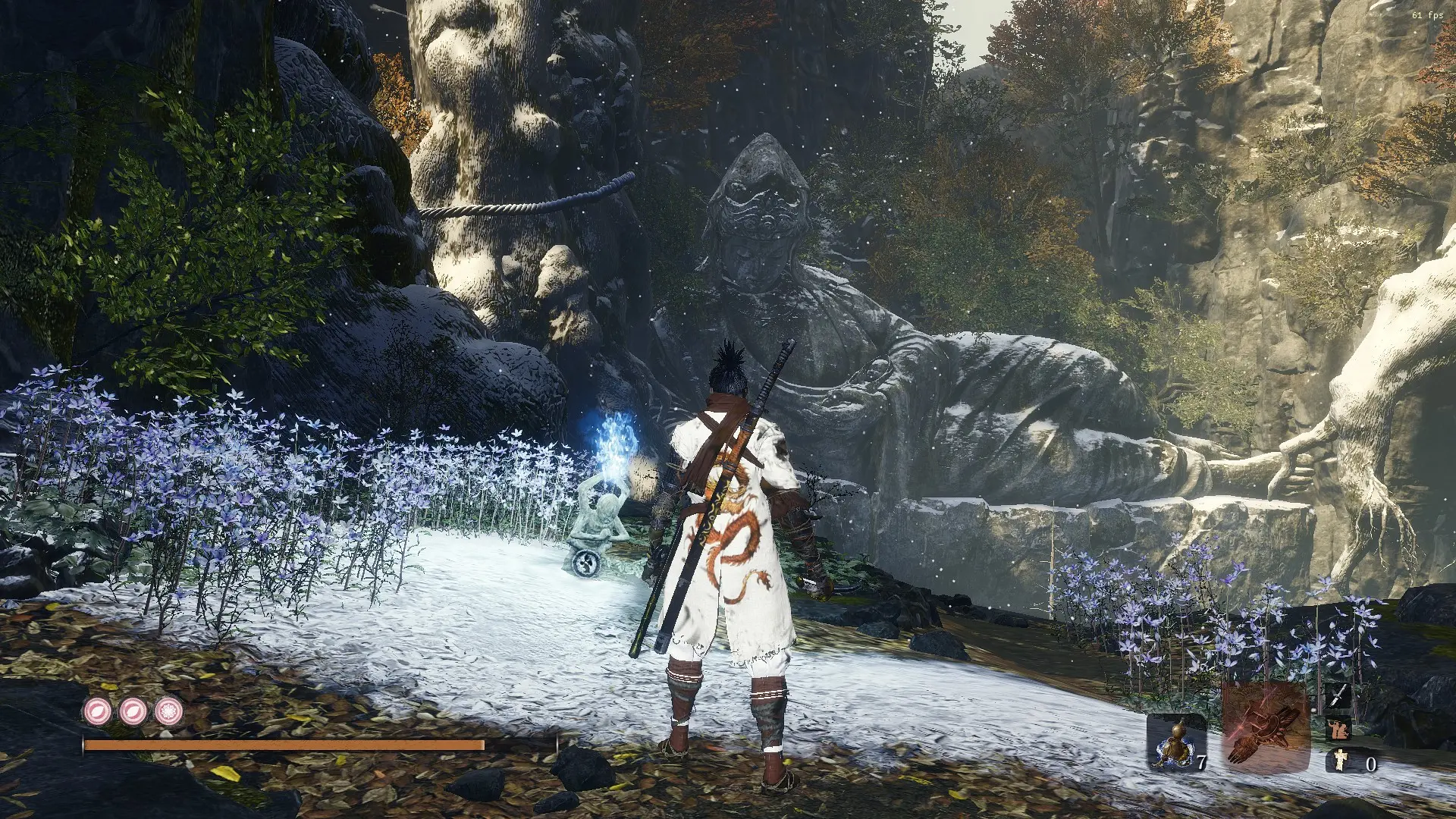
So, Asura Edition gives you a dynamic shade over the game. The lighting is not overly harsh, nor is it subtle. I believe my tweaking targeted the "perfect spot" of the ReShade. The preset is clear, and not overly complicated. Underwater is no longer murky, instead you have transparency. Menu fonts and letters are a bit more brighter--clearer.
Blue is more...blue. For example, Idol blue fire is brighter and vivid. Lazulite prostheic tools looks more badass, at least in the blue color department. Hell, any color effects look good in this preset!
Getting tired of the dull-looking color of the game? Asura Edition fixes that, no problem. Take a moment to look at my screen shots of before and after photos. I wanted to add some the screen shots this the description, but I don't how to do it.
I don't believe this mod is performance heavy. I didn't notice any difference in FPS change. You can enable the FPS meter in the ReShade settings to check for yourself.
I know, I know, it's a lot screen shots. But please take a few moments of your time to look them over and see the difference, so you'll know what I'm trying to advertise here.
-----------------------------------------------------------------------------------------
Installation
...............................
1. Download Reshade at https://reshade.me/
2. Go through the steps on the Reshade.exe setup. Choose the .exe of Sekiro. Check "Direct 3D 10+". Download all shaders (For customization), click ok, and..... DONE.
3. Now, download "Sekiro Vibrant Reshade: Asura Editon" use winrar to extract.
4. Put the downloaded .ini file to your Sekiro Directory (game main file). Steam ---> steamapps ---> common ---> Sekiro ---> Drop .ini ---> Done!
Or wherever your main game is installed in.
5. When in-game, press "Home" key and go through the turtorial. When your stuck, go to this youtube if you want more knowledge:
https://www.youtube.com/watch?v=RGNSxGvTFpY
----------------------------------------------------------------------------------------
Another advice enabling and disabling the preset in-game, so you can witness the quality of vanilla Sekiro and Asura Edition Sekiro.
1. When in-game, press "Home" key.
2. Go to settings.
3. Look for "Effects Toggle Key" and toggle whatever custom key you want; so you switch back and forth. I personally set "~" as my choic
A ReShade preset for Sekiro: Shadows Die Twice that enhances color vibrancy and lighting to make the game more visually striking. With 138 endorsements and 3,171 downloads, it's a community-tested visual upgrade for players seeking a more colorful experience.
✨ Key Features
📊 Pros & Cons
✅ Pros
- Community-approved with 138 endorsements and over 3,000 downloads
- Easy to install if you already have ReShade
- Gives Sekiro a fresh, vibrant look without changing gameplay
⚠️ Cons
- Requires ReShade, which may be tricky for first-time users
- No before/after screenshots provided in the description
- Last updated in November 2025, but no compatibility notes for future game patches
For Sekiro players who want to spice up the visuals with more color and vibrancy. If you're tired of the game's muted palette and want a quick visual overhaul, this preset is for you. Skip if you prefer the original art direction or don't want to mess with ReShade.
💡 Beginner Tips
- Make sure you have ReShade installed and configured for Sekiro before applying this preset.
- Use ReShade's in-game overlay to tweak the preset's intensity to your liking.
- Check the ReShade setup guide if you're new to it—it's a one-time process.
📊 Mod Details
- Game
- Sekiro Mods
- Author
- JonSnowMitsuha
- Version
- v01
- Downloads
- 3,171
- Endorsements
- 138
- Category
- Visuals and Graphics
- Created
- 4/8/2019
- Updated
- 11/18/2025
🔧 How to Install Sekiro Mods
Download from Nexus.
📖 Full step-by-step install guide for Sekiro →
Visit the official mod page for specific installation instructions for this mod.
🎮 Need cheat codes or console commands? Check ur gaming wiki for Sekiro commands, item IDs, and more.
Keep browsing — more Sekiro mods await