Sekiro Fps Unlock And More
⚪ Last updated 2020⚠️ Install Order · 1 step
Install in this order, then this mod last — most mods fail to load without their framework and dependencies in place.
Preview
🔍 Analysis
- 👍 2.3% endorsement rate — high engagement, a strong quality signal
- 🏆 #2 of 309 Gameplay mods in this game by downloads
📋 About This Mod
See it in action here:
Features:
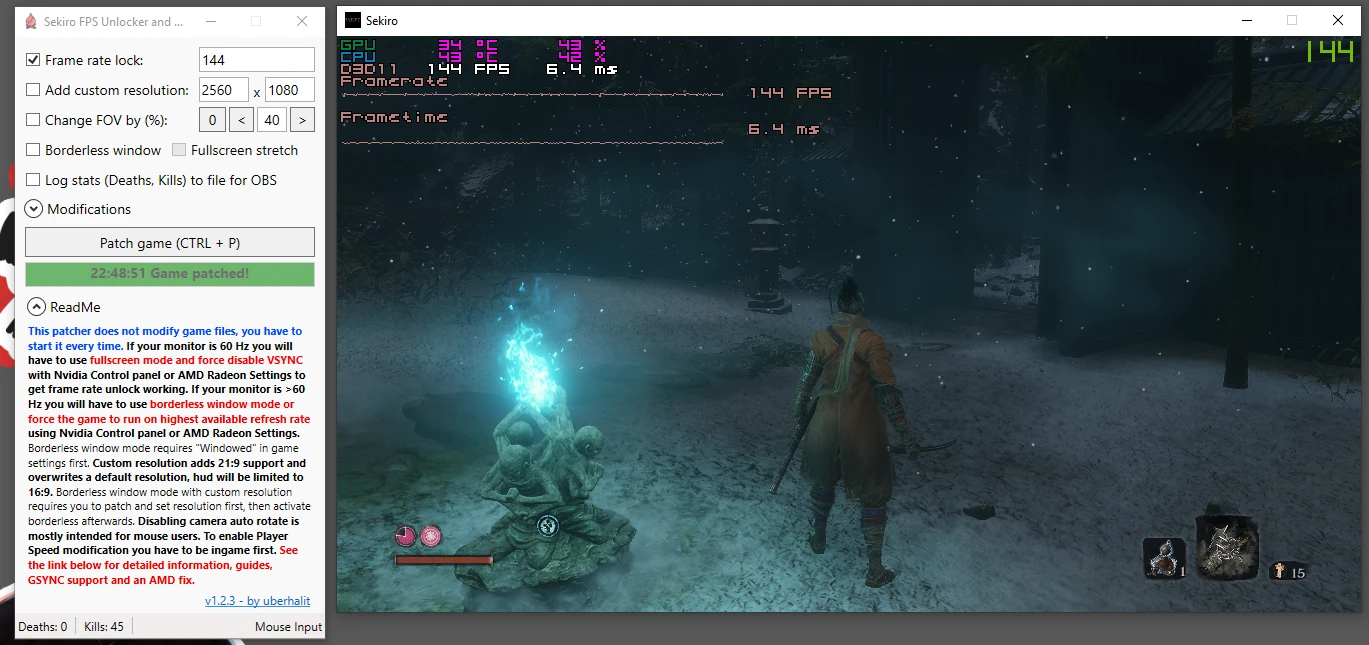
- []does not modify any game files, RAM patches only, works with all game versions
[
]G-SYNC and FreeSync support for fullscreen and even in borderless window mode[]unlock frame rate (remove FPS limit) by setting a new custom limit
[]add a custom resolution, 21:9 widescreen supported (will overwrite the default 1920x1080 / 1280x720 resolution, HUD limited to 16:9)
[]increase or decrease field of view (FOV)
[]set the game to borderless window mode
[]disable camera auto rotate adjustment on movement (intended for mouse users)
[]disable centering of camera (cam reset) on lock-on if there is no target
[]display hidden death/kill counters and optionally log them to file to display in OBS on stream
[]automatically loot enemies
[]game modifications
[]prevent dragonrot from increasing upon death
[]disable death penalties like losing Sen or experience
[]increase spirit emblem capacity on prosthetic upgrades
[]global game speed modifier (increase or decrease)
[]player speed modifier (increase or decrease)
[
]seamlessly switch between windowed, borderless and borderless fullscreen[]hotkey for patching while in (borderless) window mode
[]hotkey for toggling speed modifier while in (borderless) window mode
Usage:
The following graphical guide has to be done if you want to unlock the game's framerate or play on a higher refresh rate in fullscreen. If you do not wish to use that feature you can scroll down further to the guides on all other features. The graphic setup has to be done only once but as the patcher hot-patches the memory you have to start the patcher every time you want to use any of its features.
The game enforces VSYNC and forces 60 Hz in fullscreen even on 144 Hz monitors so we have to override these.
TL;DR Nvidia: Use Nvidia Control Panel to set 'Vsync' to 'Off' and 'Preferred Refreshrate' to 'Highest available' on a Sekiro Profile. Troubleshoot: delete the (premade) Sekiro profile, add a new profile by stating the full file path to sekiro.exe and try again. If Preferred Refreshrate is missing or game still locks to 60fps see the guide further down on Nvidia Profile Inspector and general troubleshooting.
TL;DR AMD: Use Radeon Settings to set 'Wait for Vertical Refresh' to 'Enhanced Sync' on a Sekiro profile. Start Sekiro in windowed mode and switch to fullscreen once ingame. Troubleshoot: see the guide further down below.
60 Hz monitors: disable VSYNC via driver (use 'Enhanced Sync' on AMD) and use ful
A lightweight utility that removes the frame rate cap, adds custom resolutions including 21:9 ultrawide support, adjusts FOV, enables borderless window mode, logs K/D for OBS, disables camera auto-adjust, and applies various game tweaks by patching memory without modifying game files. Popular with 14,708 endorsements and 652,545 downloads, last updated in November 2020.
✨ Key Features
📊 Pros & Cons
✅ Pros
- Huge community trust with 14,708 endorsements and over 650k downloads.
- Covers multiple quality-of-life fixes in one tool: FPS unlock, ultrawide, FOV, borderless.
- Memory patching means no permanent file changes—safe to revert.
⚠️ Cons
- Last updated in 2020—may not work with newer game versions or anti-cheat updates.
- Requires running an external utility each time you play, not a simple mod install.
- No detailed instructions or compatibility notes provided by the author.
For Sekiro players on PC who want to break the 60 FPS cap, especially those with high-refresh monitors or ultrawide displays. Also useful for streamers who want K/D logging for OBS overlays. Skip if you're on console or prefer a pure mod that doesn't require a separate tool.
💡 Beginner Tips
- Run the utility as administrator to ensure it can patch the game's memory properly.
- If you use an anti-cheat or play online, disable the utility—Sekiro's online features may conflict with memory patches.
- Set your desired resolution and FOV in the utility before launching the game; it applies the settings on startup.
📊 Mod Details
- Game
- Sekiro Mods
- Author
- uberhalit
- Version
- 1.2.5.2
- Downloads
- 652,545
- Endorsements
- 14,708
- Category
- Gameplay
- Created
- 3/26/2019
- Updated
- 11/3/2020
🧩 Commonly Used Together
Users add these mods to the same collections — a real compatibility signal, not an AI guess.
🔧 How to Install Sekiro Mods
Download from Nexus.
📖 Full step-by-step install guide for Sekiro →
Visit the official mod page for specific installation instructions for this mod.
🎮 Need cheat codes or console commands? Check ur gaming wiki for Sekiro commands, item IDs, and more.
Keep browsing — more Sekiro mods await