Sekiro Mod Engine
⚪ Last updated 2020⚠️ Install Order · 1 step
Install in this order, then this mod last — most mods fail to load without their framework and dependencies in place.
Preview
🔍 Analysis
- 👍 2.4% endorsement rate — high engagement, a strong quality signal
- 🏆 #1 of 308 Gameplay mods in this game by downloads
📋 About This Mod
Important information about Sekiro patch 1. 05
I have recently released Mod Engine 0. 1. 14 with support for Sekiro 1. 05. Note that this just fixes mod engine, and does not fix mods that may be incompatible with Sekiro 1. 05. Before reporting issues, please make sure that the mods you are using are compatible with 1. 05, as many issues you may encounter are actually from incompatible mods.
Important information about Sekiro patch 1. 03/1. 04
Mod Engine 0. 1. 11 has been released to officially support Sekiro 1. 03. It also supports 1. 04 as the exe did not change. Technically 0. 1. 10 is compatible with the latest patch, but 0. 1. 11 officially blesses the new patch so that you will no longer see a warning on startup. This update also attempts to fix issues with Mod Engine attaching that some users have reported. Some mods may not be compatible with the new patch, such as gameparam mods. Please follow up with mod creators for updates to these mods.
Mod Engine is a an injection DLL library that makes modding Sekiro game files super easy and safe. Gone are the days of having to use UXM and extract gigabytes worth of game files to play a mod. Mod Engine supports any mod that relies on file edits including cosmetic, texture, parameter, and map mods. Playing Sekiro mods is as simple as creating a folder, dropping in modded files, and modifying an ini file to point to the mod directory.
MOD ENGINE ONLY SUPPORTS THE STEAM VERSION OF SEKIRO 1. 02-1. 04 IN THIS CURRENT VERSION. OTHER VERSIONS OR CRACKED VERSIONS MAY NOT WORK AND ARE NOT SUPPORTED. DO NOT REPORT ISSUES FOR ANYTHING OTHER THAN RETAIL SEKIRO 1. 02-1. 04. IF A PATCH COMES OUT FOR SEKIRO I WILL UPDATE MOD ENGINE IN DUE TIME.
Installation:
1. Copy dinput8.dll and modengine.ini to your Sekiro directory (usually located at C:\Program Files (x86)\steam\steamapps\common\Sekiro for default installations)
2. Extract or copy the files for the mod you are installing to a unique new directory in Sekiro directory. For example, if installing cosmetic mods, you should create a directory called "mods" in Sekiro and copy all the files (parts, msg, map, event, etc) into that directory.
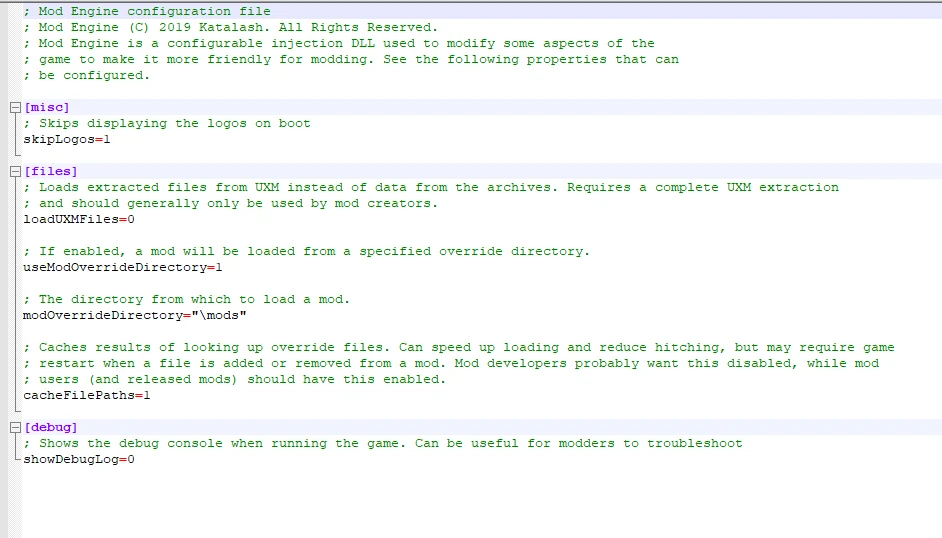
3. Open up modengine.ini and modify the modOverrideDirectory parameter to the folder you installed the mod into (a '\' character is required currently). This defaults to "\mods" but you can change it to something else if you wish.
modOverrideDirectory="\mods"
4. Enjoy your mod. If you want to play a different mod, change the modOverrideDirectory setting to point to a different folder with a different mod. To uninstall, delete or rename dinput8.dll.
Sekiro Mod Engine is a file replacement injection library that enables modding of weapons, armors, parameters, textures, and more. With 49,241 endorsements and 2.0 million downloads, it's the essential tool for Sekiro modding, last updated in November 2020.
✨ Key Features
📊 Pros & Cons
✅ Pros
- Massive community backing (49k endorsements, 2M downloads) – this is the go-to mod engine for Sekiro.
- Opens up the entire game for modding – weapons, armors, textures, parameters – all in one tool.
- Stable and proven – last updated in 2020 but still the standard, so you know it works.
⚠️ Cons
- Last updated in 2020 – may not be compatible with future game updates, though it's held up so far.
- Requires manual file placement and understanding of mod structure – not a plug-and-play mod.
For Sekiro players who want to install gameplay or visual mods – this is the foundation you need. Also for mod creators who want to build custom content. Skip if you're happy with vanilla Sekiro and don't plan to mod.
💡 Beginner Tips
- Make sure to back up your original game files before installing mods, as the engine replaces them.
- Check mod compatibility – some mods may require specific versions of the engine or other mods.
- Join the Sekiro modding community (e.g., Discord) for the latest mods and troubleshooting help.
📊 Mod Details
- Game
- Sekiro Mods
- Author
- Katalash
- Version
- 0.1.16
- Downloads
- 2,016,606
- Endorsements
- 49,241
- Category
- Gameplay
- Created
- 3/23/2019
- Updated
- 11/20/2020
🔗 Required By 9 Mods
These mods list this mod as a dependency.
🧩 Commonly Used Together
Users add these mods to the same collections — a real compatibility signal, not an AI guess.
🔧 How to Install Sekiro Mods
Download from Nexus.
📖 Full step-by-step install guide for Sekiro →
Visit the official mod page for specific installation instructions for this mod.
🎮 Need cheat codes or console commands? Check ur gaming wiki for Sekiro commands, item IDs, and more.
Keep browsing — more Sekiro mods await