Sittable rocks
⚪ Last updated 2012⚠️ Install Order · 2 steps
Install in this order, then this mod last — most mods fail to load without their framework and dependencies in place.
Preview
🔍 Analysis
- 👍 4.4% endorsement rate — high engagement, a strong quality signal
- 🏆 #273 of 337 Gameplay Effects and Changes mods in this game by downloads
📋 About This Mod
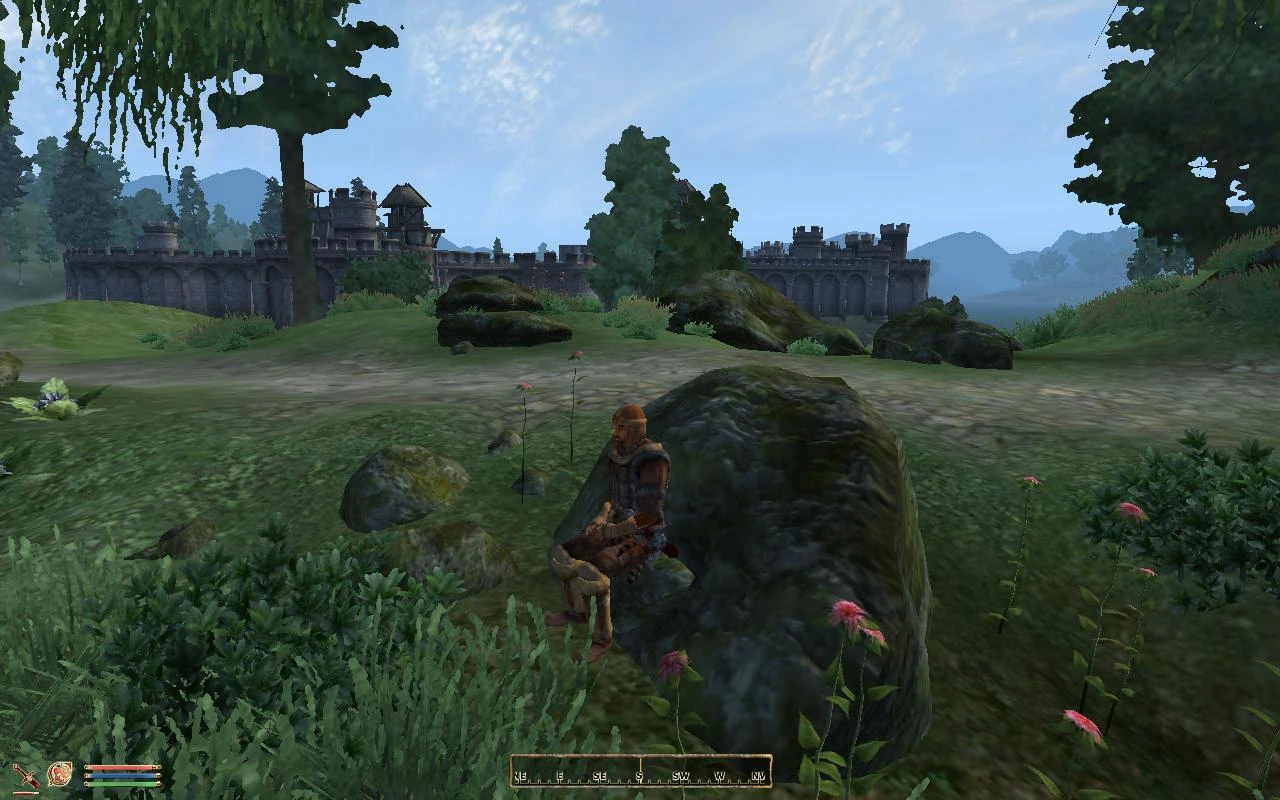
Name: Sittable rocks Version: 0. 55 Date: 17 January 2012 Category: Gameplay Effects and Changes Requirements: Oblivion Patch 1. 2. 0. 214, Oblivion Script Extender (OBSE): http://obse.silverlock.org/ Author(s): kuertee Source: http://www.tesnexus.com/downloads/file.php?id=21966 Changes since last update (0. 54) ================================ 0. 55, 17 January 2012: Compatibility: Removed the mod\'s reliance on Oblivion.esm. Tweak: Moved the INI to the INI folder. Read-me: A concise description of the mod: Gameplay changes, Compatibility, Details. Rewritten for ease of scanning. (And to get this ready for Skyrim users.) Gameplay changes ================ In the wilderness, rocks are sittable. Very few rocks in dungeons are sittable. This is because most rocks in dungeons are actually part of the dungeon wall mesh. Compatibility ============= The ESP has no master ESM. This mod should be compatible with any TES4-based games. E.g. Nehrim. The mod adds its own custom meshes so this should be compatible with other mods that adds or changes rocks. Details ======= Configure this mod with its INI file in (game folder)\\Data\\Ini\\. A custom sittable rock mesh is created in front of the player when the Activate key is pressed on a normal rock. When a new rock is activated elsewhere, the sittable rock is moved to it. Rocks that are sittable: 1. are not activatable 2. have \"rock\" in their model path Ayleid ruins that are sittable: 1. are not activatable 2. have \"exterior\" in their model path AND one of these words as well: \"block\", \"brick\", \"broken\" or \"statuebase\" 3. have \"interior\" in their model path AND one of these words as well: \"brick\", \"rubble\", or \"colbroken\" 4. have \"columnbroken\" in their model path. Fort ruins that are sittable: 1. are not activatable 2. have \"rubble\" or \"ruinswall\" in their model path 3. have \"castlecolm\" in their model path AND laid down on the ground Logs that are sittable: 1. have \"landscape\" AND \"log\" in their model path Low walls that are sittable: 1. have \"stonewall\" in their model path 2. have \"farmhouseconstruction01\" or \"farmhouseconstruction02\" in their model path Upgrade from previous versions ============================== OBMM: Deactivate the previous OMOD then follow the OBMM Install instructions with the new ZIP. Manual: Replace the old files and folders with the new files and folders from the ZIP. OBMM Install ============ 1. Click on \"Create\" to create a new OMOD. 2. Click on \"Add archive\" and point to the downloaded ZIP file. 3. Click on \"Create omod\". 4. Activate the newly created OMOD. OBMM Uninstall ============== 1. Deactivate the OMOD. Manual Install/Uninstall ======================== Unsupported. OBMM is recommended. History ======= 0. 54, 7 March 2009: Additional seats can be created for your companions. Set this number in the INI
This mod makes rocks, Ayleid ruins, and Fort ruins sittable in Skyrim. Simply approach one and press the Activate key (default) to sit, with the key configurable via an INI file. It's a simple immersion mod with 236 endorsements, last updated in 2012.
✨ Key Features
📊 Pros & Cons
✅ Pros
- Simple and functional—just walk up and press Activate to sit.
- Adds a nice touch of immersion for roleplayers who want to rest anywhere.
- Decent community support with 236 endorsements and over 5,000 downloads.
⚠️ Cons
- Last updated in 2012—may have compatibility issues with newer Skyrim versions or DLC.
- Limited scope: only rocks and ruins, not other surfaces like logs or benches.
- No documentation on how to edit the INI file, so you're on your own if you want to change the key.
For Skyrim players who enjoy immersive roleplaying and want to sit on natural scenery without needing a chair. If you're a screenshot enthusiast or a wanderer who likes to take breaks in the wild, this mod is for you. Skip if you want more complex sitting animations or broader object support.
💡 Beginner Tips
- Make sure to place the mod files in your Skyrim Data folder or use a mod manager like Nexus Mod Manager.
- If you want to change the sit key, look for the INI file in the mod's folder and edit it with a text editor.
- Since the mod is old, test it early in your playthrough to ensure it works with your current setup.
📊 Mod Details
- Game
- Oblivion Mods
- Author
- kuertee
- Version
- 0.55
- Downloads
- 5,420
- Endorsements
- 236
- Category
- Gameplay Effects and Changes
- Created
- 1/15/2009
- Updated
- 1/16/2012
🔧 How to Install Oblivion Mods
Download from Nexus.
📖 Full step-by-step install guide for Oblivion →
Visit the official mod page for specific installation instructions for this mod.
🎮 Need cheat codes or console commands? Check ur gaming wiki for Oblivion commands, item IDs, and more.
Keep browsing — more Oblivion mods await