Loot Menu
⚪ Last updated 2020⚠️ Install Order · 2 steps
Install in this order, then this mod last — most mods fail to load without their framework and dependencies in place.
Preview
🔍 Analysis
- 👍 1.6% endorsement rate — high engagement, a strong quality signal
- 🏆 #8 of 96 User Interfaces mods in this game by downloads
📋 About This Mod
DESCRIPTION:
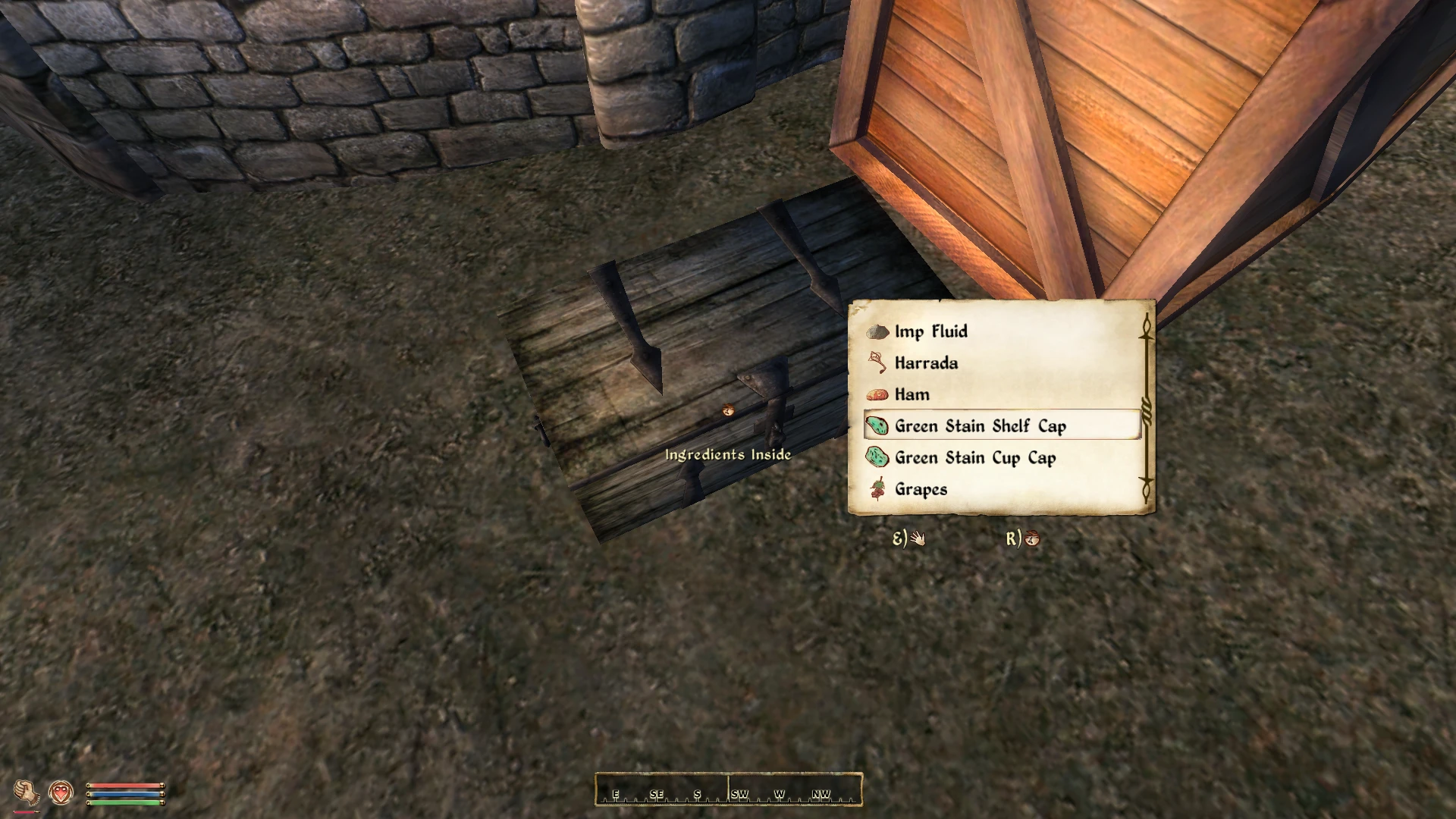
This mod adds a real-time Loot Menu similar to the one in Fallout 4.
This is a modified port of Gribbleshnibit8's Fallout: New Vegas mod.
The OBSE .dll plugin reimplements some of jazzisparis' commands from JIP LN NVSE Plugin.
-
[] Two different styles you can choose from
[
] Item icons[] A scrollbar
[] Full word wrapping
[] Sorting
[] Pickup sounds
[] Rebindable keys
[] Changeable size and location
[] Gamepad support through NorthernUI
[] Turn off features you don't want
[] Independent from UI mods
[] Compatible with everything
The menu works on all containers and creatures, both vanilla and modded. By default it will show up on scripted containers and NPCs that don't have an OnActivate block in their script, or containers that have an Activate function call inside their OnActivate block. It will not show up for any others to prevent accidental breaking of quests or mods. This approach should work fine in the vast majority of cases. Still, if needed, the mod's behavior on scripted containers can be changed in the .ini.
If an item is weightless then the whole stack will be taken, no matter how large. This can be turned off. There is also a configuration option for how many weighted items must be in a stack before you loot all at of them once.
There are two different styles for the menu. You can change them in the .ini, no need to reinstall the mod.
You can change the amount of items shown at once. This is limited from 1 to 8.
You can disable key prompts, icons and labels.
The sorting order for items is:
Quest Items, Gold, Lockpicks, Keys, Ammo, Soul Gems, Potions, Ingredients, Books, Clothing, Weapons, Armor and Miscellaneous.
CONTROLS:
Use your mouse scroll wheel to select an item.
Your current 'Activate' key takes the highlighted item and the 'Ready weapon' key opens the vanilla menu.
REQUIREMENTS:
Newest versions of:
xOBSE - use xOBSE as it is an updated fork of the original OBSE, containing a fix related to event handlers in mods, among other improvements.
Gamepad support requires:
Changing settings in-game is possible through:
RECOMMENDED:
EngineBugFixes contains fixes for some vanilla bugs related to containers and inventories.
I suspect the strange behavior that some users
Loot Menu is a UI overhaul for Oblivion that replaces the default container loot interface with a Fallout 4-inspired menu. It offers two UI styles to choose from, giving players a more modern and streamlined looting experience. With over 3,300 endorsements and 217,000 downloads, it's a popular choice for Oblivion players seeking a fresh take on inventory management.
✨ Key Features
📊 Pros & Cons
✅ Pros
- Huge community trust: 3,377 endorsements and 217k downloads show this mod is a staple for Oblivion UI modding.
- Two UI styles mean you can pick the look that fits your preference, whether you want a cleaner or more familiar layout.
- Inspired by Fallout 4's loot menu, so if you liked that system, this brings a similar feel to Oblivion.
⚠️ Cons
- Last updated in September 2020 — might have compatibility issues with newer Oblivion patches or mods that alter UI.
- Only affects container loot menus — if you wanted a full inventory overhaul, this won't cover that.
For Oblivion players who want a more modern and efficient looting experience, especially those who enjoyed Fallout 4's interface. If you're tired of the clunky default container menu and want a visual upgrade, this is a solid pick. Skip if you're looking for a complete UI overhaul or if you prefer the classic Oblivion style.
💡 Beginner Tips
- Since it's a UI mod, make sure to place it in your Oblivion Data folder and enable it in the launcher's Data Files section.
- If you use OBMM or Wrye Bash, install it through your mod manager to avoid overwriting other UI mods.
- Try both UI styles in-game to see which one feels better for your playthrough — you can switch by editing the INI or re-installing.
📊 Mod Details
- Game
- Oblivion Mods
- Author
- Ersh - original mod by Gribbleshnibit8
- Version
- 2.3.1
- Downloads
- 217,320
- Endorsements
- 3,377
- Category
- User Interfaces
- Created
- 9/4/2017
- Updated
- 9/30/2020
🔗 Required By 2 Mods
These mods list this mod as a dependency.
🧩 Commonly Used Together
Users add these mods to the same collections — a real compatibility signal, not an AI guess.
🔧 How to Install Oblivion Mods
Download from Nexus.
📖 Full step-by-step install guide for Oblivion →
Visit the official mod page for specific installation instructions for this mod.
🎮 Need cheat codes or console commands? Check ur gaming wiki for Oblivion commands, item IDs, and more.
Keep browsing — more Oblivion mods await