LINK Plus Plus
⚪ Last updated 2023⚠️ Install Order · 2 steps
Install in this order, then this mod last — most mods fail to load without their framework and dependencies in place.
Preview
🔍 Analysis
- 👍 1.2% endorsement rate — high engagement, a strong quality signal
- 🏆 #47 of 96 User Interfaces mods in this game by downloads
📋 About This Mod
DescriptionOriginal LINK is great. It do what it meant to do, and do it pretty damn good. But there's no limit to perfection, is there? This mod is a modified version of LINK (many thanks to Maskar for open permissions). It extends original LINK's functionality, while preserving full backward compatibility for mods designed to work with original LINK (if it works with LINK, it will work with LINK++ as well).
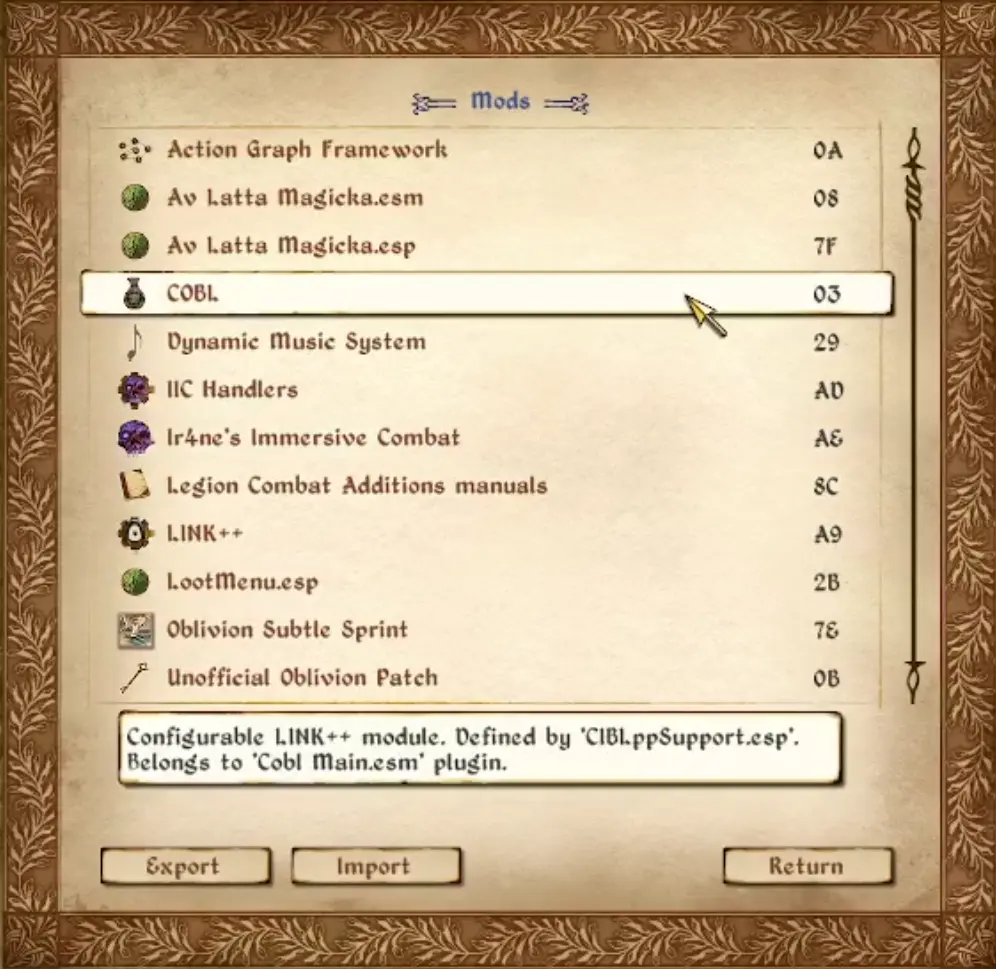
So what this mod exactly extends? First and the most important - it allows a new way of defining mod configuration entries for LINK's menu through xOBSE event handlers. This approach gives you the following benefits:
-
[]You have full control of when configuration of your mod becomes available. Original LINK's approach allows you to configure any mod at any time (even while in main menu and the game is not even started yet!). This may break your mod's logic if it doesn't expects to be configured in uninitialized state. With LINK++ only you decide when your mod can and can't be configured. You may even temporary disable your mod's configuration if it performs some heavy initialization/update and shouldn't be disturbed while doing this.
[
]Original LINK also provides no guarantees that your OnSettingsUpdated event handler will be invoked (you may configure your mod before handler is set), LINK++ guarantees that (if you define one, of course).[]It removes the implicit and allows greater flexibility. Unlike in original LINK that derives mod's .cfg and .ini paths from mod's file name, with LINK++ you can explicitly define path to .cfg file and paths to mod's .ini files (yes, you can now define multiple or even none .ini files for your mod).
[]You can now define multiple configuration entries for one mod. This is a very useful at least in 2 scenarios: 1 - if you have really-REALLY big mod that is technically one .esp file, but it is modular in it's nature and have waaaay too many configurations to fit in one menu (yes, I'm looking at you, MOO). 2 - you want to be able to merge your mod with other mods (that may also possibly support LINK) and still be able to configure them all with LINK.
[]One mod can now define configuration entries for other mods. This is very useful for adding LINK++ support for some ancient legacy mods that no one care to update anymore (see Configuration Items Begone for example).
[]Mod can optionally define its display name that will be shown in LINK++'s menu as well as description and version that will show on mouse over.
[]You can now define custom icon for your mod that will be displayed in mods list menu! It's also configurable, you can disable custom icons if you want.
[]Solves problem with duplicated menu entries if you have .esm and .esp files with the same name.
- Allows to add some custom pre-processing before mod config menu will be opened.
LINK Plus Plus is a fork of Maskar's LINK, extending its functionality while maintaining full backward compatibility with mods that support the original. With 554 endorsements and 46,327 downloads, it's a well-received UI enhancement for players who rely on LINK's features.
✨ Key Features
📊 Pros & Cons
✅ Pros
- Solid community backing with 554 endorsements and over 46k downloads.
- Backward compatible with original LINK, so existing mod setups won't break.
- Active fork from a legendary mod, bringing continued support and improvements.
⚠️ Cons
- Last updated in September 2023 — may not be updated for the latest game patches.
- Requires understanding of original LINK to fully appreciate the extensions.
For players already using Maskar's LINK who want extended functionality without breaking compatibility. Also for UI mod enthusiasts who appreciate a well-maintained fork of a classic. Skip if you're new to LINK and want a standalone UI overhaul.
💡 Beginner Tips
- If you're coming from original LINK, this is a drop-in replacement — just swap the files.
- Check the mod's forum posts for any compatibility notes with other UI mods.
- Since it's a UI mod, test it with your current mod list to ensure no conflicts.
📊 Mod Details
- Game
- Oblivion Mods
- Author
- Maskar and Ir4ne
- Version
- 0.1.4
- Downloads
- 46,327
- Endorsements
- 554
- Category
- User Interfaces
- Created
- 9/10/2023
- Updated
- 9/21/2023
🔗 Required By 1 Mod
These mods list this mod as a dependency.
🧩 Commonly Used Together
Users add these mods to the same collections — a real compatibility signal, not an AI guess.
🔧 How to Install Oblivion Mods
Download from Nexus.
📖 Full step-by-step install guide for Oblivion →
Visit the official mod page for specific installation instructions for this mod.
🎮 Need cheat codes or console commands? Check ur gaming wiki for Oblivion commands, item IDs, and more.
Keep browsing — more Oblivion mods await