Max Decoration Level Indicator
⚪ Last updated 2019⚠️ Install Order · 1 step
Install in this order, then this mod last — most mods fail to load without their framework and dependencies in place.
Preview
🔍 Analysis
- 👍 4.4% endorsement rate — high engagement, a strong quality signal
- 🏆 #10 of 40 User Interface mods in this game by downloads
📋 About This Mod
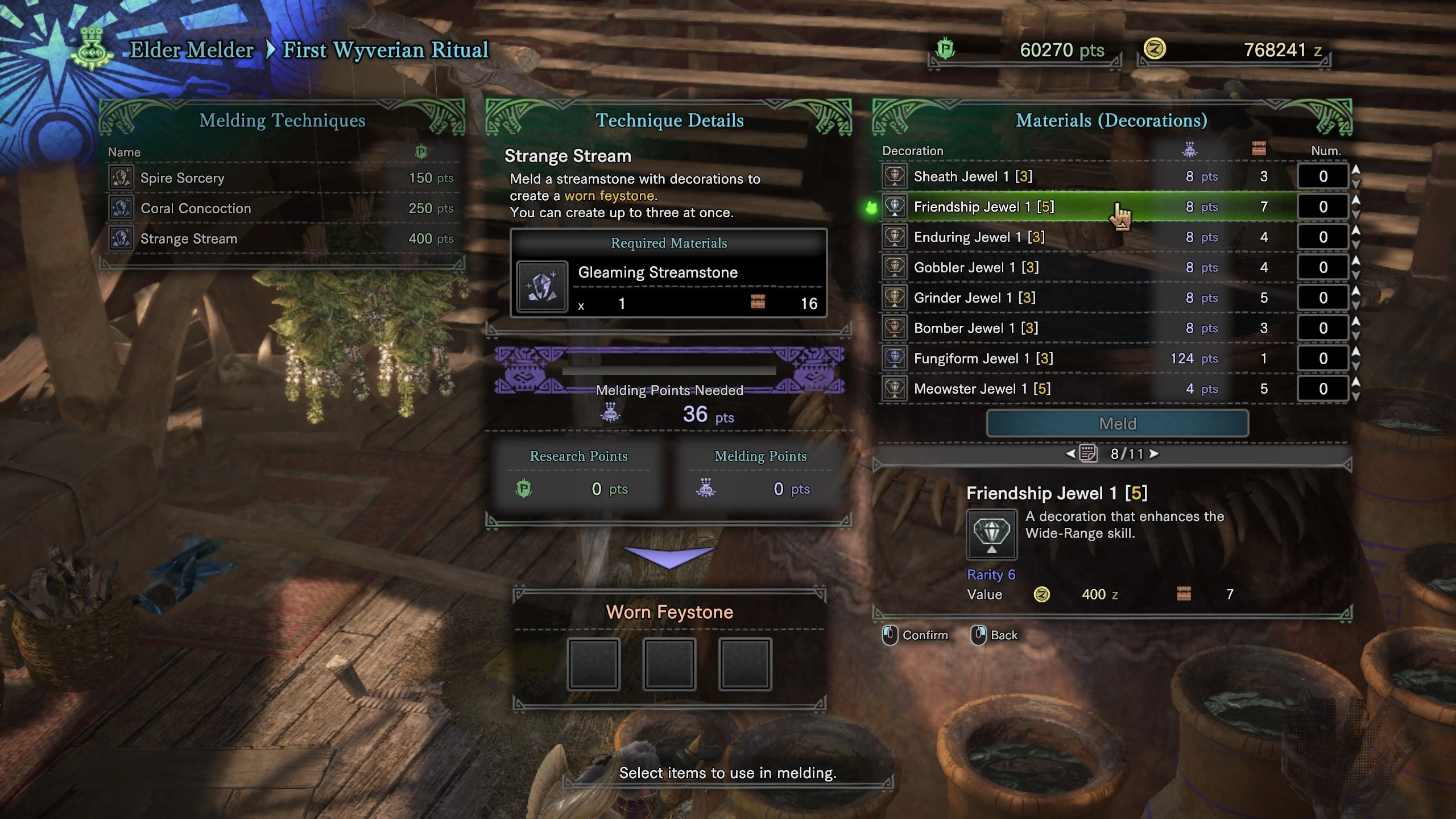
Very straightforward with a huge QoL boon for people who meld a lot - adds a [?] besides the name of the decoration, which lets you know how many you should keep when melding or how many you can equip for their max effect.
As of v0. 2 the maximum is now simply shown in brackets, in yellow: [5]
Thanks to seven332's tool, I was able to update all of the files more quickly, so I am now packaging them as one zip file for all languages.
Installation:
Simply copy the nativePC folder into your MHW folder: steamapps\common\Monster Hunter World\nativePC\
Uninstallation:
Simply delete the item_eng.gmd file from the text\steam folder located in: steamapps\common\Monster Hunter World\nativePC\common\text\steam
This UI mod for Monster Hunter: World adds a max number next to decoration names, showing how many to keep when melding or equipping for max effect. It supports all languages in a single file and has 3,794 endorsements.
✨ Key Features
📊 Pros & Cons
✅ Pros
- Huge community trust with 3,794 endorsements and 85k downloads.
- Solves a real headache—no more guessing how many decorations to hoard.
- One file covers every language, so no fiddling with language packs.
⚠️ Cons
- Last updated in 2019—might not work with newer title updates or Iceborne.
- Only shows a number—doesn't explain which skills are worth maxing, so you'll still need to know your build.
For Monster Hunter: World players who are tired of juggling decorations and want a quick visual cue for melding and loadouts. Skip if you're on console or prefer a more detailed UI overhaul.
💡 Beginner Tips
- Make sure to back up your nativePC folder before adding mods, just in case.
- If you're using a mod manager like Vortex, let it handle the file placement to avoid conflicts.
- Check if the mod is compatible with your game version—since it's from 2019, it may need an update for Iceborne.
📊 Mod Details
- Game
- Monster Hunter World Mods
- Author
- Endracion
- Version
- v0.8-all
- Downloads
- 85,348
- Endorsements
- 3,789
- Category
- User Interface
- Created
- 9/16/2018
- Updated
- 5/29/2019
🧩 Commonly Used Together
Users add these mods to the same collections — a real compatibility signal, not an AI guess.
🔧 How to Install MHW Mods
Install Stracker\
📖 Full step-by-step install guide for MHW →
Visit the official mod page for specific installation instructions for this mod.
🎮 Need cheat codes or console commands? Check ur gaming wiki for MHW commands, item IDs, and more.
Keep browsing — more MHW mods await