HunterPie - Overlay and Rich Presence
⚪ Last updated 2023⚠️ Install Order · 1 step
Install in this order, then this mod last — most mods fail to load without their framework and dependencies in place.
Preview
🔍 Analysis
- 👍 2.7% endorsement rate — high engagement, a strong quality signal
- 🏆 #4 of 40 User Interface mods in this game by downloads
📋 About This Mod
What is HunterPie?
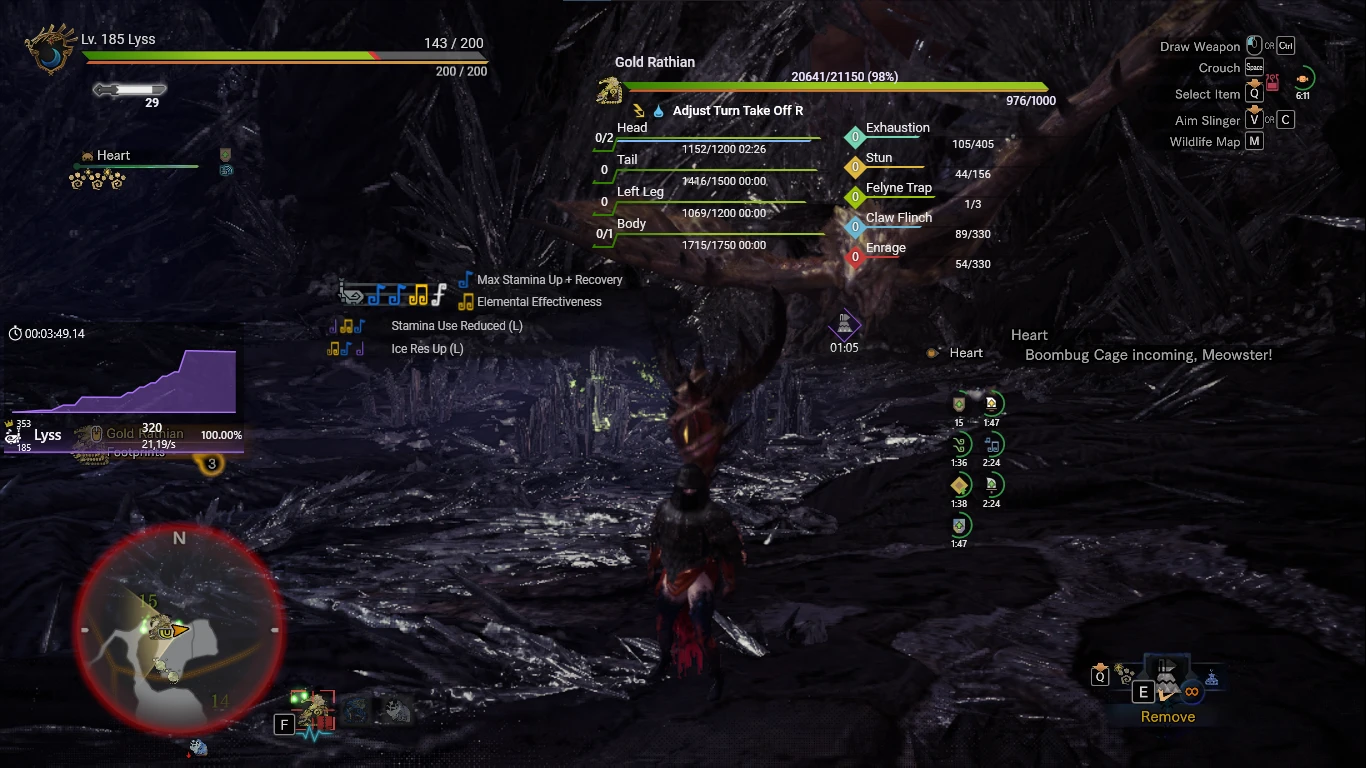
HunterPie is an overlay with Discord rich presence support. It works by reading the game process memory, storing all the necessary data to later on display everything in the overlay and in the discord rich presence. HunterPie also supports auto-update, so whenever there's a new patch, it will automatically search and download all the new files, it can be disabled though.
HunterPie is open-source, feel free to check it out on GitHub.
If you want a more organized way to see HunterPie features, consider checking out it's official documentation.
Attention: Development for this version of HunterPie was discontinued in favor of HunterPie V2, the new version supports both MHW and MHRise but does not contain every feature of this version.
Main Features
-
[]Discord Rich Presence support: it's highly detailed, tracks all your activity and displays it for your friends on Discord. Also has an "Ask To Join" feature where other people can join (requires HunterPie due to how Rich Presence works).
[
]Honey Hunters World build uploader: Tired of manually selecting your gear in Honey Hunters World? HunterPie automatically gets your current character gear and gives you a link to your build with only 1 click![]Decoration & Charms exporter: HunterPie can export your decoration and charms in Honey Hunters World string format!
[]Clean and detailed Overlay: HunterPie has a nice and clean overlay.
[]Automatic Updates: HunterPie has an automatic way to check for the latest files, so you don't need to manually download a new version whenever a new update comes out! That also includes automatic update for the latest localization files.
[]Plugin System: You can make your own HunterPie extensions and they have access to everything HunterPie tracks including Player, Monsters and Game information!
[]Easy to configure and to use: HunterPie has a settings tab, so you don't have to manually edit a config.json file!
Installation
-
[]Download the files by clicking on the "Manual" button here in Nexus.
[]Extract the .zip file you downloaded anywhere you want.
[]Run HunterPie.exe that is located inside the folder you extracted the files to.
Discord Rich Presence
You can now show your friends what you're hunting! The Discord Rich Presence feature shows what stage you are in, your character name, Hunter Rank, Master Rank, your weapon, and the size of your party. This feature can be disabled in HunterPie settings. You can read more about the Rich Presence implementation here.
HunterPie has a complete, modern and simple-to-use overlay.
Monster Widget
HunterPie has a detailed monster widget, monster parts, ailments, enrage timer, monster size crown, name, weaknesses and it all in a very clean design. The colors can be changed with a theme file. You can read more about the monster widget here.
Harvest Box Widget
If enabled, this widget is shown in "peace" areas by default (Astera, Gathering hub and your room), however you can enable it to show in all zones too in HunterPie's settings. It displays the fertilizer names, their duration and the amount of items in your harvest box. It also has an animation for when a fertilizer is close to expire (under 4 days left). In the bottom part, it displays your steam fuel, argosy and tailraider safari, a red bubble will warn you whenever your steam fuel is full, when argosy is in the town and when tailraiders are back from their expedition. You can read more about this widget here.
Specialized Tool Widget
They're shown whenever your equipped mantle cooldown/timer starts. This widget color can be customized in HunterPie's settings.
Damage Meter Widget
Displays total damage, damage per second, player classes, HR, MR, percentage and quest time. You can read more about it here.
-
[]Download the files by clicking on the "Manual" button here in Nexus.
HunterPie is a lightweight overlay for Monster Hunter: World that adds Discord Rich Presence integration. With over 21,000 endorsements and 792,000 downloads, it's a popular tool for hunters who want to share their in-game activity with friends. Last updated in October 2023, it remains a staple for the game's community.
✨ Key Features
📊 Pros & Cons
✅ Pros
- Massive community trust – 21k endorsements and 792k downloads speak for themselves
- Does exactly what it says: clean overlay plus Discord Rich Presence, no bloat
- Still updated as of October 2023, so it's not abandoned
⚠️ Cons
- Only for Monster Hunter: World, so no use if you play other titles
- Overlay might conflict with other UI mods or anti-cheat – test carefully
For Monster Hunter: World players who want to show off their hunts on Discord and have a handy overlay for in-game info. Perfect for streamers and social hunters. Skip if you don't use Discord or prefer a minimal UI.
💡 Beginner Tips
- Make sure to run the overlay as administrator if it doesn't appear in-game
- Check your Discord settings to ensure Rich Presence is enabled for the game
- If you use other overlay tools, disable them to avoid conflicts
📊 Mod Details
- Game
- Monster Hunter World Mods
- Author
- haatos
- Version
- 1.0.6
- Downloads
- 792,174
- Endorsements
- 21,763
- Category
- User Interface
- Created
- 2/26/2020
- Updated
- 10/18/2023
🔧 How to Install MHW Mods
Install Stracker\
📖 Full step-by-step install guide for MHW →
Visit the official mod page for specific installation instructions for this mod.
🎮 Need cheat codes or console commands? Check ur gaming wiki for MHW commands, item IDs, and more.
Keep browsing — more MHW mods await