Monster 3 Star Elemental Weakness Indicator
⚪ Last updated 2018⚠️ Install Order · 1 step
Install in this order, then this mod last — most mods fail to load without their framework and dependencies in place.
Preview
🔍 Analysis
- 👍 5.9% endorsement rate — high engagement, a strong quality signal
- 🏆 #39 of 40 User Interface mods in this game by downloads
📋 About This Mod
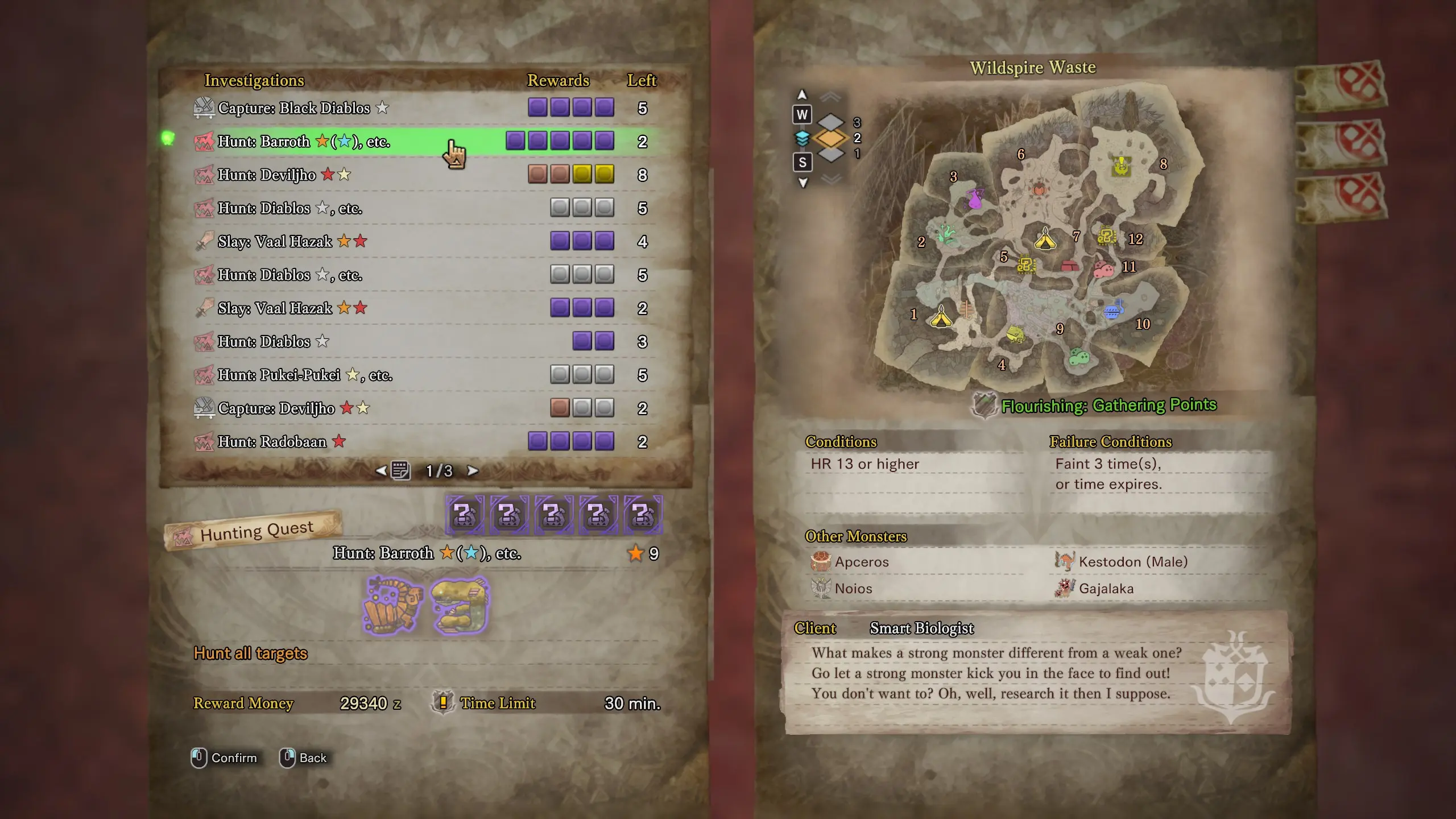
As suggested by zukane2, here's another QoL change where the monster's 3 ☆ Elemental Weakness is displayed next to their name in Investigations and Monster Field Guide/Researcher.
Saves you the trouble of browsing the wiki or monster guide's details!
Elemental colors are as follows:
★ - Dragon
★ - Thunder
★ - Water
★ - Fire
★ - Ice
All languages can be found in the optional downloads section.
As of v0. 2, weaknesses are displayed as colored stars thanks to Krillion's suggestion.
If you're interested in these being displayed in the monster icons everywhere instead; see my Monster 3 Star Elemental and Status Ailment Weakness mod.
** If you want to use my Threat Level Indicator alongside this mod, please download following mod instead: Monster Threat and 3 Star Weakness Indicators.
Installation:
Simply copy the nativePC folder into your MHW folder: steamapps\common\Monster Hunter World\nativePC\
Uninstallation:
Simply delete the em_names_eng.gmd file from the text folder located in: steamapps\common\Monster Hunter World\nativePC\common\text\
This UI mod for Monster Hunter: World displays the 3-star elemental weakness next to a monster's name in Investigations and the Monster Field Guide/Researcher. It's a quality-of-life improvement for hunters who want quick reference to elemental matchups without opening menus. With 686 endorsements and 11,718 downloads, it's a popular, lightweight addition.
✨ Key Features
📊 Pros & Cons
✅ Pros
- Solid community trust with 686 endorsements and over 11k downloads.
- Saves time by putting key info right where you need it.
- Lightweight UI tweak that doesn't mess with gameplay.
⚠️ Cons
- Last updated in 2018, so it might not work with the latest game patches.
- Only shows the 3-star weakness, not other elemental resistances or statuses.
- Potential conflicts with other UI mods that alter monster name displays.
For Monster Hunter: World hunters who want to quickly check elemental weaknesses without digging through menus. Perfect for players who frequently switch weapons based on monster matchups. Skip if you prefer a more comprehensive UI overhaul or play with mods that already show this info.
💡 Beginner Tips
- Make sure to place the mod files in the nativePC folder of your Monster Hunter: World directory.
- If you use other UI mods, test this one first to see if they conflict.
- Since it's from 2018, check if the mod still works after game updates; if not, look for a community patch.
📊 Mod Details
- Game
- Monster Hunter World Mods
- Author
- Endracion
- Version
- 0.2-eng
- Downloads
- 11,717
- Endorsements
- 686
- Category
- User Interface
- Created
- 9/17/2018
- Updated
- 9/25/2018
🔧 How to Install MHW Mods
Install Stracker\
📖 Full step-by-step install guide for MHW →
Visit the official mod page for specific installation instructions for this mod.
🎮 Need cheat codes or console commands? Check ur gaming wiki for MHW commands, item IDs, and more.
Keep browsing — more MHW mods await