SmartHunter - Overlay
⚪ Last updated 2019⚠️ Install Order · 1 step
Install in this order, then this mod last — most mods fail to load without their framework and dependencies in place.
Preview
🔍 Analysis
- 👍 2.3% endorsement rate — high engagement, a strong quality signal
- 🏆 #1 of 40 User Interface mods in this game by downloads
📋 About This Mod
SmartHunter - Overlay
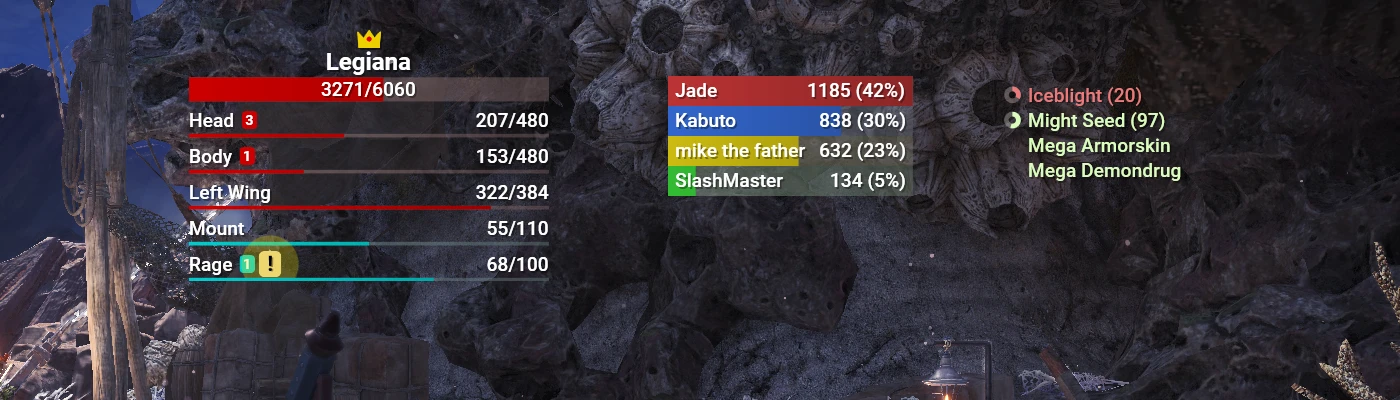
A complete overlay for Monster Hunter: World on PC. Features include:
-
[]Monster widget - name, health, parts, status effect buildup, and crown.
[
]Team widget - name and damage meters.[]Player widget - buff, debuff, and equipment/mantle timers.
[]Open source - freely learn from and contribute to the project on github.
[]Skinnable - create and distribute your own rich styles and animations with XAML.
[]Easy localization - create and distribute your own translations for our international friends.
Notes
-
[]Monster parts/status effect buildups only update properly for the host.
[
]Team damage does not work in expedition mode.Requirements
-
[]Windows.
[
]The latest . NET Framework runtime.[]Game must be running in borderless or windowed.
How to use
-
[]Launch SmartHunter.exe.
[]Hold LeftAlt to view widget locations.
[]Click and drag widgets to move them.
[]Scroll over widgets to rescale them.
[]Customize your experience by editing Config.json. This file is generated when you launch SmartHunter.
How to create and use new localizations
-
[]Create a copy of en-US.json and rename it for the locale you are translating to.
[
]Translate the strings in the second part of each key value pair. Do not change the keys.[]Ensure the new file is in the SmartHunter folder.
[]Open Config.json and point LocalizationFileName to the new file.
Note to translators: please use the official in-game translations and terminology where possible, to provide a consistent experience for players.
How to create and use new skins
-
[]Create a copy of Default.xaml and rename it appropriately.
[
]Make changes to the new file.[]Ensure the new file is in the SmartHunter folder.
[]Open Config.json and point SkinFileName to the new file.
FAQ
Why isn't SmartHunter running?
-
[]Make sure you have the latest . NET Framework
[
]Make sure the app is in its own writable folder[]Try putting it in a new folder on your desktop or in My Documents
[]Try running it as an admin
SmartHunter is running but I can't see the overlay?
-
[]Make sure the game is running in borderless or windowed, NOT fullscreen
[
]Hold LeftAlt, if you can see the red borders around the widgets, you'll see the overlay when you go into a quest[]If you can't see the red borders, check Config.json to make sure the widgets aren't positioned off your screen. If they are, change the X and Y values.
Can I turn off monster health? Can I turn off team damage so it only shows percentage? Can I turn off widgets I don't want? Can I turn off other things?
Yes - Config.json is your friend.
Can I send damage or other information to chat?
No, and there are no plans to add this yet. The information shown by this overlay is intended to be for your eyes only.
Why don't monster parts and status effects update properly in multiplayer sessions?
This data only updates properly for the quest host. This is just the way the game works and it can't be worked around.
I can't find the config file. It's not in the zip folder?
Config.json is generated when you launch SmartHunter.
Credits
[]HelloWorld for inspiration with their overlay.
[]Material1 for their efforts in finding monster sizes.
[]hqvrrsc4 for inspiration with their overlay.
[]HelloWorld, amatess2002, regretofabreath, and hawk333 for their efforts in indexing monster parts.
[][url=https://www.nexusm
-
[]Make sure the game is running in borderless or windowed, NOT fullscreen
-
[]Make sure you have the latest . NET Framework
-
[]Create a copy of Default.xaml and rename it appropriately.
-
[]Create a copy of en-US.json and rename it for the locale you are translating to.
-
[]Launch SmartHunter.exe.
-
[]Windows.
-
[]Monster parts/status effect buildups only update properly for the host.
SmartHunter is a feature-rich overlay for Monster Hunter: World that displays monster health, parts, status effects, crown, team damage, player buffs/debuffs, and equipment/weapon buffs. It is open source, localizable, and skinnable, making it a highly customizable tool for players who want detailed combat information.
✨ Key Features
📊 Pros & Cons
✅ Pros
- Huge community trust with 29,657 endorsements and 1.3 million downloads.
- Packed with info: monster health, parts, statuses, crowns, team damage, and buffs all in one overlay.
- Open source and skinnable means you can tweak it to look exactly how you want.
⚠️ Cons
- Last updated in 2019 — likely outdated for current Monster Hunter: World versions.
- Overlay tools can be considered cheating in some multiplayer circles, so use with caution.
For Monster Hunter: World players who want to min-max hunts with real-time monster and team data. Also for modders who enjoy customizing UI skins. Skip if you prefer a vanilla experience or play on consoles.
💡 Beginner Tips
- Check if the overlay is compatible with your game version, as it hasn't been updated since 2019.
- Look for community-made skins or translations if you want a different look or language.
- If you play online, be aware that some players might frown upon overlay mods — use at your own discretion.
📊 Mod Details
- Game
- Monster Hunter World Mods
- Author
- r00telement
- Version
- 1.1.7113.30815
- Downloads
- 1,293,609
- Endorsements
- 29,606
- Category
- User Interface
- Created
- 1/27/2019
- Updated
- 6/23/2019
🔗 Required By 1 Mod
These mods list this mod as a dependency.
🔧 How to Install MHW Mods
Install Stracker\
📖 Full step-by-step install guide for MHW →
Visit the official mod page for specific installation instructions for this mod.
🎮 Need cheat codes or console commands? Check ur gaming wiki for MHW commands, item IDs, and more.
Keep browsing — more MHW mods await