Low Texture Resolution Workaround
⚪ Last updated 2019⚠️ Install Order · 1 step
Install in this order, then this mod last — most mods fail to load without their framework and dependencies in place.
Preview
🔍 Analysis
- 👍 1.5% endorsement rate — high engagement, a strong quality signal
- 🏆 #5 of 69 Visuals and Graphics mods in this game by downloads
📋 About This Mod
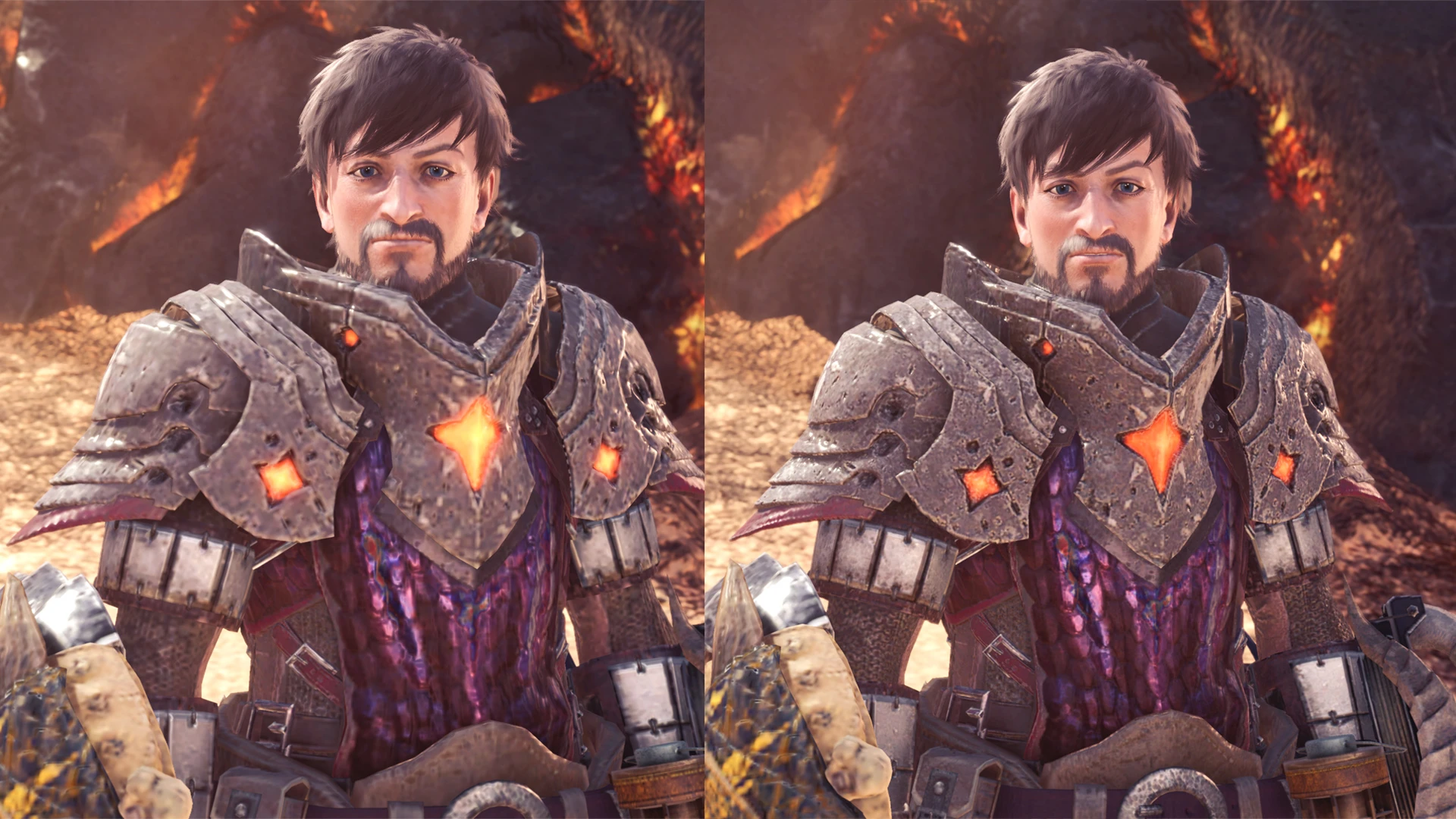
Monster Hunter: World - Crude Low Texture Resolution Workaround v1. 07
Mod by MHVuze
Update 04. 04. 2019: It only took Capcom 6 months to address this blatant issue but it seems as of build 167353 they have finally fixed the texture quality setting and thereby have remedied the low resolution problem. I recommend wiping your nativePC folder to clear out any textures touched by this workaround. You do not need to use the High Resolution texture pack by the way, the issue is fixed for the "High" setting as well (I haven't verified others for obvious reasons).
Update 31. 10. 2018: Capcom has partially adressed the texture loading issue in today's title update (Kulve Taroth). Several reports indicate the issue still persists outside of the Astera hub. Hence why I will continue to update this workaround until it's fixed completly.
This is definitely not a proper fix for the problem and it might introduce other visual curiosities even if I haven't noticed any.
Currently adresses player, armor, NPCs, Palico and weapons.
Tested and working with game build 154766.
Use at your own risk! Play in offline mode if you fear a ban or whatever.
If you have installed texture mods for the above categories, rename your nativePC folder before running this. Then, after the steps below are completed, copy back the contents of that renamed folder to nativePC.
If you have to overwrite texture files in the process, those will likely suffer from the low resolution issue again.
I can't and won't guarantee compatibility with mods touching NPC/weapon/player/armor stuff.
How-to (First-time install & update):
1. Move WorldDecompress.exe to your game install directory (i.e. D:\Steam\steamapps\common\Monster Hunter World)
2. Unpack all main WorkaroundData.rar from the download section to your game install directory so that the .cdi and .cdp files are next to MonsterHunterWorld.exe and WorldDecompress.exe
3. Run WorldDecompress.exe and wait for a bit
(4. You can now delete everything called WorldDecompress_ from your game install dir)
Tip: You can install WorkaroundData independently from each other. No need to reinstall everything if a new one gets added. Just put the .exe in the directory as well as the .cdi and .cdp of the new WorkaroundData you want to install and run.
To get rid of the mod, just remove the nativePC folder. Or, if you have other mods installed, remove the files of this mod to keep the other mods intact.
If you downloaded this mod from anywhere but NexusMods, be wary of malicious modifications.
Donations are appreciated: https://streamlabs.com/mhvuze
Twitter: https://twitter.com/mhvuze
Technical background: The game
A crude workaround for texture issues in Monster Hunter: World, no longer needed after build 167353. It provides a temporary band-aid solution until Capcom addressed the problems. For players on older builds who want improved textures.
✨ Key Features
📊 Pros & Cons
✅ Pros
- Huge community adoption (2,916 endorsements, 196k downloads) — clearly solved a real problem for many players
- Simple and effective for its time — a quick fix for an annoying visual issue
- Lightweight and easy to use — just drop it in and go
⚠️ Cons
- Obsolete since build 167353 — if you're on a current version, this mod does nothing
- Author explicitly calls it 'crude' and 'a band aid' — not a polished solution
- No longer updated since 2019 — no support for newer builds
For Monster Hunter: World players stuck on older builds (pre-167353) who want to clean up texture pop-in without waiting for Capcom. Skip if you're on a current build — you don't need this anymore.
💡 Beginner Tips
- Check your game build number before installing — if it's 167353 or later, skip this mod entirely
- If you're on an older build, place the files in your game directory as instructed (manual install)
- This mod is a temporary workaround — consider updating your game to get the official fix
📊 Mod Details
- Game
- Monster Hunter World Mods
- Author
- MHVuze
- Version
- 1.10
- Downloads
- 196,783
- Endorsements
- 2,916
- Category
- Visuals and Graphics
- Created
- 8/23/2018
- Updated
- 1/22/2019
🔧 How to Install MHW Mods
Install Stracker\
📖 Full step-by-step install guide for MHW →
Visit the official mod page for specific installation instructions for this mod.
🎮 Need cheat codes or console commands? Check ur gaming wiki for MHW commands, item IDs, and more.
Keep browsing — more MHW mods await