Colorful ReShade
⚪ Last updated 2018⚠️ Install Order · 1 step
Install in this order, then this mod last — most mods fail to load without their framework and dependencies in place.
Preview
🔍 Analysis
- 👍 3.3% endorsement rate — high engagement, a strong quality signal
- 🏆 #3 of 69 Visuals and Graphics mods in this game by downloads
📋 About This Mod
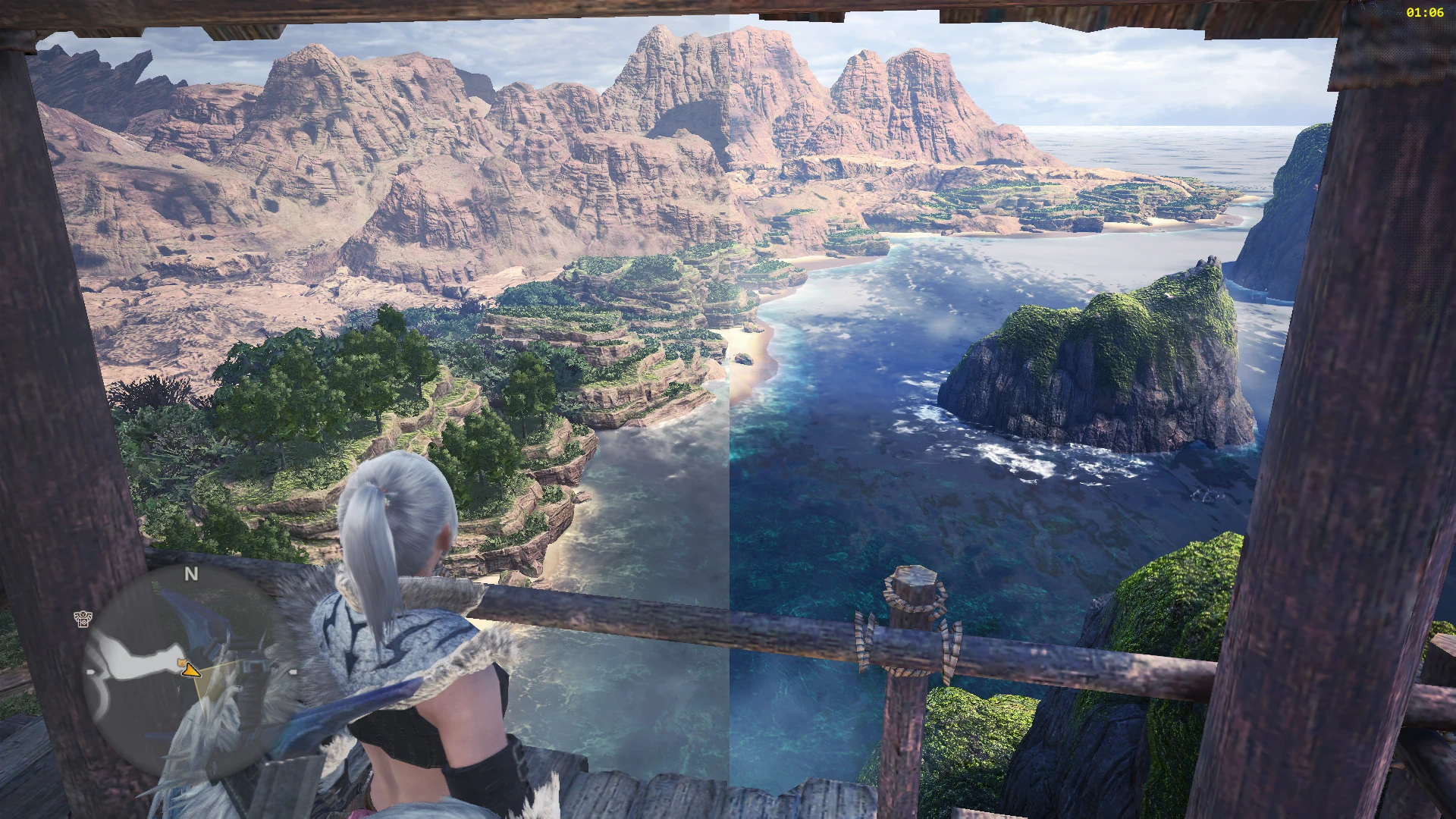
Well, in general, the water looks more blue, the leaves look more green, and the fire looks more red, dark places look darker, and bright places look brighter, in a not so overdone way that won't hurt your eyes even if looked at for a long time imo.
Yes, it works with Iceborne, as updates don't affect how reshade works.
Installation:
-
[]Extract the preset into the Monster Hunter World folder (C:\Program Files (x86)\Steam\steamapps\common\Monster Hunter World\)
[
]Download and install reshade from https://reshade.me/[]Choose Clarity, Colorfulness, Curve, and EyeAdaptation as the effects/shaders
[]Open MHW with the Direct3D 10+ option and once opened press Shift+F2 to open up the reshade menu
[]From the drop down menu select Leaf's Colorful ReShade
- []Deleted the Leaf's Colorful ReShade.ini, dxgi.dll, dxgi.ini files.
- Delete the reshade-shaders folder
Screenshots:
Colorful ReShade is a preset that enhances the game's visuals by adding depth and color, addressing the washed-out appearance. It is compatible with Iceborne and has gained significant popularity with 7,377 endorsements and 223,502 downloads. Last updated in 2018, it remains a community favorite for improving the game's mood and realism.
✨ Key Features
📊 Pros & Cons
✅ Pros
- Huge community trust with 7,377 endorsements and over 223k downloads.
- One-file preset—no complex setup, just drop it in and go.
- Works with Iceborne, so you're covered even with the expansion.
⚠️ Cons
- Last updated in 2018—might have issues with newer game patches or ReShade versions.
- No screenshots or detailed previews in the description, so you're flying blind until you test it.
- Preset is subjective—what looks 'realistic' to the author might not suit your taste.
For Monster Hunter: World players who find the base game's colors dull and want a quick visual boost without tweaking settings. If you're into vibrant, saturated visuals and don't mind a preset that's been around for years, this is for you. Skip if you prefer a more natural or desaturated look.
💡 Beginner Tips
- Make sure you have ReShade installed first—this is just a preset, not the full tool.
- Test the preset in different areas (e.g., Ancient Forest vs. Elders Recess) to see if the color boost fits your preference.
- If the game updates, re-check the preset's compatibility; you might need to reinstall ReShade.
📊 Mod Details
- Game
- Monster Hunter World Mods
- Author
- Leaf
- Version
- 1.00
- Downloads
- 223,506
- Endorsements
- 7,367
- Category
- Visuals and Graphics
- Created
- 9/1/2018
- Updated
- 9/1/2018
🧩 Commonly Used Together
Users add these mods to the same collections — a real compatibility signal, not an AI guess.
🔧 How to Install MHW Mods
Install Stracker\
📖 Full step-by-step install guide for MHW →
Visit the official mod page for specific installation instructions for this mod.
🎮 Need cheat codes or console commands? Check ur gaming wiki for MHW commands, item IDs, and more.
Keep browsing — more MHW mods await