Natural Bone ( and Crystal )
⚪ Last updated 2020⚠️ Install Order · 1 step
Install in this order, then this mod last — most mods fail to load without their framework and dependencies in place.
Preview
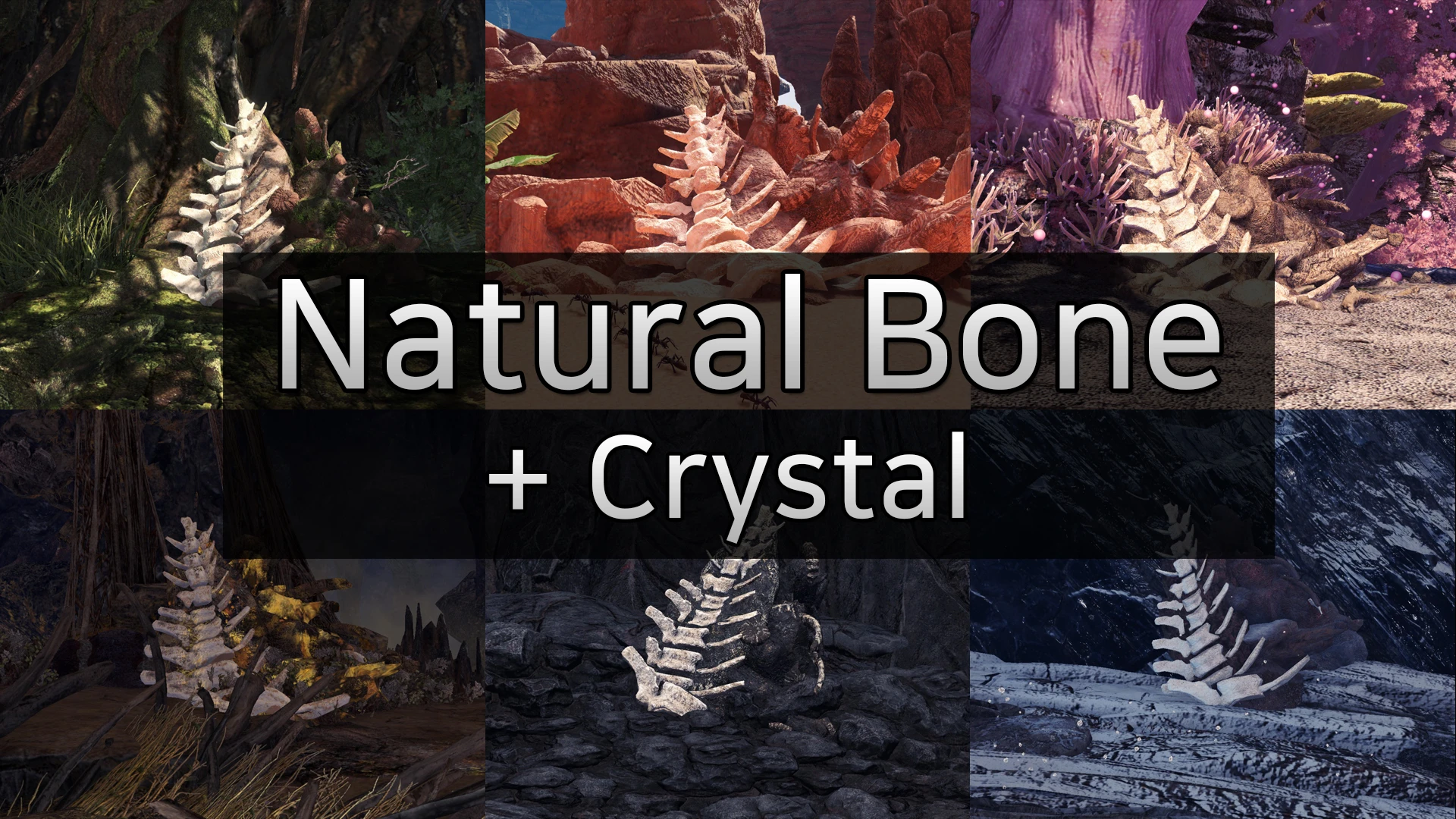
🔍 Analysis
- 👍 3.9% endorsement rate — high engagement, a strong quality signal
- 🏆 #6 of 69 Visuals and Graphics mods in this game by downloads
📋 About This Mod
Recommended to install this mod as a manual
- Updated 15/03/20 -
· [빙설지대 뼈무덤]
뼈의 색상을 더욱 밝게 조정하고 바위에 쌓여있던 눈을 제거하여
더 쉽게 찾을 수 있도록 만들었습니다
·
Tundra
Region's
BONE PILE
]
The color of the bones was adjusted to make brighter
and shovel away the snow from the rock.
It will be easier to find.
인도하는 땅에 있는 뼈무덤과 광맥의 텍스쳐를 더 밝게 바꿔줍니다
압축 풀기 후 nativePC 폴더를 복사해서 몬스터헌터 월드가 설치되어있는 폴더에 붙여넣기
뼈무덤: nativePC\Assets\gm000\gm000_512,513, 522,523, 532,533, 542,543, 552,553, 582,583 삭제
광맥 : nativePC\Assets\gm000\gm000_510,511, 520,521, 530,531, 540,541, 550,551, 580,581 삭제
Replace the texture of Guide-Land's BONE PILE & MINING OUTCROP more brightly
Just unzip and copy nativePC folder to the base folder of wherever you have MHW installed
· Uninstall
BONE PILE : Delete nativePC\Assets\gm000\gm000_512,513, 522,523, 532,533, 542,543, 552,553, 582,583
MINING OUTCROP : Delete nativePC\Assets\gm000\gm000_510,511, 520,521, 530,531, 540,541, 550,551, 580,581
- Updated 12/03/20 -
· 빙설지대에 있는 뼈무덤과 광맥의 텍스쳐를 추가했습니다
· 육산호지대 광맥의 색상을 변경하였습니다.
· Add Tundra Region's BONE PILE, MINING OUTCROP textures
· Change Corral Region's MINING OUTCROP color
- Updated 10/02/20 -
· 모든 텍스쳐의 해상도를 높이고 색상을 조정하였습니다.
· The resolution of all textures has been increased and the color adjusted.
- Updated 06/02/20 -
· 용암지대에 있는 뼈무덤과 광맥의 텍스쳐를 추가했습니다
· Add Volcanic Region's BONE PILE, MINING OUTCROP textures
- Updated 22/01/20 -
· 광맥의 색상을 더욱 선명하게 조정하였습니다
· MINING OUTCROP's color has been adjusted more vivid
- Updated 21/01/20 -
· 색상을 재조정하고 텍스쳐의 해상도를 높였습니다
· 광맥의 색상을 변경하는 모드도 추가되었습니다
· Color adjusted and Improved texture resolution
· Add MINING OUTCROP's color change mod
A compact visual mod that replaces the textures of Guiding Lands resources in Monster Hunter: World with brighter, more vivid versions. Popular with 6,637 endorsements and 167,984 downloads, last updated in March 2020.
✨ Key Features
📊 Pros & Cons
✅ Pros
- Huge download count (167,984) shows it's a go-to for many hunters.
- Simple texture swap that makes resource nodes pop—no more squinting.
- Optional crystal variant adds extra flair if you want more than just bone.
⚠️ Cons
- Last updated in 2020—might not be compatible with the latest game patches.
- Only affects Guiding Lands resources; if you want other area overhauls, this won't help.
For Monster Hunter: World players who spend a lot of time in the Guiding Lands and want resource nodes to stand out. Skip if you're looking for broader visual overhauls or gameplay changes.
💡 Beginner Tips
- Back up your original texture files before replacing them, so you can revert if needed.
- If you use a mod manager like Vortex, let it handle the file placement to avoid conflicts.
- Check if the mod requires the Stracker's Loader or similar for texture mods to work—if so, install that first.
📊 Mod Details
- Game
- Monster Hunter World Mods
- Author
- Kmunan
- Version
- 1.2
- Downloads
- 167,984
- Endorsements
- 6,630
- Category
- Visuals and Graphics
- Created
- 1/20/2020
- Updated
- 3/14/2020
🧩 Commonly Used Together
Users add these mods to the same collections — a real compatibility signal, not an AI guess.
🔧 How to Install MHW Mods
Install Stracker\
📖 Full step-by-step install guide for MHW →
Visit the official mod page for specific installation instructions for this mod.
🎮 Need cheat codes or console commands? Check ur gaming wiki for MHW commands, item IDs, and more.
Keep browsing — more MHW mods await