Trading UnCapped
⚪ Last updated 2018Preview
🔍 Analysis
- 👍 3.3% endorsement rate — high engagement, a strong quality signal
- 🏆 #100 of 116 User Interface mods in this game by downloads
📋 About This Mod
Trading UnCapped
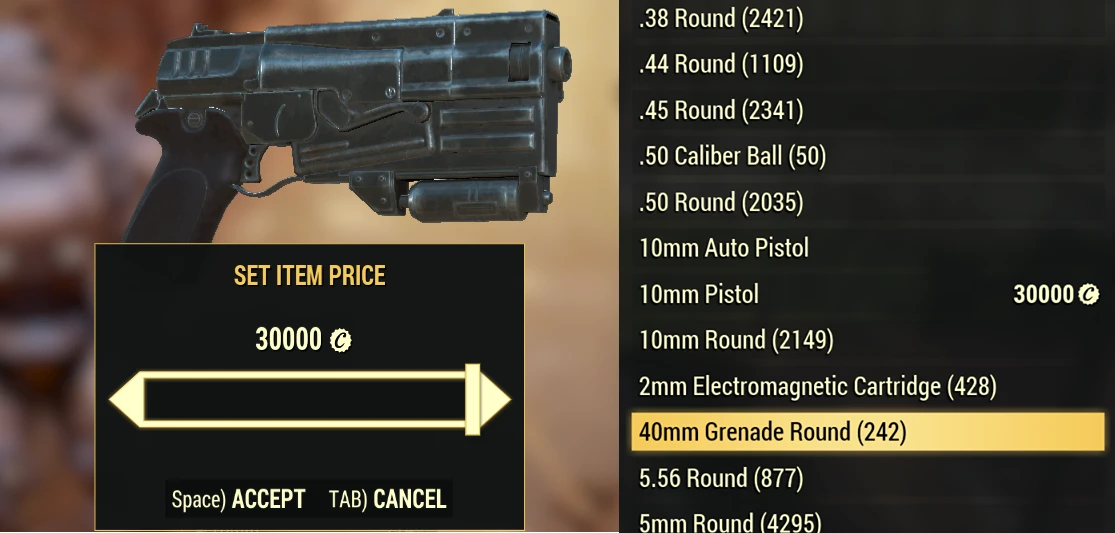
Traders unite! this mod will remove the client-side 5000 cap trading limit. This cap is not enforced on the server side so IT DOES WORK! - also no reason why it needed to be there. Currently valuable items are worth far more than 5000 caps and to buy these it usually requires a level of trust, or giving free caps first over multiple trades - there has been scamming using that method. Also the value of caps have been degrading due to this 5k limit, well no more!
Note:
You don't need this mod to buy someones items above 5k - only to list something yourself!MAKE CAPS GREAT AGAIN
shoutout to /r/Market76 - a great place to trade items
Installation:
credit to registrator2000 for this
1. Download and extract the mod to your Fallout 76 Data folder, e.g. <Program Files>\Bethesda.net Launcher\games\Fallout76\Data
2. Add TradingUnCapped.ba2
to your archive load list in Fallout76Custom.ini.
3. Launch the game.
First time installing a BA2-archive mod in Fallout 76?
If you are new to F76 modding and have not yet created Fallout76Custom.ini:
-
[]Download it from the Optional Files section in the Files tab.
[
]Place the file in <Documents Folder>\My Games\Fallout 76\. - Then place the main file (BetterInventory.ba2) in your Fallout 76 Data folder and you're ready to go.
If you have an existing Fallout76Custom.ini:
These instructions will allow you to load modded assets for your game.
Create or edit the following file: <Documents Folder>\My Games\Fallout 76\Fallout76Custom.ini
Copy and paste the following two lines into Fallout76Custom.ini:
sResourceArchive2List = TradingUnCapped.ba2
Entries are separated by a comma.
Whenever you want to add an archive to your load list, simply append the archive name to the end of this list. To stop loading the archive, remove it from the list.
Trading UnCapped removes the client-side 5000 cap trading limit in Fallout 76, allowing players to list items worth more than 5,000 caps. It's a simple UI mod with 110 endorsements and 3,336 downloads, last updated in December 2018. Works because the cap isn't server-enforced.
✨ Key Features
📊 Pros & Cons
✅ Pros
- Solves a real problem for traders (110 endorsements show community support).
- Simple and effective – no server-side changes needed.
- Includes clear installation steps, even for first-time modders.
⚠️ Cons
- Last updated in 2018 – may not work with current game versions after updates.
- Only affects client-side listing; you still need this mod to list, but not to buy.
- Requires manual .ini editing, which might intimidate casual players.
For Fallout 76 traders who regularly deal in high-value items and are tired of the 5k cap. Also for players who want to avoid trust-based multi-trade scams. Skip if you're a casual player who rarely trades or if you're on a platform where mods aren't supported.
💡 Beginner Tips
- If you're new to modding, download the optional Fallout76Custom.ini from the Files tab to avoid manual creation.
- Make sure to add TradingUnCapped.ba2 to your sResourceArchive2List in Fallout76Custom.ini, not just place the file in Data.
- After installing, test by listing an item worth over 5k caps to confirm the mod is active.
📊 Mod Details
- Game
- Fallout 76 Mods
- Author
- Unravel
- Version
- 1
- Downloads
- 3,336
- Endorsements
- 110
- Category
- User Interface
- Created
- 12/3/2018
- Updated
- 12/3/2018
🧩 Commonly Used Together
Users add these mods to the same collections — a real compatibility signal, not an AI guess.
🔧 How to Install Fallout 76 Mods
Use Vortex. Place .ba2 files in Data folder. Use cautiously online.
📖 Full step-by-step install guide for Fallout 76 →
Visit the official mod page for specific installation instructions for this mod.
🎮 Need cheat codes or console commands? Check ur gaming wiki for Fallout 76 commands, item IDs, and more.
Keep browsing — more Fallout 76 mods await