Tex Lite MNGR - FO76 Texture Reducing and Optimizing Tool
🟡 Updated this yearPreview
🔍 Analysis
- 👍 3.2% endorsement rate — high engagement, a strong quality signal
- ✅ Updated 1 day after the latest game patch — actively maintained
- 🏆 #11 of 17 Performance mods in this game by downloads
📋 About This Mod
Tex Lite MNGR. - Fallout76 Texture Reducing & Optimizing Tool
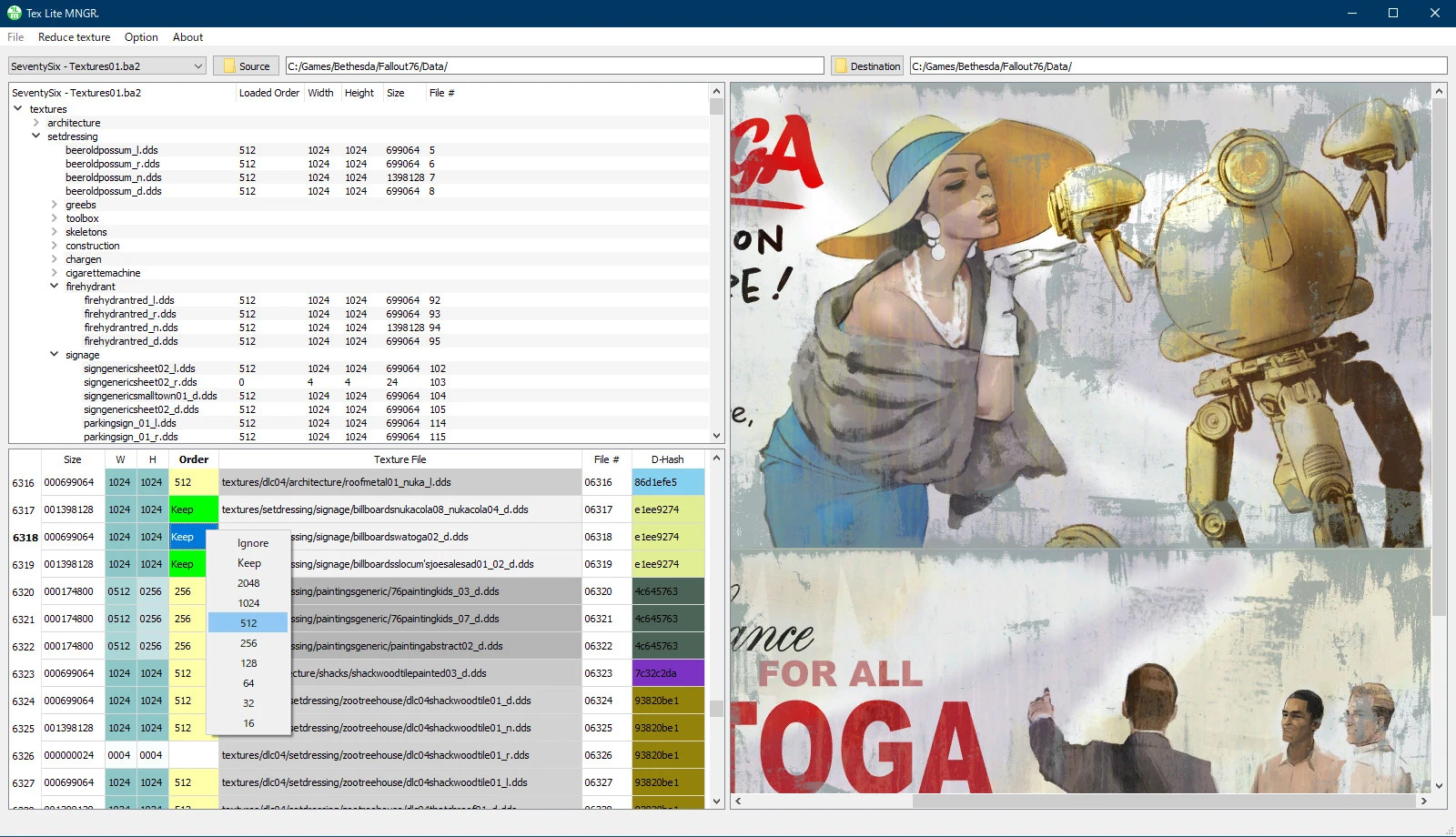
Tex Lite MNGR.(TLM) improves game performance by reducing & optimizing the texture data of Fallout76.
You will get improved video frame rate and reduced game load time.
Users' PC specs vary.
You can create your own texture data that can be played comfortably on your PC.
It's easy and fast.
If you are a new user, please refer to the Basic Tutorial below to learn how to use it. It's easy!
Main features of Tex Lite MNGR.
-
[]TLM can change the each texture size.[/]
[]Compression level of chunk data can be specified. (10 steps)[/]
[]Two types of texture BA2 can be output.(Ini force BA2 type, Replacement BA2 type)[/]
[]Save and load order data.[/]
[]Built-in texture viewer.[/]
[]Built-in BA2 merger.[/]
[]Built-in Fallout76Custom.ini Assistant.[/]
Notes.
-
[]Only Fallout76 texture BA2 files can be used.[/]
[]TLM dose not resize textures in /facegen and /interface(include /atx/interface) directories.[/]
-
[]TLM add a very small texture data for BA2 merge management, but it is not used in the game, it will not have any impact on the game.[/]
[]User-specified data such as directory locations and settings are stored in TexLiteMNGR.ini.[/]
- []Texture image displayed in the texture viewer may differ in color from the actual output image.[/]
-
[]TLM does not access to Windows Registry Key and any networks.[/]
-
[]Settings[/]
[]Edit Order Data[/]
[]Save/Load Order Data[/]
[]Basic Tutorial (For new users)[/]
1. Settings:
Output BA2 Type:
TLM outputs BA2 types can be fixed, "Ini Force BA2" or "Replace BA2".
Select "Selectable" if you want to switch for each Reduce operation.
*Replace type is for advanced users.(If you don't understand it well enough. original texture BA
-
[]Settings[/]
-
[]Only Fallout76 texture BA2 files can be used.[/]
Tex Lite MNGR is a tool for Fallout 76 that reduces and optimizes textures to improve performance while balancing graphics quality. It allows users to generate custom textures tailored to their PC, with 213 endorsements and 6,593 downloads, last updated in July 2026.
✨ Key Features
📊 Pros & Cons
✅ Pros
- Solid community trust with 213 endorsements.
- Active development, last updated July 2026.
- Practical solution for performance issues without sacrificing visuals.
⚠️ Cons
- Requires manual setup, which may be intimidating for beginners.
- Limited to texture optimization; does not address other performance bottlenecks.
For Fallout 76 players struggling with FPS drops who want a customizable way to reduce texture quality without ruining the game's look. Also for modders who want a tool to tweak textures for their specific hardware. Skip if you're looking for a one-click performance mod or if you're not comfortable with manual configuration.
💡 Beginner Tips
- Make sure to back up your original texture files before running the tool.
- Start with a moderate texture reduction and test performance in-game before going lower.
- Check the mod's forum or comments for user-created guides if you get stuck.
📊 Mod Details
- Game
- Fallout 76 Mods
- Author
- Unikko
- Version
- 1.9.20
- Downloads
- 6,593
- Endorsements
- 213
- Category
- Performance
- Created
- 7/8/2021
- Updated
- 7/22/2026
🔧 How to Install Fallout 76 Mods
Use Vortex. Place .ba2 files in Data folder. Use cautiously online.
📖 Full step-by-step install guide for Fallout 76 →
Visit the official mod page for specific installation instructions for this mod.
🎮 Need cheat codes or console commands? Check ur gaming wiki for Fallout 76 commands, item IDs, and more.
Keep browsing — more Fallout 76 mods await