Fallout 76 FPS and Performance Fix
⚪ Last updated 2020This mod may not work until the author updates it. Check for an update, or see the rollback guide.
Preview
🔍 Analysis
- 👍 2.9% endorsement rate — high engagement, a strong quality signal
- 🏆 #2 of 17 Performance mods in this game by downloads
📋 About This Mod
Fallout 76 FPS and Performance Fix!
What will this mod do?
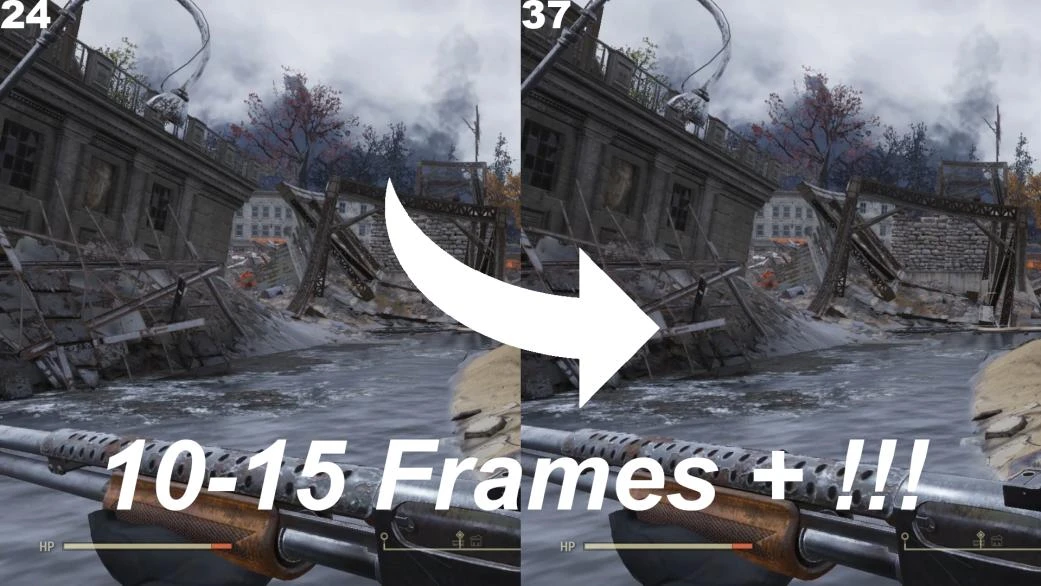
My mod will help improve performance and increase FPS in Fallout 76. I have gotten 10-25 frames, myself.
How do I install it?
To install this mod, you just manually download the txt file, then follow the instructions in there!
A Conclusion on what it does:
Following the instructions in the txt file, this will change some of the values in the Fallout76Prefs.ini file. It will reduce your render-distance, and more, for a better experience. This mod is recommended for lower spec computers, or anyone using high-end mods.
An extra solution for laggy games:
I found this video to be extra useful for gaming! https://www.youtube.com/watch?v=WnKDPLjbg_I(I like setting mine to 1 minute.)
(Suggestion of video commented by: trojankiller ; Video Author: LooneyGoonX)
Check out my other mods:
https://www.nexusmods.com/fallout4/mods/39570 Fallout 4 FPS and Performance Fix
https://www.nexusmods.com/newvegas/mods/67809 Fallout New Vegas FPS and Performance Fix
https://www.nexusmods.com/fallout3/mods/23932/ Fallout 3 FPS and Performance Fix
A performance tweak mod for Fallout 76 that edits Fallout76Prefs.ini to reduce render distance and other settings, boosting FPS by 10-25 frames. Recommended for lower-end PCs or those running heavy mods. Includes a link to an external video for additional lag fixes.
✨ Key Features
📊 Pros & Cons
✅ Pros
- Solid track record with 1,550 endorsements and 53,561 downloads
- Simple manual install—just download a txt file and follow the steps
- Author has similar mods for Fallout 4, New Vegas, and 3, showing experience
⚠️ Cons
- Last updated in January 2020—may not be compatible with current game patches
- No detailed breakdown of exactly which INI values are changed
- External video link may be outdated or unavailable
For Fallout 76 players on lower-end PCs who want a quick FPS boost without complex mods. Also useful for those running heavy visual mods and needing to offset performance hits. Skip if you're on a high-end rig or prefer a more customizable performance tool.
💡 Beginner Tips
- Make sure to back up your Fallout76Prefs.ini before applying changes, so you can revert if needed.
- The mod reduces render distance—if you notice pop-in, you can manually adjust the values in the INI to find a balance.
- Since the mod is from 2020, check if the game's settings have changed; you may need to reapply after updates.
📊 Mod Details
- Game
- Fallout 76 Mods
- Author
- SiTheHandsomeGuy
- Version
- 0.1
- Downloads
- 53,561
- Endorsements
- 1,550
- Category
- Performance
- Created
- 1/19/2020
- Updated
- 1/19/2020
🔧 How to Install Fallout 76 Mods
Use Vortex. Place .ba2 files in Data folder. Use cautiously online.
📖 Full step-by-step install guide for Fallout 76 →
Visit the official mod page for specific installation instructions for this mod.
🎮 Need cheat codes or console commands? Check ur gaming wiki for Fallout 76 commands, item IDs, and more.
Keep browsing — more Fallout 76 mods await