Show Health Re-Redux
⚪ Last updated 2021Preview
🔍 Analysis
- 👍 3.6% endorsement rate — high engagement, a strong quality signal
- 🏆 #51 of 116 User Interface mods in this game by downloads
📋 About This Mod
Paused at the moment!
This Mod is a reworked version of my Mod, so please try this mod for now!
Description
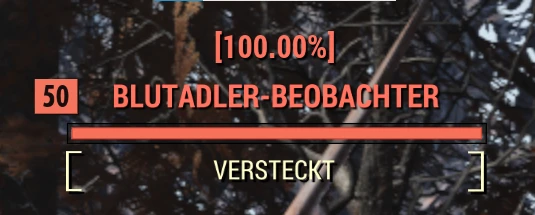
ShowHealth Re-Redux simply shows target's health % above the name bar.
Could be helpful to test weapon damage or monitor HP.
Because of the new level scaling it is only possible to Show Health in %
Installation
1. Extract ShowHealthReRedux.ba2 or the Interface folder into "...\Fallout76\Data"
2. (Optional) Download the Fallout76Custom.ini from the Download page if you don't have one already.
3. If you do have one already, add ShowHealthReRedux.ba2 to the end of your sResourceArchive2List and sResourceIndexFileList in your Fallout76Custom.ini
Compatibility
Compatible with Improved Health Bars : https://www.nexusmods.com/fallout76/mods/368
Compatible with Perk Loadout Manager : https://www.nexusmods.com/fallout76/mods/124
Compatible with Event Notifications : https://www.nexusmods.com/fallout76/mods/371
Compatible with Custom Crosshair : https://www.nexusmods.com/fallout76/mods/551
Compatible with Text Chat : https://www.nexusmods.com/fallout76/mods/151
Compatible with HUDEditor : https://www.nexusmods.com/fallout76/mods/953 (Standalone Version!)
ShowHealth Re-Redux must be the last in the loading order! ! ! !
This mod modifies the hudmenu.swf file and will not be compatible with other mods that do so.
Show Health Re-Redux is a UI mod for Fallout 76 that displays target health percentage above the name bar. It's a reworked version of the author's previous mod, currently paused but functional. With 386 endorsements and 10,646 downloads, it's a niche tool for players who want to monitor HP or test weapon damage. Requires manual installation and must load last.
✨ Key Features
📊 Pros & Cons
✅ Pros
- Solid community trust with 386 endorsements and over 10k downloads
- Simple and effective: shows health % right above the name bar, great for testing damage
- Explicitly compatible with several popular mods like Perk Loadout Manager and Text Chat
⚠️ Cons
- Author paused the mod, so no updates since December 2021 — may break with future game patches
- Must be last in load order, which can conflict with other UI mods that modify hudmenu.swf
- Only shows health in percentage due to new level scaling, not exact values
For Fallout 76 players who want a quick, at-a-glance view of enemy health percentages, especially for testing weapon damage or monitoring tough enemies. Skip if you prefer exact HP numbers or use other mods that modify the same UI file.
💡 Beginner Tips
- Make sure to add ShowHealthReRedux.ba2 to both sResourceArchive2List and sResourceIndexFileList in your Fallout76Custom.ini, or the mod won't load.
- If you don't have a Fallout76Custom.ini, download the one provided by the author to avoid manual setup errors.
- Since this mod must be last in load order, place it after any other UI mods in your mod manager or file order.
📊 Mod Details
- Game
- Fallout 76 Mods
- Author
- pepezoro-madcat2k4-SoltyJenkins
- Version
- 1.43
- Downloads
- 10,646
- Endorsements
- 386
- Category
- User Interface
- Created
- 9/20/2020
- Updated
- 12/18/2021
🧩 Commonly Used Together
Users add these mods to the same collections — a real compatibility signal, not an AI guess.
🔧 How to Install Fallout 76 Mods
Use Vortex. Place .ba2 files in Data folder. Use cautiously online.
📖 Full step-by-step install guide for Fallout 76 →
Visit the official mod page for specific installation instructions for this mod.
🎮 Need cheat codes or console commands? Check ur gaming wiki for Fallout 76 commands, item IDs, and more.
Keep browsing — more Fallout 76 mods await