RatMonkeys Easy Sorting and Tagging
🟡 Updated this yearPreview
🔍 Analysis
- 👍 2.1% endorsement rate — high engagement, a strong quality signal
- ✅ Updated 0 day after the latest game patch — actively maintained
- 🏆 #4 of 116 User Interface mods in this game by downloads
📋 About This Mod
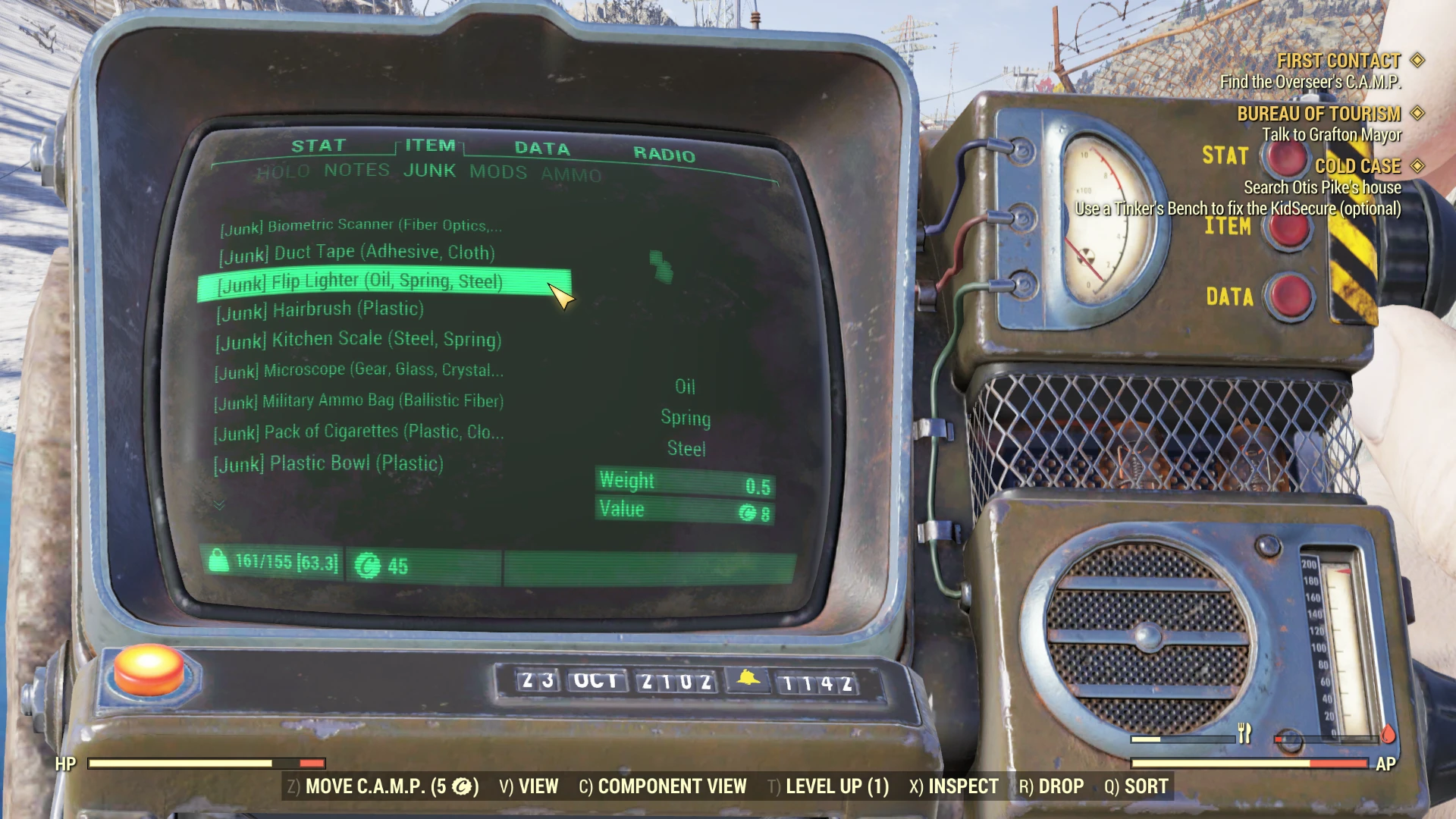
Adds Tags to the beginning of items in your pipboy inventory, making it easier to sort items and find what you need. Also adds junk tags to end of misc junk items so you can see what resources you will get when you scrap it. Thanks to everyone who has helped to report some of the wrongly tagged items.
Apparel and Plan Rarity Explanation (added with 1. 7):
APPAREL AND PLAN RARITY MAY BE INACCURATE, OUTDATED, AND/OR INCOMPLETE. The things that are tagged with a specific rarity just means that you should do more research before vendoring or deleting that item. Just because something is not tagged as rare does not mean that it is not rare! The rarity information comes from the good folks over at The Plan Collectors. If you have updates or notice glaring inaccuracies or omissions, please let me know, but also let them know.
= Uncommon
= Rare
= Ultrarare
? = Seasonal (not yet implemented)
Food Category Explanation:
= Completely safe. No disease, no spoiling.
= Food that spoils over time, but has no disease.
= Food that spoils over time, and carries disease.
= A prepared meal that can be canned
= Used to make teas.
= Raw meat that spoils over time and carries disease
= Teas, juices, drinks, water, etc.
= , and become spoiled after a certain time.
Scrap Category Explanation:
= (Vendor) Cannot be bulked, but can be sold directly to vendors in single quantities.
= (Bulk) Can be bulked at a tinker bench.
ZBgRmqq2gGQ
Installation
1. Unzip to your Data folder. That's it.
2. You should have the file format Data > Strings > SeventySix_en.xxx (where xxx is the file formats)
3. Run the game.
Compatibility
This mod should be compatible with most other mods that do not edit Fallout 76's strings. It is compatible with Better Inventory. Install Better Inventory first, then install this mod after. This mod works on ENGLISH client language only.
RatMonkeys Easy Sorting and Tagging adds tags to the beginning of items in your Fallout 76 pip-boy inventory, making it easier to sort and find items. It also adds junk tags to misc items to show scrap resources. Includes rarity indicators for apparel and plans, plus food and scrap category explanations. With 2,954 endorsements and 137,874 downloads, it's a popular UI enhancement.
✨ Key Features
📊 Pros & Cons
✅ Pros
- Huge community trust with 2,954 endorsements and 137,874 downloads.
- Actively maintained—last updated July 2026, so it's current with the game.
- Adds practical sorting tags that save time managing inventory in Fallout 76.
⚠️ Cons
- Rarity tags for apparel and plans may be inaccurate or outdated, as the author warns.
- Seasonal rarity tag (?) is not yet implemented, so some items may lack expected tags.
- No explicit compatibility notes for future game updates, though the mod is recent.
For Fallout 76 players who spend too much time scrolling through their pip-boy inventory and want quick visual cues for sorting. Also for collectors who want to know which apparel and plans are rare before vendoring. Skip if you prefer a vanilla UI or don't care about inventory organization.
💡 Beginner Tips
- Make sure you place the files in the correct Data > Strings folder as described, or the mod won't load.
- If you use a mod manager, you can still install manually—just extract the archive to your Fallout 76 Data folder.
- Check the rarity tags before selling or scrapping items—they're a heads-up, not a guarantee, so do extra research on valuable plans.
📊 Mod Details
- Game
- Fallout 76 Mods
- Author
- L0n36unm4n
- Version
- 2.44
- Downloads
- 137,874
- Endorsements
- 2,954
- Category
- User Interface
- Created
- 11/16/2018
- Updated
- 7/22/2026
🔗 Required By 1 Mod
These mods list this mod as a dependency.
🧩 Commonly Used Together
Users add these mods to the same collections — a real compatibility signal, not an AI guess.
🔧 How to Install Fallout 76 Mods
Use Vortex. Place .ba2 files in Data folder. Use cautiously online.
📖 Full step-by-step install guide for Fallout 76 →
Visit the official mod page for specific installation instructions for this mod.
🎮 Need cheat codes or console commands? Check ur gaming wiki for Fallout 76 commands, item IDs, and more.
Keep browsing — more Fallout 76 mods await