Dot Crosshair 76
🟡 Updated this yearPreview
🔍 Analysis
- 👍 2.7% endorsement rate — high engagement, a strong quality signal
- ✅ Updated 1 day after the latest game patch — actively maintained
- 🏆 #70 of 116 User Interface mods in this game by downloads
📋 About This Mod
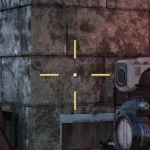
This mod just keeps the dot in the middle of the screen whenever the crosshairs are, and if you use the "More Dot" version, it keeps the dot visible during contextual crosshairs and when aiming down sights in 1st-person. I made this mod because I got tired of losing track of the center of my screen, mostly when contextual crosshairs would appear. Personally I find it also helps keep my aim centered as well.
To install, first create a "Fallout76Custom.ini" in the following directory (if you don't already have one):
C:\Users\Username\Documents\My Games\Fallout 76\
Then, put the following lines in the Fallout76Custom.ini:
sResourceArchive2List = DotCrosshair76.ba2,
or, if you have multiple mods:
sResourceArchive2List = ExampleMod1.ba2, ExampleMod2.ba2, DotCrosshair76.ba2,
then, simply place "DotCrosshair76.ba2" in your Fallout 76 data directory, which by default is:
C:\BethesdaDotNet\Bethesda.net Launcher\games\Fallout76\Data\
or, if you have the game on Steam:
C:\Steam\steamapps\common\Fallout76\Data\
A minimal UI tweak that keeps the dot centered on screen whenever crosshairs are visible. With 174 endorsements and 6,484 downloads, it's a small but appreciated utility for players who want a consistent aiming reference.
✨ Key Features
📊 Pros & Cons
✅ Pros
- Does exactly what it says: dot stays centered, no fuss
- Decent community trust with 174 endorsements
- Tiny download size (6,484 downloads) suggests it's stable and popular
⚠️ Cons
- No compatibility notes for other UI mods or game updates
- Limited to a single visual tweak—no customization options
For players who find the default crosshair dot drifting or want a consistent aiming point in the heat of battle. Skip if you're looking for a full UI overhaul or adjustable crosshair settings.
💡 Beginner Tips
- If you're using a mod manager, install this like any other mod and let it handle file placement.
- If you're on a game with anti-cheat (like Overwatch), check if mods are allowed before installing.
- Test in the practice range to see if the dot stays centered during movement and abilities.
📊 Mod Details
- Game
- Fallout 76 Mods
- Author
- Bunslinger
- Version
- 26.0
- Downloads
- 6,484
- Endorsements
- 174
- Category
- User Interface
- Created
- 6/30/2021
- Updated
- 7/22/2026
🔧 How to Install Fallout 76 Mods
Use Vortex. Place .ba2 files in Data folder. Use cautiously online.
📖 Full step-by-step install guide for Fallout 76 →
Visit the official mod page for specific installation instructions for this mod.
🎮 Need cheat codes or console commands? Check ur gaming wiki for Fallout 76 commands, item IDs, and more.
Keep browsing — more Fallout 76 mods await