BuffsMeter - Active Effects on HUD
🟡 Updated this yearPreview
🔍 Analysis
- 👍 1.9% endorsement rate — high engagement, a strong quality signal
- ✅ Updated 10 days after the latest game patch — actively maintained
- 🏆 #20 of 116 User Interface mods in this game by downloads
📋 About This Mod
MY OTHER MODS
HUD widgets
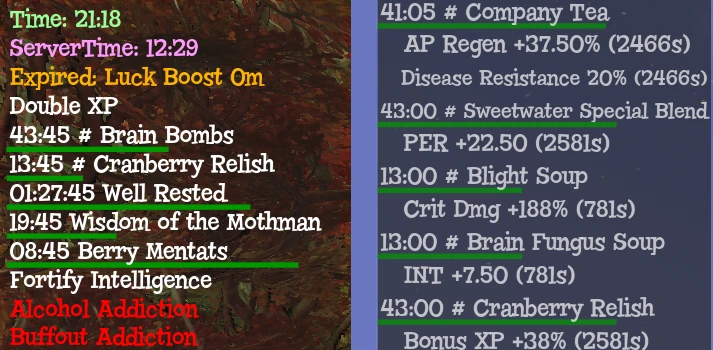
BuffsMeter - Show active effects / buffs on HUD. Show checklist of missing effects.
HUD Challenges and Events - Show challenges, active events/caravans, minerva location, nuke codes, seasons data...
HUD Condition - Show weapon and armor conditions. Power armor, Ghoul and Vault-girl versions available.
HUD Server Player List - Show all players on current server. Show camp vendors with your category filters, hide visited vendors.
Kill Streak Timer - Adds timer for Kill Streak active effect; used for Adrenaline and Adrenal Reaction.
Pick Up History List Counter - Keep track of how many items you picked up; used for resetting resource and item spawns.
Inventory Management
Invent O Matic Stash (Unofficial) - Write inventory to file. Bulk scrap. Mass transfer. Filter area loot. Mass buy/sell to vendors. Legendary mod tracking. Item Protection... AND MUCH MORE
Invent O Matic Pipboy (Unofficial) - Switch armor sets. Quick use your buffs. Mass drop with a single key press. Drop item protection...
Improved Workbench - Show inventory item count and equipped perks in crafting menu. Improved Quantity Menu. Quick Repair Button. Show Durability. Reorganize UI...
Radial Menu Loadout Manager - Slot custom loadouts to favorites wheel. Gamepad/controller compatible.
Better Inventory (Unofficial) - Better Inventory mod version remade for PipBoy update.
Time-savers
Skip Popups - Skip any popup. Skip scrap confirmation menus. Auto confirm Repair Kit. Extended Scrap Components view, no scrolling.
Easy Terminal Hacking and Lockpicking Bar - Auto-unlock hackable terminals. Show sweetspot bar for lockpicking.
Instant Expedition Rewards - Display all expedition quests and rewards at once, not one by one.
Instant Daily Op Rewards - Display all daily ops rewards at once, not one by one.
Quick Actions - Saves you a few clicks... Start expos or dops, join events or teams, change icon or tent, server hop - all in one click.
Other interfaces
Improved Social Menu - Fixes friend selection switching when trying to join world. Remove popups and team creation delay. Adds friends/recent count and Character name. Redact own or other player names. And more...
Improved Pipboy Stats - Changes PERKS tab to custom format, showing curve tables and current bonuses.
VendingHistory - Show persistent sale history by integrating Vendor Log output to Vending History interface. Search functionality. Localization support.
Custom Radios (Stations) - NOW WITH UI. Make your own song playlists without issues like hosts talking, songs cutting short, or silent parts... Includes Diamond City Radio and Appalachia no ads. Additionally New Vegas Radios.
V. A. T. S. Priority - Set desired/default target limb priorities for VATS.
QuickBoy Edit - Remove background shadow, rescale/zoom in or center PipBoy Quick view, all optional.
Other
JSONConfigManagerˇ - Organization and editing tool for JSON, XML, and INI mod config files. Backup and Restore functionality.
Other mods I helped with
Camp Swap Lock - Configurable Options to Lock your Camp and Disable Camp Replacement.
Dynamic Ping Audio - Allows Dynamic Assignment of Ping Audio Cues based on Target Type. Also includes Ping Audio Delay Options.
BuffsMeter adds a HUD widget to display active effects and buffs, plus a checklist for missing effects. It's part of MsZelia's larger suite of UI mods for Fallout 76. With 641 endorsements and 34,589 downloads, it's a well-received utility for players who want to track their character's status at a glance.
✨ Key Features
📊 Pros & Cons
✅ Pros
- Solid community trust with 641 endorsements and 34k downloads.
- Recent update (July 2026) shows the author is actively maintaining it.
- Useful for min-maxers who need to track buff uptime without opening menus.
⚠️ Cons
- No screenshots or videos provided, so you can't preview the HUD look.
- May require other mods from the same author for full functionality, but dependencies aren't listed.
For Fallout 76 players who want to keep an eye on their active buffs and debuffs without digging through menus. If you're a build optimizer or just like a cleaner HUD, this is a handy tool. Skip if you prefer minimal UI changes or want a more comprehensive HUD overhaul.
💡 Beginner Tips
- Since it's a UI mod, make sure to place the files in the correct Data folder or use a mod manager like Vortex to avoid conflicts.
- Check if the mod requires the SFE (Script Extender) or other prerequisites—if so, install those first.
- If you use other HUD mods, test load order to ensure they don't overlap or hide each other's elements.
📊 Mod Details
- Game
- Fallout 76 Mods
- Author
- MsZelia
- Version
- 1.4.6
- Downloads
- 34,589
- Endorsements
- 641
- Category
- User Interface
- Created
- 9/7/2024
- Updated
- 7/31/2026
🧩 Commonly Used Together
Users add these mods to the same collections — a real compatibility signal, not an AI guess.
🔧 How to Install Fallout 76 Mods
Use Vortex. Place .ba2 files in Data folder. Use cautiously online.
📖 Full step-by-step install guide for Fallout 76 →
Visit the official mod page for specific installation instructions for this mod.
🎮 Need cheat codes or console commands? Check ur gaming wiki for Fallout 76 commands, item IDs, and more.
Keep browsing — more Fallout 76 mods await