Nameplates - Floating Healthbars
🟡 Updated this year⚠️ Install Order · 2 steps
Install in this order, then this mod last — most mods fail to load without their framework and dependencies in place.
Preview
🔍 Analysis
- 👍 1.8% endorsement rate — high engagement, a strong quality signal
- 🏆 #44 of 110 User Interface mods in this game by downloads
📋 About This Mod
Requires F4SE for Game Version 1. 8. 7 or greater
What does it do?
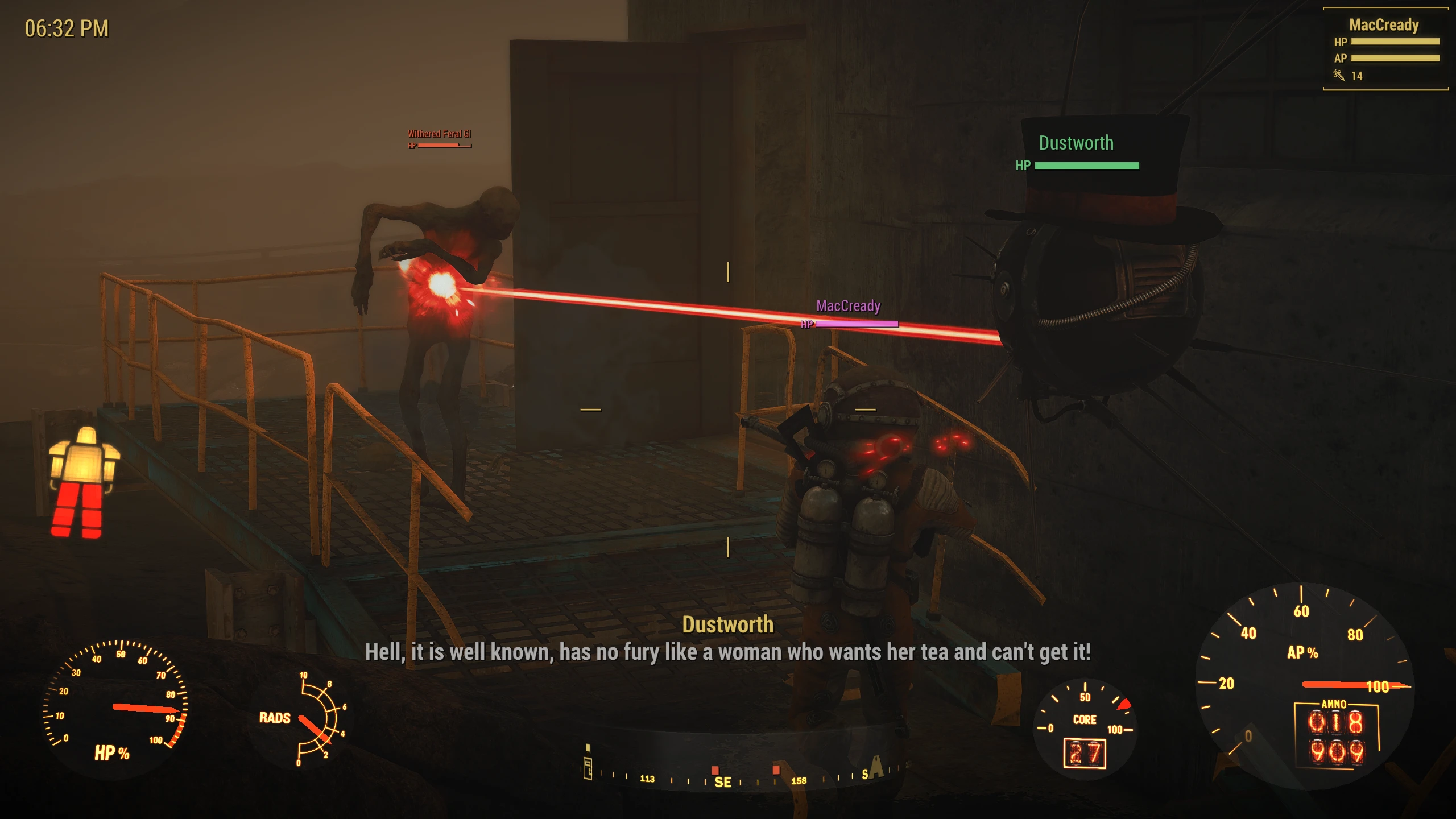
Adds floating healthbars in the world (Not really, just an illusion) to any Actor engaged in combat.
How does it work?
The F4SE plugin injects an additional layer into the HUD and registers a special HUD component internally for this layer. The layer is updated on a per frame-basis and converts the Actor's head position to Screen position and is scaled accordingly by depth (Quest markers follow the same concept). The bars also make a line-of-sight (also invisibility) check to ensure you can actually see the Actor to see the healthbar.
How do I change the bar colors?
This can be done in the text file "Data\F4SE\Plugins\F4EE\hudextension.ini". Leaving the color as "-1" will use the default color (Either your HUD color, or the enemy red color)
Can I change which bars I see?
Yes, you can choose whether you only see teammates, enemies, non-hostile, or lovers in any combination. See Data\F4SE\Plugins\F4EE\hudextension.ini for more defaults.
Modder Notes
If you're a modder there is an internal API that allows you to colorize bars based on an ActorValue. You can set which particular ActorValue the plugin should check within the ini file. This means that you can script the color of the bar the Actor should use when engaged in combat, instead of using the fixed colors provided by the ini.
How do I uninstall it?
Remove the files included in the archive:
-
[]Data\Interface\HUDExtension.swf
[
]Data\F4SE\Plugins\hudextension.ini[]Data\F4SE\Plugins\hudextension.dll
Known Issues
-
[]Nameplates of Actors in combat will disappear if you load a save game where you are currently already engaged in combat
[]You may occasionally see healthbars cut off underneath certain components e.g. If you enter a Power Armor and an NPC speaks showing Subtitles, and one of the nameplates happens to be close enough such that it would appear underneath the subtitle, you may see part of the bar cut off
[]Nameplates don't appear in all HUD scenarios (Such as scope zoomed)
-
[]Nameplates of Actors in combat will disappear if you load a save game where you are currently already engaged in combat
Adds floating colored health bars above characters in Baldur's Gate 3, distinguishing allies, enemies, non-hostiles, and romanced companions. With over 9,300 endorsements and 517k downloads, it's a popular UI enhancement for players who want clearer combat readability. Last updated June 2026.
✨ Key Features
📊 Pros & Cons
✅ Pros
- Huge community trust—9,371 endorsements and half a million downloads means this is a proven mod.
- Color-coded bars make combat readability way better—no more squinting at health pools.
- Still updated as of June 2026, so it's likely compatible with recent patches.
⚠️ Cons
- No mention of settings or customization—might be a one-size-fits-all look.
- Could conflict with other UI mods that alter health bars—test with your load order.
For BG3 players who want clearer combat info at a glance, especially in big fights. If you're tired of guessing enemy health, this is a must-have. Skip if you prefer a minimal UI or already use a comprehensive UI overhaul.
💡 Beginner Tips
- Use a mod manager like Vortex or BG3 Mod Manager to avoid manual file placement errors.
- If you use other UI mods, load this one after them to ensure it takes priority.
- Check the mod's posts section for any reported conflicts with specific UI overhauls.
📊 Mod Details
- Game
- Fallout 4 Mods
- Author
- Expired6978
- Version
- 1.1.15
- Downloads
- 517,257
- Endorsements
- 9,371
- Category
- User Interface
- Created
- 1/27/2017
- Updated
- 6/5/2026
🔧 How to Install Fallout 4 Mods
Download from Nexus.
📖 Full step-by-step install guide for Fallout 4 →
Visit the official mod page for specific installation instructions for this mod.
🎮 Need cheat codes or console commands? Check ur gaming wiki for Fallout 4 commands, item IDs, and more.
Keep browsing — more Fallout 4 mods await