Gold Kit for Color Pipboy -anti-Black and White Screen-
⚪ Last updated 2016⚠️ Install Order · 2 steps
Install in this order, then this mod last — most mods fail to load without their framework and dependencies in place.
Preview
🔍 Analysis
- 👍 4.1% endorsement rate — high engagement, a strong quality signal
- 🏆 #84 of 110 User Interface mods in this game by downloads
📋 About This Mod
NEW in 1. 1: Provides an automatic removal of the monochrome display in the Pipboy, making it ready to show colors. No need to edit an .ini file anymore.
Description
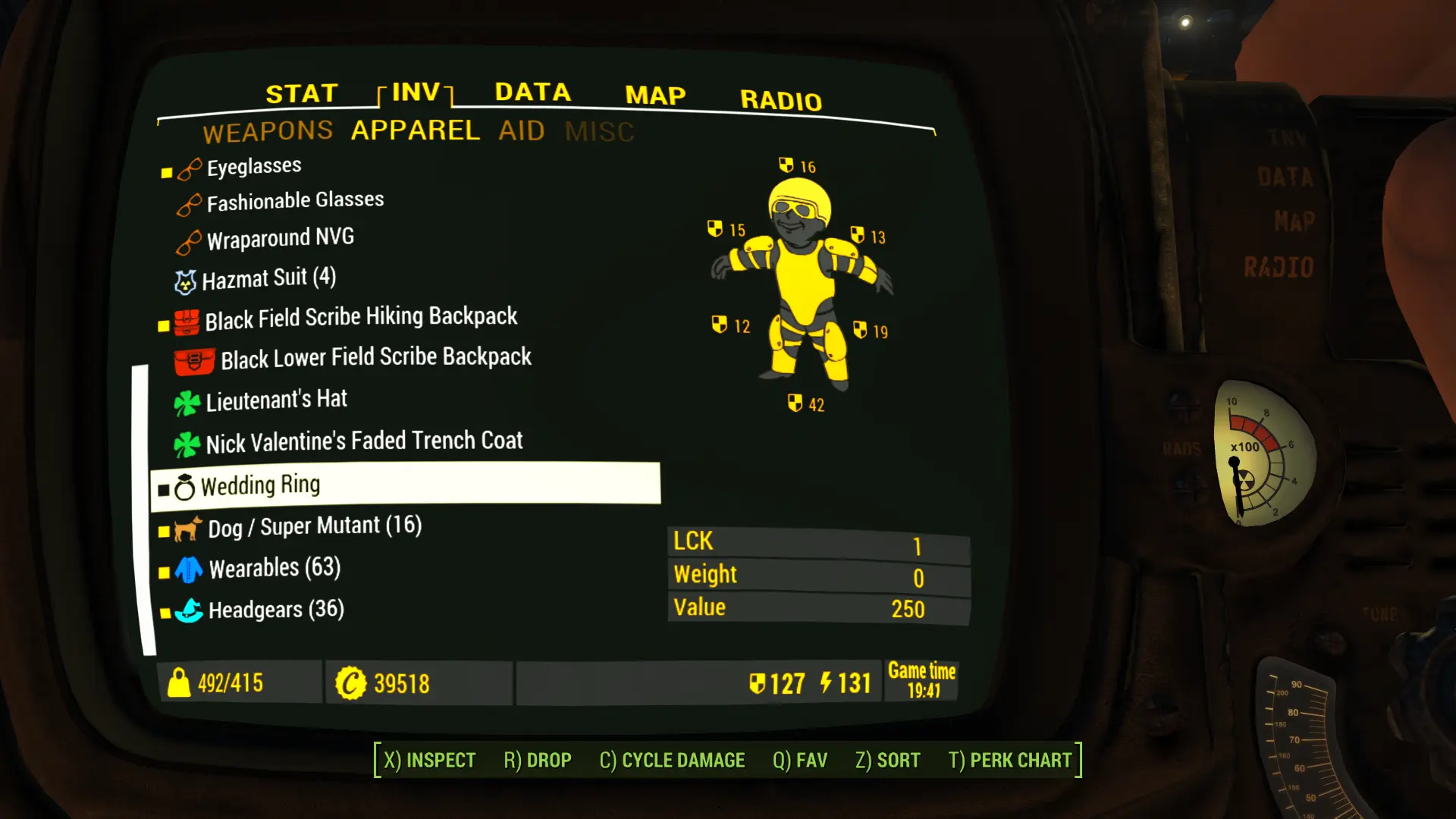
Displays all Pipboy screens with Colored Icons, Animations and some Fonts (see screenshots). The in-game Barter/Container/Workbench screens display colored icons too.
Colored World Maps are better but a Color Pipboy means black and white screens with a strong contrast. This is unconfortable to photosensitive people and others.
GKCP is part of an ensemble of three, making the Color Pipboy... well, more like a Color Pipboy in contrast with the black & white display one are having when the monochrome display is removed in order to use a Colored World Map (main reason).
The other mods: - A Realistically Weightless Colored Sorting Mod By using DEF_INV and this mod's resources, it provides both the inventory screens and the in-game Barter/Container/Workbench windows with a variety of colored icon tags instead of tags. It helps to reduce the contrast and makes the inventory prettier. There are Weightless and Vanilla Weights installs, Full or Modular.
- - Zoom-out Extended for World and Local Maps
- Allows to zoom-out fully on the World/Local Maps and deals with the on-map color of those two screens.
This mod requires DEF_INV. If not, the inventory screens would be without icon tags for items and there would be no subcategory tabs.
GKCP and to a lesser extend Z-o E and ARWCSM are expressively made for a Color Pipboy. It is Color by opposition to Monochrome. With the monochrome display, everything in the Pipboy screens is in shades of green. Actually, under that layer, all is black and white. This mod colors most of what is white.
When one removes the monochrome display, the Power Armor Pipboy screens (World Map, inventory...) become too bright. You'll probably need to change (or add) these lines in Fallout4Custom.ini: Chapters [] are essential: The default are respectively 3 and 1: fPipboyScreenEmitIntensityPA=1 fPipboyScreenDiffuseIntensityPA=0. 15
I have also seen: 1. 25 and 0. 15.
As GKCP v1. 1 provides an automatic removal of the monochrome display of the Pipboy, making it ready to display colors, what follows is less relevant. Basically, to remove the monochrome display in the Pipboy screens, you need to edit Fallout4Custom.ini and write: bPipboyDisableFX=1 Fallout4Custom.ini takes precedent over the other INIs
Gold Kit for Color Pipboy is a UI mod for Fallout 4 that replaces the default black-and-white Pip-Boy screens with color icons, animations, and fonts. It also colors icons in Barter and Container windows. With nearly 10,000 endorsements and 233,000 downloads, it's a popular choice for players wanting a more vibrant Pip-Boy interface.
✨ Key Features
📊 Pros & Cons
✅ Pros
- Huge community trust with 9,685 endorsements and 233,905 downloads
- Simple visual upgrade that makes the Pip-Boy easier on the eyes
- Covers more than just the Pip-Boy—Barter and Container icons get color too
⚠️ Cons
- Last updated in 2016—may not be compatible with the latest Fallout 4 patches or DLC
- Only affects UI colors—if you want gameplay changes, this isn't for you
For Fallout 4 players who find the default Pip-Boy's black-and-white screen harsh and want a more colorful, readable interface. Also great for modders who want a solid base for further UI tweaks. Skip if you're looking for gameplay overhauls—this is purely cosmetic.
💡 Beginner Tips
- Since this mod is from 2016, check if you need to use an older version of Fallout 4 or use a compatibility patch if you have the latest updates.
- Use a mod manager like Nexus Mods' Vortex to install and manage the mod—it'll make uninstalling easier if you run into issues.
- If you're using other UI mods, load this one after them to ensure its colors take priority.
📊 Mod Details
- Game
- Fallout 4 Mods
- Author
- Zenotep
- Version
- 1.11
- Downloads
- 233,905
- Endorsements
- 9,685
- Category
- User Interface
- Created
- 3/19/2016
- Updated
- 3/30/2016
🔧 How to Install Fallout 4 Mods
Download from Nexus.
📖 Full step-by-step install guide for Fallout 4 →
Visit the official mod page for specific installation instructions for this mod.
🎮 Need cheat codes or console commands? Check ur gaming wiki for Fallout 4 commands, item IDs, and more.
Keep browsing — more Fallout 4 mods await