Game Configuration Menu
⚪ Last updated 2020⚠️ Install Order · 2 steps
Install in this order, then this mod last — most mods fail to load without their framework and dependencies in place.
Preview
🔍 Analysis
- 👍 0.5% endorsement rate
- 🏆 #7 of 110 User Interface mods in this game by downloads
📋 About This Mod
If you are looking for direct help, information, patches, unreleased mods, pre-released updates for my mods or just want to talk and share images and videos of your adventures, feel free to join us!
What is GCM?
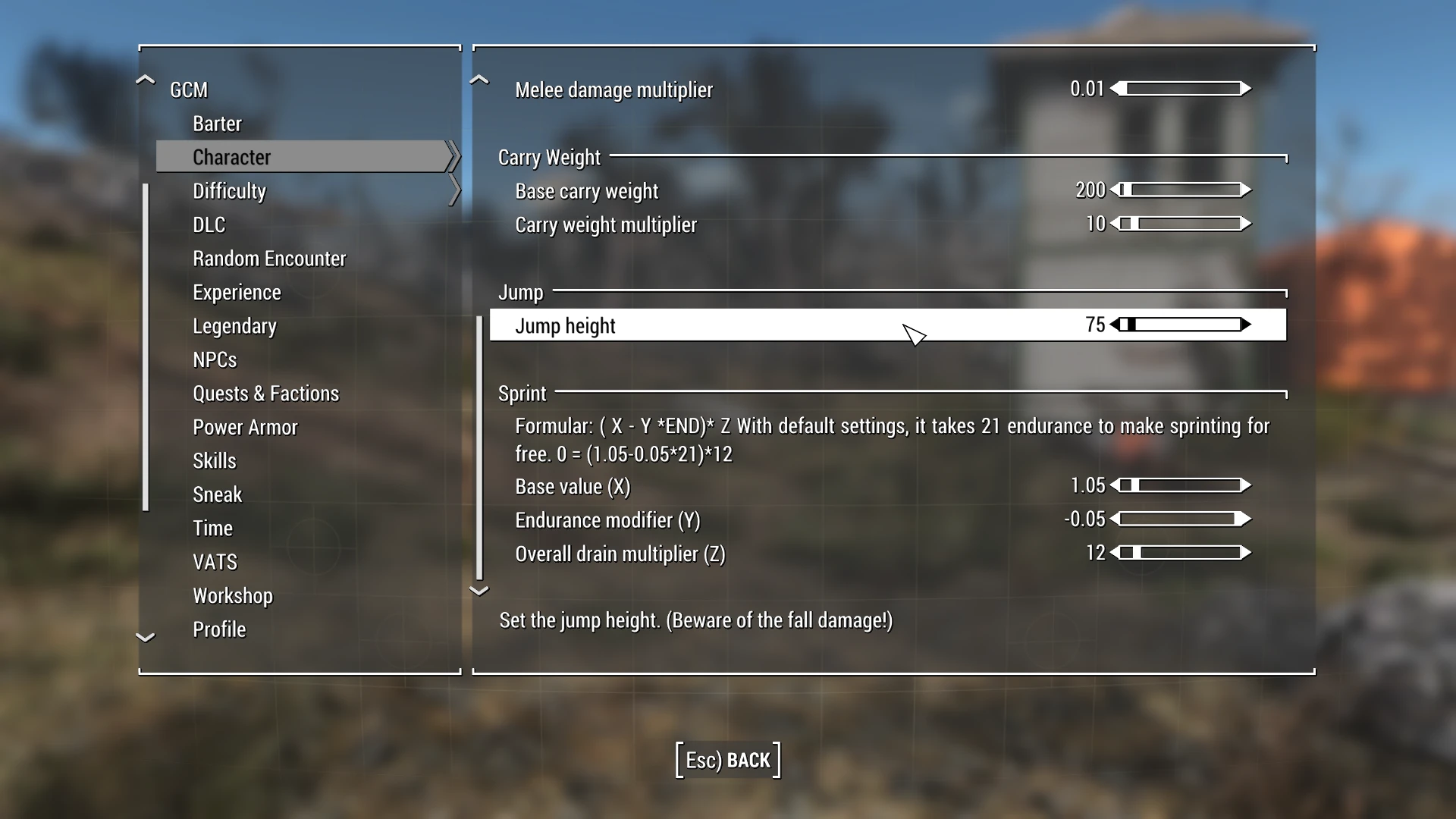
GCM allows you easily set many game settings without the need of additional ESPs or console commands.
What can not be changed?
Survival settings (Hunger, Thirst, Fatigue, Sleep, Diseases etc.)
As survival has been added as a brand new script based system by Bethesda, it has been excluded from this mod and released as a standalone mod.
Survival Configuration Menu
Features a brand new eat and drink system, which relies on weight of the item instead of the caps value and allows you to control it. In addition to that, you can tweak many aspects of the survival added features. Like tweaking disease chance, disabling adrenaline. Choose how long you can maximally sleep on the different bet types. And more.
What can be changed?
There are a lot of settings within the game, this mod does not cover all. This mod will be updated over time and new settings will be added.
Right now the following categories exist to give you an idea:
Barter -
(buy and sell settings)
Character -
(Adjust character attributes and formulas)
DLC -
(Covers only Automatron right now: Disable robot encounters, adjust chances, etc.)
Difficulty -
(Change the difficutly of each difficutly setting on the fly!)
Experience -
(Change the exp gain from crafting)
Gameworld -
(Respawn settings)
Legendary -
(Adjust legendary chances/spawn rate)
NPCs -
(Adjust bonus health of NPCs, adjust throw frequency of stuff/explosives, disable the spidy sense dodge)
Quests & Factions -
(Covers only BoS for now. Adjust quest item chances and reward amount, unlock railroad armor mods)
Power Armor -
(Power drain settings, durability settings and settings for the jetpack)
Random Encounter -
(Disable random encounters, adjust frequency, set level conditions etc.)
Skills -
(Pickpocket max chance, Hacking settings to set the number of words, lockpick settings)
Sneak -
(Sneak damage multiplier, reverse pickpocket, detection settings)
Sound -
(Settings to allow you to disable combat music or tweak it)
Time -
(Timescale, gamehour, fast travel speed)
VATS -
(VATS activation distance, times
Game Configuration Menu (GCM) is a lightweight UI mod that lets you adjust many game settings directly through an in-game menu, eliminating the need for extra ESPs or console commands. With 15,962 endorsements and 3.3 million downloads, it's a popular tool for players who want quick, hassle-free configuration.
✨ Key Features
📊 Pros & Cons
✅ Pros
- Huge community trust with 15,962 endorsements and 3.3 million downloads.
- Saves time by removing the need for console commands or extra plugins.
- Simple and effective—does exactly what it says without bloat.
⚠️ Cons
- Last updated in 2020—may not be compatible with the latest game patches.
- Requires a mod manager for proper installation, which might be a hurdle for beginners.
For modders who want a quick, no-fuss way to tweak game settings without diving into console commands or adding extra ESPs. Perfect for players who value convenience and a clean load order. Skip if you're on the latest game version and worried about compatibility.
💡 Beginner Tips
- Use a mod manager like Vortex or Mod Organizer 2 to install GCM and keep your load order clean.
- After installing, launch the game and look for the GCM option in the pause menu or main menu to start tweaking settings.
- If you're on a newer game version, check the mod's comments for user reports on compatibility before installing.
📊 Mod Details
- Game
- Fallout 4 Mods
- Author
- Zzyxzz
- Version
- 0.7.1
- Downloads
- 3,257,522
- Endorsements
- 15,962
- Category
- User Interface
- Created
- 8/1/2018
- Updated
- 8/11/2020
🧩 Commonly Used Together
Users add these mods to the same collections — a real compatibility signal, not an AI guess.
🔧 How to Install Fallout 4 Mods
Download from Nexus.
📖 Full step-by-step install guide for Fallout 4 →
Visit the official mod page for specific installation instructions for this mod.
🎮 Need cheat codes or console commands? Check ur gaming wiki for Fallout 4 commands, item IDs, and more.
Keep browsing — more Fallout 4 mods await