FallUI - Inventory
⚪ Last updated 2022⚠️ Install Order · 2 steps
Install in this order, then this mod last — most mods fail to load without their framework and dependencies in place.
Preview
🔍 Analysis
- 👍 1.0% endorsement rate — high engagement, a strong quality signal
- 🏆 #8 of 110 User Interface mods in this game by downloads
📋 About This Mod
FallUI - Inventory
A optimized Fallout 4 inventory interface for PC.
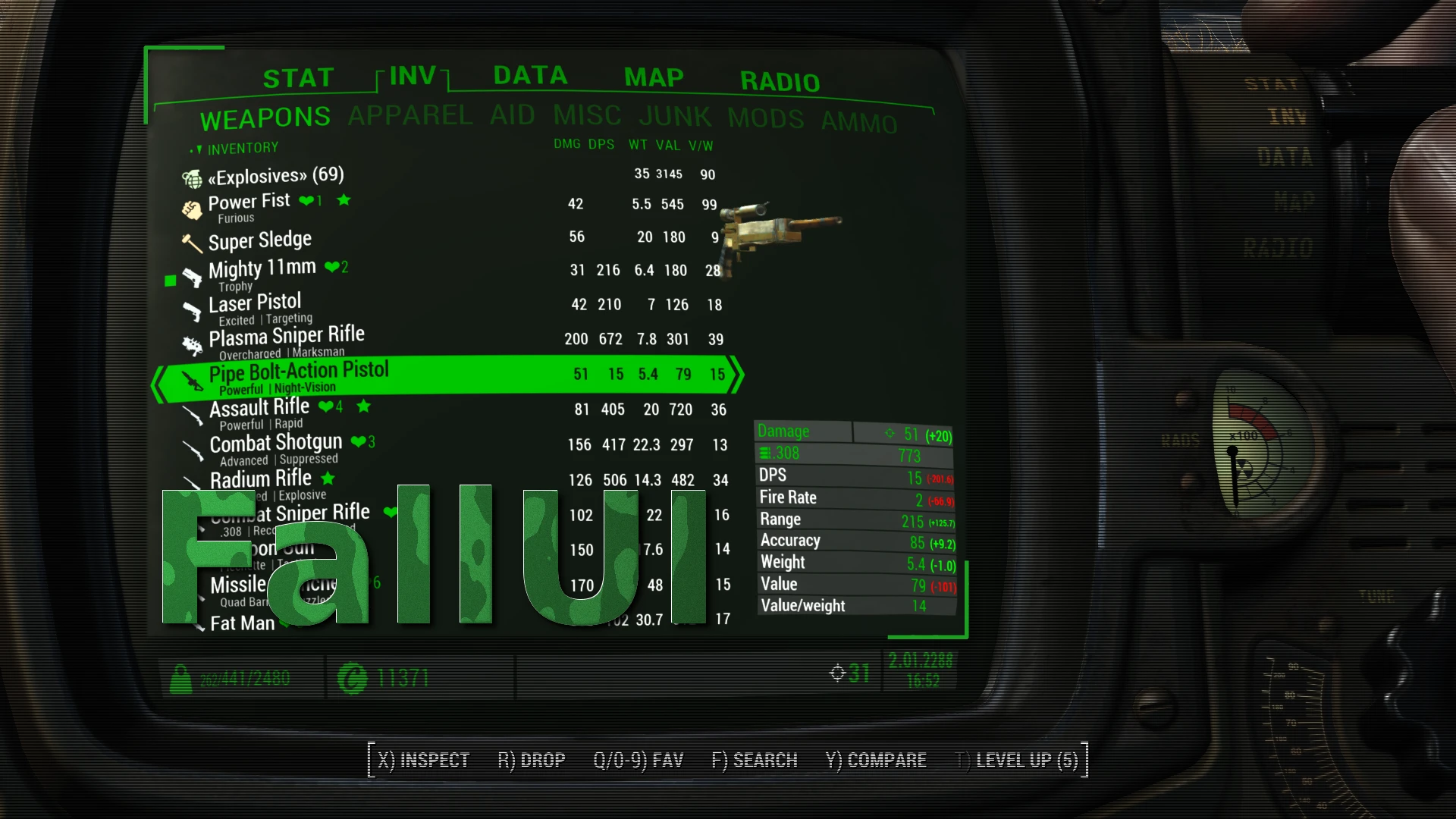
Complete overhaul of the inventories of Pipboy, container, trader, workshops and companions. Enhances most info tables in Pipboy with more details and much better look. Also adds a huge load of quality-of-live features, information and more tools like bulk transfer to container (or back). The goal of this mod is to make Fallout 4 interface feels like it was made for PC.
Motivation and history
This mod begun as a small extension to the long time best inventory mod dev_inv by Neanka (Permissions to use DEF_INV as base granted).
The main reason for building this mod was the bad performance with the really huge icon sets and item sorting mods today.
So i fixed that. And found other nice-to-have feature i'am missing, and build that, and so on. The result can be seen in the features list.
Meanwhile it has developed to an complete own overhaul mod of Pipboy and inventory, including many new features and a better customizable style than vanilla Fallout.
Since the new-writting in version 1. 11 it uses the original Fallout 4 interface files as base instead of extending def_inv, so all new icons and interface elements of the new Fallout 4 version are included too now.
FallUI have also got brothers and sisters, like FallUI Workbench, FallUI Confirm boxes and many more. These modular mods extend other interfaces as well and can be used separately or all together, just as you like! With the new mods "FallUI" become the name for the whole series, and this mod got a new post name "FallUI - Inventory" to be part of the FallUI series.
Features
-
[]Multilanguage (Included: EN, DE, ES, ESMX, FR, IT, PL, PTBR, RU)
[
]For all DLC's[]Includes most features known from Neankas great DEF_INV
[]Fully compatible with existing DEF_INV configuration files
- [
[]Improved performance with huge inventory
[]Optimized loading and initialization of Pipboy and container interfaces using deferred loading and chunk processing of data. Greatly reduces
lags and stuttering while opening Pipboy.[]Table style item display (weight, value, damage, dps,...)
-
[]Automatic detection of displayable values
[]Used in Pipboy item list, container item list, barter item list and workshop settlement list!
[]Clickable column header for sorting
[
]Improved filtering[*]Allows new sub-sub-categories (like food, rad food, soft drinks,.. in subcategory food in category apparel)
FallUI - Inventory is a UI overhaul for Fallout 4 that optimizes the inventory interface for PC players. With over 30,000 endorsements and 3 million downloads, it's a highly popular mod that improves usability and navigation. Last updated in October 2022, it remains a staple for many players.
✨ Key Features
📊 Pros & Cons
✅ Pros
- Huge community trust with 30,936 endorsements
- Massive download count (3M) shows it's a go-to for many
- UI overhaul that makes inventory management smoother
⚠️ Cons
- Last updated in 2022 — may not be fully compatible with the latest game patches
- Requires manual installation or mod manager setup, no auto-installer
For Fallout 4 players who spend a lot of time managing inventory and want a cleaner, more efficient interface. Perfect for modders and completionists who value UI polish. Skip if you're happy with the vanilla inventory or prefer gameplay-changing mods.
💡 Beginner Tips
- Use a mod manager like Vortex or Mod Organizer 2 to install and manage FallUI - Inventory easily.
- If you use other UI mods, check load order to ensure FallUI loads after them to avoid conflicts.
- Test the mod in a new save or after clearing your inventory to see the changes clearly.
📊 Mod Details
- Game
- Fallout 4 Mods
- Author
- m8r98a4f2
- Version
- 2.2.1
- Downloads
- 2,959,061
- Endorsements
- 30,936
- Category
- User Interface
- Created
- 12/3/2020
- Updated
- 10/28/2022
🔧 How to Install Fallout 4 Mods
Download from Nexus.
📖 Full step-by-step install guide for Fallout 4 →
Visit the official mod page for specific installation instructions for this mod.
🎮 Need cheat codes or console commands? Check ur gaming wiki for Fallout 4 commands, item IDs, and more.
Keep browsing — more Fallout 4 mods await